How to Implement Just-in-Time (JIT) User Provisioning with SSO and SCIM
Just-in-Time (JIT) provisioning creates users automatically during SSO login. SCIM provisioning creates and manages users using standardized APIs before login.
How to Implement Just-in-Time (JIT) User Provisioning with SSO and SCIM
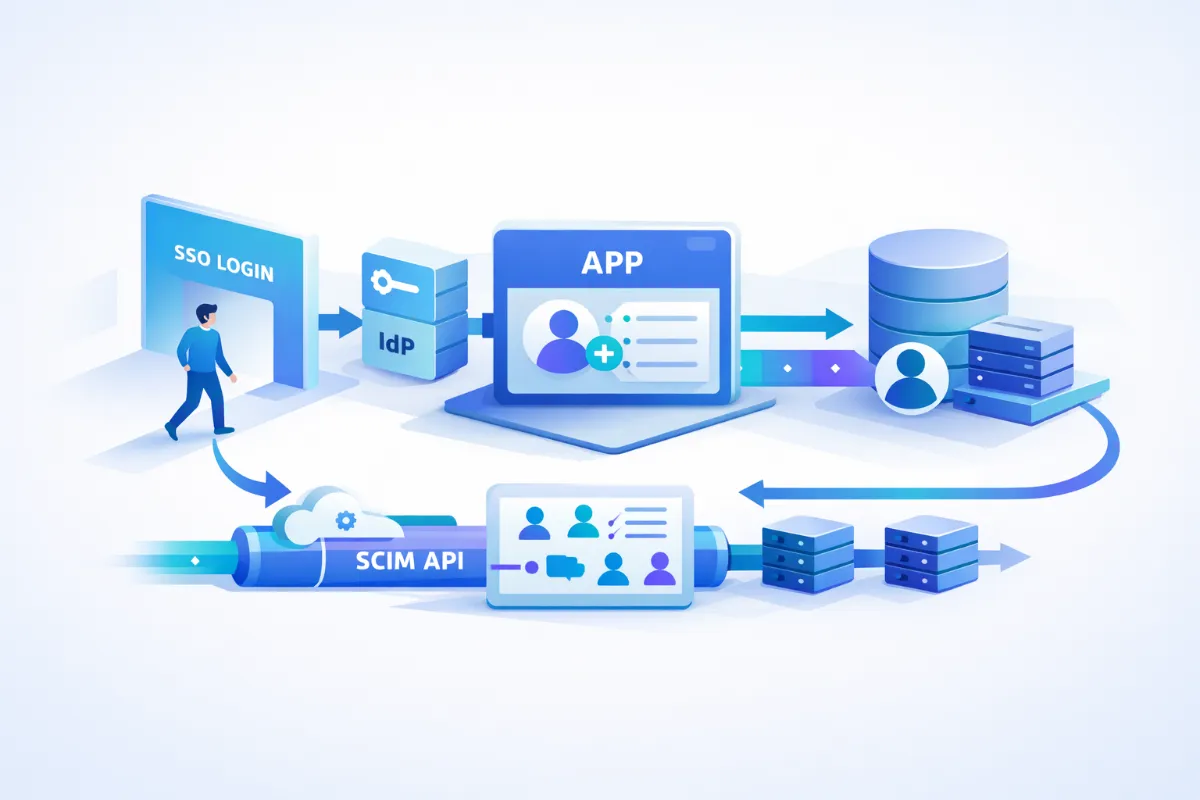
Just-in-Time (JIT) provisioning creates users automatically during SSO login. SCIM provisioning creates and manages users using standardized APIs before login. JIT provisioning operates inside the authentication flow, while SCIM provisioning runs through background synchronization.
JIT provisioning reduces onboarding friction by eliminating manual user creation. SCIM provisioning enables automated provisioning and deprovisioning across systems. JIT is ideal for fast SSO integration with minimal setup, while SCIM is required for enterprise-grade lifecycle management.
JIT provisioning depends on SAML or OIDC attributes from the identity provider. SCIM provisioning depends on REST APIs for user lifecycle operations. JIT creates users only when they attempt login, while SCIM ensures users exist before login attempts.
Quick TL;DR
JIT provisioning creates users at login using SSO data.
SCIM provisioning syncs users using APIs before login.
JIT is simple and fast to implement.
SCIM provides full lifecycle control and automation.
Use both JIT and SCIM for enterprise-ready systems.
What is JIT User Provisioning
JIT provisioning creates user accounts during SSO authentication. It eliminates the need to pre-create users in your system.
When a user logs in via an identity provider, your application checks if the user exists. If the user does not exist, the system creates the account instantly using attributes from the IdP response.
Key characteristics of JIT provisioning include:
User is created on first successful login
No pre-provisioning is required
Uses attributes from IdP response
Works with SAML and OIDC protocols
JIT provisioning eliminates manual onboarding steps.JIT provisioning relies on identity provider attributes for user creation.
How JIT Provisioning Works
JIT provisioning runs as part of the authentication flow. It ensures that users can access the application without prior setup.
Step-by-step flow:
User clicks “Login with SSO”
Identity provider authenticates the user
IdP sends a SAML assertion or OIDC token
Application checks if the user exists in the database
Application creates the user if not found
User session is established
This process happens in real time during login.
JIT provisioning executes during authentication flow.User creation depends on accurate IdP attribute mapping.
JIT vs SCIM Provisioning
JIT and SCIM provisioning solve different problems in identity management. JIT focuses on access, while SCIM focuses on lifecycle control.
Feature
JIT Provisioning
SCIM Provisioning
Timing
During login
Before login
Setup complexity
Low
Medium to high
Lifecycle management
Limited
Full lifecycle
Deprovisioning
Not supported
Fully supported
Sync mechanism
Event-based
API-based
JIT provisioning is event-driven and reactive.SCIM provisioning is proactive and state-driven.SCIM ensures user lifecycle consistency across systems.
When to Use JIT Provisioning
JIT provisioning is best suited for scenarios where speed and simplicity are priorities. It works well for teams that want to enable SSO quickly without complex setup.
Use JIT provisioning when:
Onboarding speed is critical
Supporting SMB or mid-market customers
SCIM integration is not required
Minimizing integration complexity
JIT provisioning is suitable for quick SSO enablement.
How to Implement JIT Provisioning
Implementing JIT provisioning requires integrating SSO and handling user creation dynamically.
Step 1: Enable SSO Integration
Configure a SAML or OIDC connection with your identity provider. Common providers include Okta, Azure AD, and Google Workspace.
SSO integration is required for JIT provisioning.
Step 2: Capture IdP Response
Extract user attributes from the SAML assertion or ID token. Validate the response signature to ensure authenticity.
IdP response provides user identity data.
Step 3: Map User Attributes
Map required attributes such as email, first name, and last name. Optionally map roles or groups for authorization.
Email must be the unique identifier for each user.
Step 4: Check User Existence
Query your database using the email address. Ensure that duplicate accounts are not created.
User lookup prevents duplicate accounts.
Step 5: Create User Dynamically
Create a new user record if the user does not exist. Assign default roles or permissions if needed.
User creation happens only once per identity.
Step 6: Establish Session
Generate a session or JWT token after successful authentication. Redirect the user to the application.
Authentication completes after user creation.
Common Mistakes
Many teams implement JIT provisioning incorrectly due to missing edge cases.
Missing attribute mapping breaks user creation
Duplicate users occur without unique constraints
JIT cannot handle user deactivation automatically
Incorrect role mapping leads to access issues
JIT provisioning requires strict attribute validation.
Best Practices
Follow these best practices to ensure a reliable implementation:
Always use email as the primary identifier
Normalize email values to prevent duplicates
Combine JIT with SCIM for lifecycle management
Validate IdP responses for security
Log provisioning events for debugging
Hybrid provisioning improves reliability and scalability.
Conclusion
JIT provisioning simplifies user onboarding through real-time account creation. SCIM provisioning enables automated lifecycle management across systems.
JIT provides speed, while SCIM provides control. Modern SaaS applications should support both provisioning models.
Hybrid provisioning is the standard for enterprise-ready identity systems.
*** This is a Security Bloggers Network syndicated blog from SSOJet – Enterprise SSO & Identity Solutions authored by SSOJet – Enterprise SSO & Identity Solutions. Read the original post at: https://ssojet.com/blog/how-to-implement-just-in-time-jit-user-provisioning-with-sso-and-scim
About Author





.jpg "TeamViewer empowers public sector organisations to ‘shift left’ with TeamViewer ONE")