
Passwd Enterprise Review: Features, Pricing & Security
Passwd Enterprise is built for organizations that want more control over where and how their password manager operates.
Its biggest differentiator is private deployment. Enterprise customers can run Passwd within their own Google Cloud project, retain control of their encryption keys, and choose where their data is stored. The plan also adds audit logging and priority support.
That makes Passwd Enterprise particularly compelling for organizations already standardized on Google Workspace and Google Cloud. Instead of placing another credential repository in a vendor-managed environment, they can keep password management within cloud infrastructure they control.
I evaluated Passwd Enterprise’s deployment model, security protections, administrative controls, and pricing to determine where those added capabilities provide meaningful value over Passwd Professional.
For prospective buyers, the decision ultimately comes down to one question: How much control does your organization need over the infrastructure protecting its credentials?
Passwd Enterprise at a glance
 |
|
| Best for | Google Workspace-centric organizations wanting greater infrastructure control |
| Per-user pricing | $6 per active user/month |
| Private cloud deployment | Yes, within the customer’s Google Cloud project |
| Customer-controlled encryption keys | Yes, through Google Cloud KMS |
| Data residency control | Yes |
| Audit logging | Yes |
| Google Workspace integration | Yes |
| Google user and group synchronization | Yes |
| TOTP support | Yes |
| Passkey support | Yes |
| Public API | Yes |
| Enterprise support | Priority support |
Passwd Enterprise retains the core password-management capabilities available elsewhere in the platform. Organizations can store, share, and autofill credentials, with support for TOTP codes and passkeys. Users can access Passwd via browser extensions and mobile applications, and password health monitoring helps identify credential risks.
The real reason to consider Enterprise is the additional control it provides over the underlying infrastructure and encryption. Organizations also gain greater auditing capabilities and priority support.
What does Enterprise add over Passwd Professional?
Organizations considering Enterprise should first determine whether they actually need the additional controls.
Professional already provides unlimited records and sharing, so an organization does not need to purchase Enterprise to deploy Passwd broadly. Enterprise becomes more compelling when an organization needs greater control to meet its security and compliance requirements.
| Unlimited records | ||
| Unlimited sharing | ||
| Google Workspace integration | ||
| TOTP and passkeys | ||
| Security audit | ||
| Public API | ||
| Private Google Cloud deployment | ||
| Customer-controlled encryption keys | ||
| Audit logging | ||
| Priority support | ||
| Per-user price |
Advertisement
For many businesses, Professional may be enough. The Enterprise decision starts making more sense when controlling where credential data resides, who controls encryption keys, and how activity can be audited becomes important.
Private Google Cloud deployment is a key differentiator
Private deployment is the feature that most clearly separates Passwd Enterprise from its other plans.
Enterprise customers can deploy Passwd into their own Google Cloud project instead of relying on Passwd’s managed SaaS environment. This gives organizations more control over where their password-management environment runs and over where their data is stored.
I see several reasons this could matter to an enterprise. Some may have internal requirements governing where sensitive information can reside. Others may want direct control over the cloud environment containing employee and shared business credentials.
Before choosing this deployment model, IT and security teams should understand exactly which security and configuration responsibilities belong to Passwd and which fall to their own Google Cloud administrators. They should also clarify responsibility for ongoing monitoring and determine how backup and recovery will be handled.
Encryption and customer-controlled keys
Credential encryption is important in any password manager, but Passwd Enterprise gives customers additional control over the infrastructure that protects their data.
Passwd states that stored information is encrypted using Google Cloud Key Management Service (KMS). Enterprise customers retain control over their encryption keys, giving security teams more authority over how sensitive credential data is protected.
Before deploying Passwd in an enterprise environment, I would want a clear understanding of how those keys are managed throughout their lifecycle. Security teams should know how rotation and recovery work and who has administrative access. I would also want to understand what level of access Passwd retains and what happens if a customer disables or revokes a key.
Advertisement
Audit logging adds enterprise visibility
Audit logging is another meaningful difference between Professional and Enterprise. Passwd makes audit logs available to Enterprise customers through their Google Cloud environment.
For security teams, those logs provide visibility into activity involving some of the organization’s most sensitive credentials. Teams can use that information to investigate credential access and administrative activity while maintaining greater accountability around shared credentials.
Organizations that rely heavily on centralized security monitoring should confirm Passwd’s log retention capabilities and how its audit data can be incorporated into alerting and SIEM workflows before deployment.
Google Workspace administration at enterprise scale
Passwd’s Google Workspace integration can provide a meaningful day-to-day advantage for user administration.
Passwd synchronizes Google Workspace users and Google Groups, allowing administrators to manage credential access using an identity structure they already maintain. For example, an existing department or team group can be used to assign access without maintaining the same group separately within Passwd.
This can simplify administration as employee roles and access needs change. For organizations already standardized on Google Workspace, Passwd fits naturally into existing identity-management processes.
That Google-native approach is an important consideration for buyers. Organizations built primarily around other identity ecosystems may not benefit from the same level of seamless integration.
Advertisement
Access controls and shared authentication
Passwd’s access controls and authentication features are not exclusive to the Enterprise plan, but they remain important when evaluating the platform for a larger deployment.
Administrators can assign different levels of access depending on how an employee needs to use a credential. I like the Passkey Only role, which allows employees to authenticate through the browser extension without viewing the password or saving the passkey to their device.
Passwd also supports TOTP codes for shared accounts, helping teams manage multifactor authentication without relying on separate methods for distributing one-time codes. Shared passkeys allow teams to use passkey-based authentication while keeping access centrally managed. Administrators can revoke that access when an employee no longer needs it.
Security auditing identifies risky credentials
Unlike Enterprise audit logging, Passwd’s security audit focuses on the credentials themselves rather than user or administrative activity.
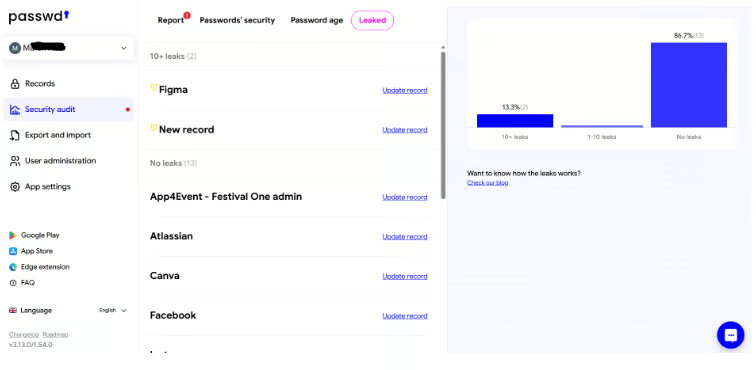
Passwd evaluates password strength and age. It also checks whether credentials may have appeared in known data breaches. For compromised-password detection, Passwd creates hashed password fingerprints and compares them against leaked data via the Have I Been Pwned API. Password-strength evaluation occurs locally within the customer’s Passwd environment.
This gives administrators a way to identify credentials that may need attention, rather than treating every password in the vault as carrying the same level of risk.
Advertisement
Public API supports enterprise automation
Passwd’s public API is not exclusive to the Enterprise plan, but it can still be useful for larger deployments. Organizations can use the API to work with stored credentials through CI/CD pipelines or internal tools.
The API allows development or IT teams to incorporate credential access into automated workflows, rather than relying solely on employees to access credentials through the vault.
For enterprise use, I would pay particular attention to application authentication and access restrictions. Security teams should also understand how activity is logged and how credential rotation works when applications automatically access secrets.
I would view the API as a useful extension of Passwd’s password-management capabilities rather than assume it can replace a dedicated secrets-management solution.
Passwd Enterprise pricing
Passwd Enterprise costs $6 per active user per month with per-user billing, compared with $4 per active user per month for Professional. Passwd also offers organization-wide pricing based on the total number of Google Workspace users.
Organizations can switch between per-user and organization-wide billing as their deployment changes. Per-user pricing may make more sense when Passwd is limited to selected employees, while organization-wide pricing may be more cost-effective for broader deployments.
Advertisement
What you gain with Passwd Enterprise
Passwd Enterprise builds on the Professional plan, adding capabilities designed for organizations that want greater control over their password-management environment.
One key addition is private deployment within the customer’s own Google Cloud project. Enterprise customers retain control over their encryption keys and can choose where their data is stored, giving IT and security teams greater authority over the infrastructure that protects their credentials.
Enterprise also adds audit logging through the customer’s Google Cloud environment. This gives security teams greater visibility into activity within Passwd and can support access investigations or compliance requirements.
Enterprise also includes priority support, with Passwd positioning its support offering above the online support listed for Professional customers. Passwd’s documentation indicates that Enterprise deployments may also include dedicated onboarding and optional SLA packages. The customer feedback I reviewed was generally positive about Passwd’s responsiveness.
For organizations that already get what they need from Professional, the decision to move to Enterprise largely comes down to whether these additional capabilities align with their security and operational requirements.
Passwd Enterprise Alternatives
Passwd Enterprise is a strong fit for Google-centric environments, but other platforms may better suit organizations with different requirements. Here are three alternatives I would consider.
Keeper
Keeper is an alternative I’d consider for enterprises seeking broader security capabilities for their password manager.

Keeper provides centralized credential management with granular access controls. Role-based policies give administrators control over how employees use credentials, while security auditing helps identify passwords that may need attention.
For larger deployments, Keeper supports SSO and automated provisioning through enterprise identity systems. Security teams can also send activity data to SIEM platforms for centralized monitoring. Organizations with more advanced requirements can extend the platform into privileged access and secrets management.
Proton Pass for Business
Proton Pass may be a strong fit for enterprises already invested in Proton’s privacy-focused ecosystem.

Proton Pass for Business supports password and passkey management, with secure vault sharing for teams. Its built-in authenticator helps keep multifactor authentication within the same platform, while security tools can identify credentials that may need attention.
Higher-tier business plans add SSO and SCIM provisioning for enterprise access management. Activity data can also be integrated with SIEM platforms, while the Proton Pass CLI extends credential access into developer workflows.
For existing Proton customers, adding Proton Pass can also reduce the need to bring another vendor into their environment.
LastPass Business
LastPass Business is geared toward enterprises that need their password manager to work across a broader identity and security environment.

Centralized policies give administrators control over how employees use the platform, while reporting provides visibility into password-management activity. Secure sharing allows credentials to be distributed without relinquishing administrative oversight.
LastPass supports identity environments such as Microsoft Entra ID and Google Workspace. Security teams can also connect activity data with SIEM platforms such as Microsoft Sentinel and Splunk for centralized monitoring.
I think the best choice comes down to how well each platform fits the organization’s existing environment. Some enterprises may benefit more from broader integrations or specialized security capabilities. Passwd stands out for Google-centric organizations that value customer-controlled deployment within Google Cloud.
Who should use Passwd Enterprise?
I think Passwd Enterprise makes the most sense for organizations already standardized around Google Workspace and Google Cloud.
Its Google Workspace integration allows Passwd to fit into the identity processes those organizations already use, while the Enterprise deployment model gives them greater control over the environment that protects their credentials.
That additional control may also help companies address security or compliance requirements without moving password management outside their existing Google environment.
Organizations built primarily around other identity ecosystems may want to compare Passwd with broader enterprise platforms to determine which approach better fits their existing environment.
Frequently asked questions
What is the difference between Passwd Professional and Enterprise?
Passwd Professional provides the core capabilities needed for business password management, while Enterprise adds greater control over the infrastructure where Passwd runs. Enterprise customers can deploy Passwd within their own Google Cloud project and retain control over their encryption keys. The Enterprise plan also adds audit logging and priority support.
How much does Passwd Enterprise cost?
Passwd Enterprise costs $6 per active user per month with per-user billing. Organization-wide pricing is also available and starts at $39 per month for organizations with 2–10 Google Workspace users.
How does Passwd Enterprise work with Google Workspace and Google Cloud?
Passwd integrates with Google Workspace to synchronize users and Google Groups, allowing administrators to manage credential access using their existing identity structure. Enterprise customers can also deploy Passwd within their own Google Cloud project, giving them greater control over where the platform runs and where their data is stored.
Who controls the encryption keys with Passwd Enterprise?
Enterprise customers retain control over their encryption keys through Google Cloud Key Management Service (KMS), allowing them to manage how their credential data is protected.
Bottom line
In my opinion, one of Passwd Enterprise’s key advantages is how closely it fits into Google’s ecosystem. For companies already using Google Workspace and Google Cloud, it brings password management into infrastructure and identity processes they already use.
The Enterprise plan builds on that Google-native approach by allowing customers to manage the environment where Passwd runs.
For Google Workspace organizations that value that level of infrastructure control, Passwd Enterprise is the version I would evaluate first.
Even well-protected credentials can be put at risk when an endpoint is compromised. Endpoint detection and response (EDR) solutions help security teams detect and respond to threats on the devices where those credentials are used.
About Author