Microsoft Teams AI Phishing Detection: Rollout and Deepfake Warnings
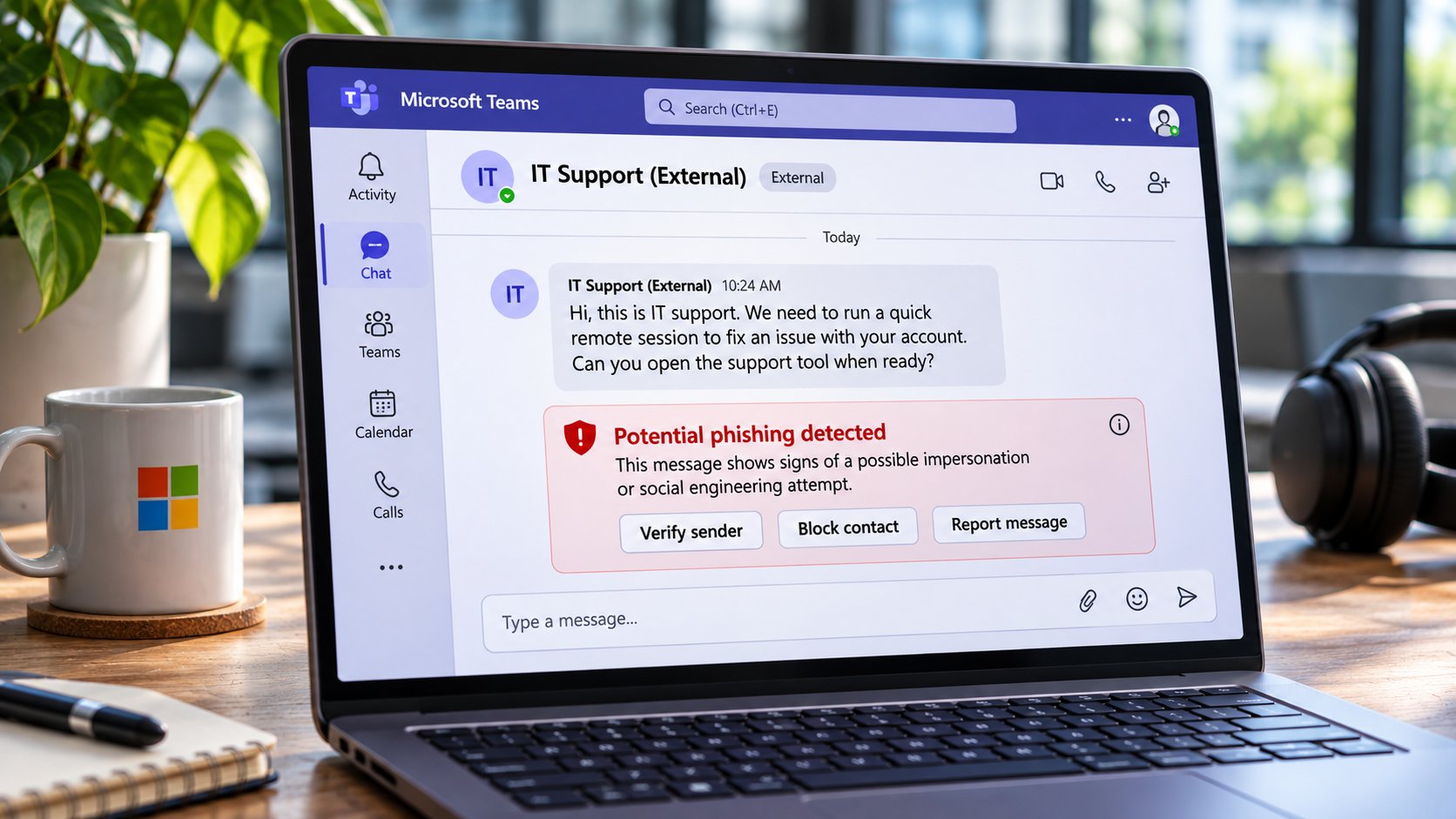
A message from someone claiming to be IT support lands in Microsoft Teams. There is no suspicious link or attachment, just a request to launch a remote-access tool.
Microsoft’s new AI phishing detection is designed to spot the deception in the conversation itself.
The protection analyzes chats with unfamiliar external contacts, looking for phishing, impersonation, and social engineering attempts that traditional link scanning can miss. Targeted Release began in early November, with worldwide general availability expected by mid-December 2026. No administrator setup is required.
Microsoft is also preparing deepfake warnings for Teams meetings, but those will work differently. Organizations must select and configure certified third-party providers to analyze potentially manipulated audio and video.
How Teams AI phishing detection works
Microsoft’s Oct. 21 Message Center announcement says the new protection evaluates conversation context rather than relying exclusively on suspicious URLs or files.
For most users, detection focuses on first-time chats with external contacts. Teams mobile users in China may also receive additional protection against fraud in internal conversations.
According to Microsoft’s phishing detection guidance, Teams briefly analyzes recent messages and their surrounding context after a conversation with a new external contact begins.
If the system detects suspicious behavior, it can display a warning directly in the chat.
Users can review the sender’s identity and email address, block the contact, or report the message. Teams does not automatically block the sender or end the conversation.
Why suspicious conversations are harder to detect
Attackers increasingly use trusted collaboration tools to bypass the suspicion employees might apply to unfamiliar emails.
In April, Microsoft warned about Teams impersonation scams in which criminals posed as IT support staff and convinced employees to grant remote access.
The attacker might claim an account needs repairing or that security software requires immediate attention. The employee then launches a legitimate support tool, potentially giving the attacker access to their device.
A malicious attachment is unnecessary when the victim performs the requested action.
Microsoft introduced default messaging protections earlier this year, strengthening safeguards against dangerous file types and malicious URLs.
The new detector extends that protection to suspicious behavior within conversations.
Microsoft says the system does not retain customer message content for AI training or secondary uses. It is designed exclusively for security detection, not employee monitoring, advertising, or productivity analysis.
When will phishing warnings appear?
Microsoft’s deployment schedule has two stages:
| Rollout stage | Expected availability |
|---|---|
| Targeted Release | Early to mid-November 2026 |
| Worldwide general availability | Early to mid-December 2026 |
During initial quality validation, detection may run silently without displaying warnings.
Once that phase is complete, Teams users may see an advisory alert when the system identifies a potentially deceptive conversation.
Microsoft acknowledges that some phishing attempts may escape detection. Employees should continue verifying unfamiliar contacts, particularly anyone requesting credentials, verification codes, payments, or remote access.
Deepfake warnings require a different deployment
The phishing detector operates inside Teams without new administrator configuration. Microsoft’s upcoming meeting-level deepfake detection, however, depends on external providers.
According to an Oct. 15 Message Center notice, updated Oct. 22, certified third-party solutions will analyze meeting audio and video for signs of synthetic or manipulated content.
The providers send detection signals to Teams, which can display warnings and offer related in-meeting controls.
Microsoft supplies the integration, but the third-party provider performs the actual analysis.
Organizations must select a supported provider, deploy its application through the Teams admin center, grant the necessary permissions, and configure applicable meeting policies.
This introduces a separate consideration for companies handling confidential meetings: approved providers may process live meeting audio and video.
Administrators should review each provider’s data-handling practices, permissions, and compliance documentation before deployment.
Microsoft already offers meeting-bot blocking controls that can prevent detected external bots from joining calls. Those controls manage meeting access, while the upcoming feature will examine media for possible manipulation.
When will deepfake detection arrive?
Microsoft expects Targeted Release to begin in mid-November and finish by late November 2026.
Worldwide general availability has not been announced. Microsoft plans to provide that timeline through a future Message Center update.
Until then, organizations cannot assume deepfake detection will be available alongside the December phishing protection rollout.
What IT teams should do now
The two features require different preparations.
For AI phishing detection, security teams should:
- Review external communication policies and identify which contacts employees can interact with.
- Remind users to verify unexpected requests from supposed IT personnel or executives.
- Explain how to block suspicious contacts and report incorrect warnings.
- Monitor the December rollout to confirm when user-facing alerts become available.
For deepfake detection, administrators should:
- Evaluate certified providers and their supported capabilities.
- Review how meeting audio and video will be processed.
- Check application permissions and meeting policy requirements.
- Track Microsoft’s announcement of a general-availability date.
Organizations should also retain existing identity verification and incident-reporting procedures.
An employee receiving an unexpected request for remote access should verify it through an established internal channel, regardless of whether Teams displays a warning.
The December rollout will put additional phishing protection directly into Teams chats without requiring configuration. Meeting-level deepfake detection will require a separate security and procurement decision before organizations can use it.
Also read: Singapore’s new AntiScam Pango app uses AI to identify suspicious patterns in WhatsApp, Telegram, and SMS notifications.
About Author