
Microsoft Sway Being Exploited by Threat Actors for Hosting QR Code Phishing Campaigns

A recent study conducted by cybersecurity firm Netskope sheds light on the misuse of Microsoft Sway and CloudFlare Turnstile in launching QR code-based phishing schemes to deceive users into disclosing their Microsoft Office credentials on a fraudulent platform.
The targets of these campaigns have been individuals in various sectors mainly in technology, manufacturing, and finance within Asia and North America.
Definition of Quishing
Quick Response (QR) codes provide a convenient method to visit websites or access information on mobile devices without the need to manually enter a URL. However, the use of QR codes carries a risk as cybercriminals can exploit them to direct users to malicious content.
The tactic known as “quishing” involves redirecting users to malicious websites or encouraging them to download harmful content by scanning a QR code. Once on the fraudulent site, cybercriminals attempt to steal personal and financial data. Due to the nature of QR codes, users cannot determine the destination of the code post-scanning.
Thomas Damonneville, the executive of anti-phishing organization StalkPhish, informed TechRepublic that quishing is an emerging practice that is simple to execute and complicates the verification of content legitimacy.
Quishing Incidents through Microsoft Sway
In July 2024, Netskope Threat Labs identified a significant surge in traffic to phishing sites through Microsoft Sway, with the majority of these rogue pages incorporating QR codes.
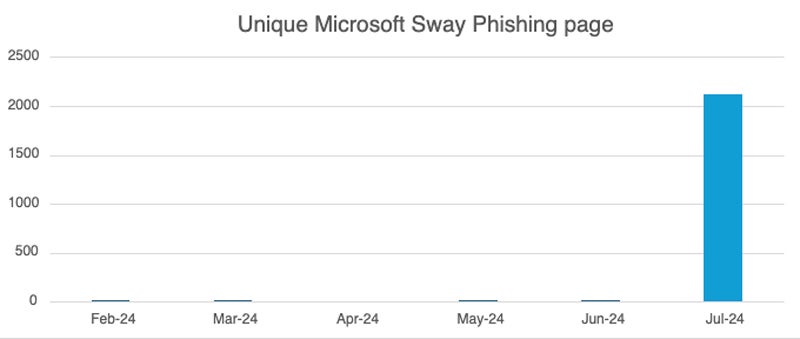
Microsoft Sway, a web application under Microsoft Office offering free services for creating presentations and web-based content, becomes an attractive target for cybercriminals due to its no-cost accessibility.
The study by Netskope researcher Jan Michael Alcantara highlighted instances where victims were directed to phishing schemes for Microsoft Office credentials through Microsoft Sway pages.
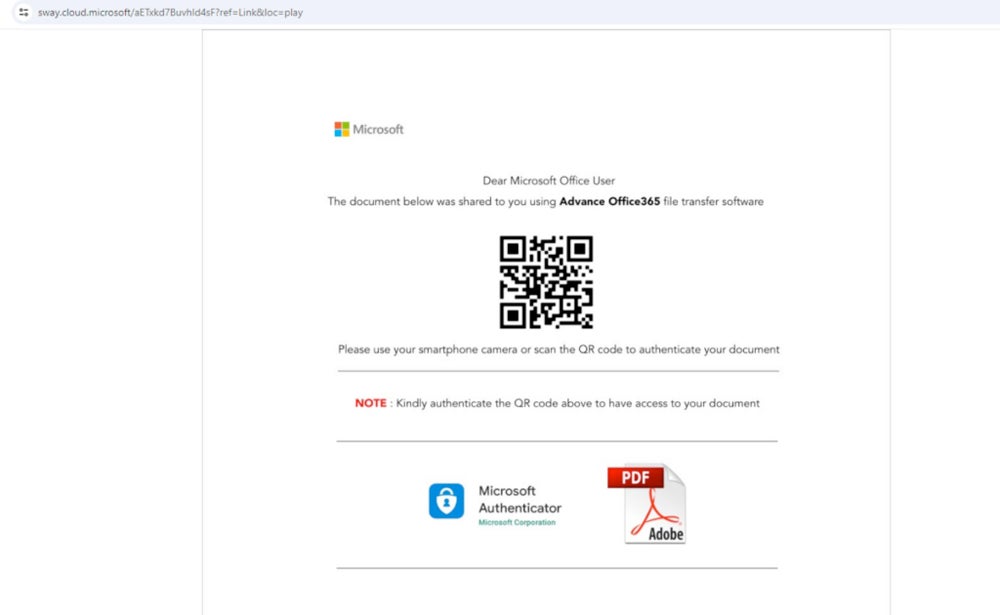
While Netskope’s research does not elaborate on the distribution method of the deceptive links, it is feasible that such links could be disseminated through emails, social media platforms, SMS, or instant messaging applications.
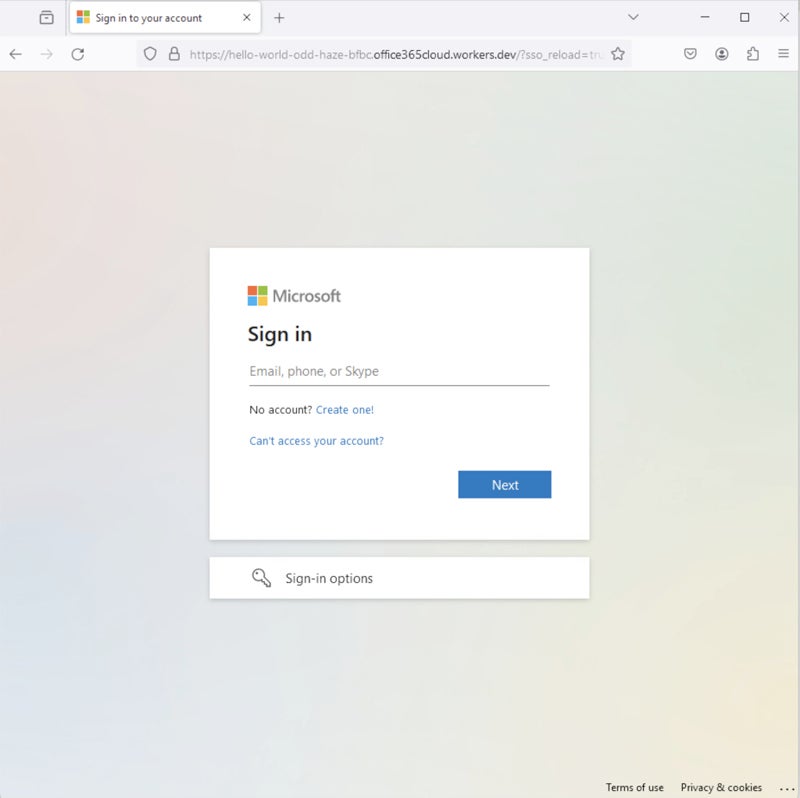
The final fraudulent page often resembles the authentic Microsoft Office login page, as depicted in a May 2024 report by the same researcher.
Sneakier offensive using CloudFlare Turnstile
CloudFlare’s Turnstile is a costless tool that substitutes captchas, which have been abused in documented attack schemes. This lawful service enables website owners to conveniently integrate the required Turnstile code into their content, empowering users to effortlessly select a verification code rather than unraveling a captcha.

From the viewpoint of an attacker, leveraging this complimentary tool is enticing as it demands users to select a CloudFlare Turnstile before being directed to the phishing page. This introduces an additional layer of defense against discovery by the attacker, as the ultimate phishing payload remains veiled from online URL scanners.
Perpetrator-in-the-middle phishing strategy
Conventional phishing tactics generally gather credentials prior to presenting an error page or redirecting the user to the authentic login page. This tactic leads users to assume they have input erroneous credentials, potentially leaving them oblivious to the deception.
The perpetrator-in-the-middle phishing technique is more inconspicuous. The user’s credentials are accumulated and instantly utilized to access the genuine service. This approach, also known as transparent phishing, enables the user to successfully log in after the illicit theft of credentials, rendering the attack less noticeable.
Complexities in detecting malevolent QR codes
“No individual can interpret a QR code visually,” Damonneville mentioned. “A smartphone is essential to scan it. Some URLs may be excessively lengthy for comprehensive verification, if at all verified… But who verifies URLs?”
Text-based detection methods are also ineffective against QR codes as they are graphical elements. Furthermore, a widely accepted standard for validating the authenticity of QR codes is absent. Security measures such as digital signatures for QR codes are not generally implemented, complicating the process of confirming the source or integrity of the content.
How can you stop a QR code from phishing?
Several QR code readers offer a glimpse of the URL, enabling users to examine the URL before scanning it. Any suspicion regarding the URL should deter the user from utilizing the QR code. Additionally:
- QR codes directing to activities like logins or data provision should trigger caution and demand meticulous scrutiny.
- Security solutions can also contribute, as they are capable of identifying phishing URLs. Always subject URLs to scanning using such a tool.
- Payments via QR codes should not be initiated unless the legitimacy is assured.
Microsoft Sway is not the lone legitimate product that may be exploited by cybercriminals to house phishing pages.
“Genuine sites or applications are frequently employed to host quishing or phishing operations, including Github, Gitbooks, or Google Docs, for instance, on a daily basis,” Damonneville noted. “This is excluding the numerous URL shorteners in circulation or free hosting platforms, widely utilized to easily conceal a URL.”
This underscores the importance of enhancing users’ awareness and delivering training to employees to distinguish a suspicious URL from an authentic one.
Disclaimer: I am part of Trend Micro, however, the opinions expressed in this piece are my own.
About Author




