
The number of vulnerabilities has increased significantly. The Verizon Data Breach Investigations Report highlighted a nearly 200% surge in the exploitation of vulnerabilities in 2023. In the initial seven months of 2024, emerging vulnerabilities escalated by another 30% compared to the previous year. It’s no surprise that vulnerability management tools are becoming an essential part of enterprise cybersecurity defense.
According to Michelle Abraham, research director of Security and Trust at IDC, “Vulnerability management plays a crucial role in cybersecurity. Ignoring vulnerabilities exposes organizations to continuous risks as vulnerabilities may fade in news but not in the minds of attackers.”
Comparison of Top vulnerability management tools
Several vulnerability management tools share similar characteristics. However, upon closer inspection, it becomes evident that each tool has its distinct focus and approach. Some tools are more specialized than others. The comparison was based on price and four key features:
- Cloud-based, on-premises, or hybrid approach.
- Inclusion in a comprehensive cybersecurity suite.
- Automated detection.
- Automated resolution.
It’s important to note that a direct price-to-price comparison is challenging due to varying pricing models and limited transparency in pricing.
| Initial Cost | Cloud vs. On-premises | Cybersecurity Suite Inclusions | Automated Detection | Automated Resolution | |
|---|---|---|---|---|---|
| Tenable | Approximately $4,000 per year for 100 assets. | Cloud-based. A separate on-premises suite, Tenable Security Center, is available for vulnerability management. | Includes vulnerability management, web application scanning, cloud security, identity exposure, operational technology security, attack surface management, and risk assessment. | Yes | Yes |
| ESET | $275 for five devices per year for the ESET Protect package, which includes ESET Vulnerability and Patch Management. | Cloud-based. An on-premises suite is also available.that integrates vulnerability management | EDR, server security, mobile threat defense, encryption, threat prevention, cloud security, vulnerability & patch management, MFA, and MDR | Automated discovery exists but not as extensive as some competitors | Includes certain capabilities for auto-remediation |
| Syxsense | $9 per device per month or $960 annually for 10 devices | Separate versions available for cloud-based and on-premises deployments | Patch management, vulnerability scanning, IT management, mobile device management, and zero trust framework | Yes | Yes |
| CrowdStrike | $184 annually for the complete suite and approximately $40 annually for Exposure Management | Delivered through the cloud | EDR, antivirus, threat hunting/intelligence, exposure management, AI, cloud security, SIEM, data protection, and automation features | Yes | Yes |
| Qualys | $295 per year for the small enterprise variant and around $2000 for the corporate version. | Cloud-based with an available on-premises alternative. | Asset tracking, vulnerability & configuration management, risk resolution, threat identification & response, EDR, cloud protection, and regulatory compliance. | Yes | Yes |
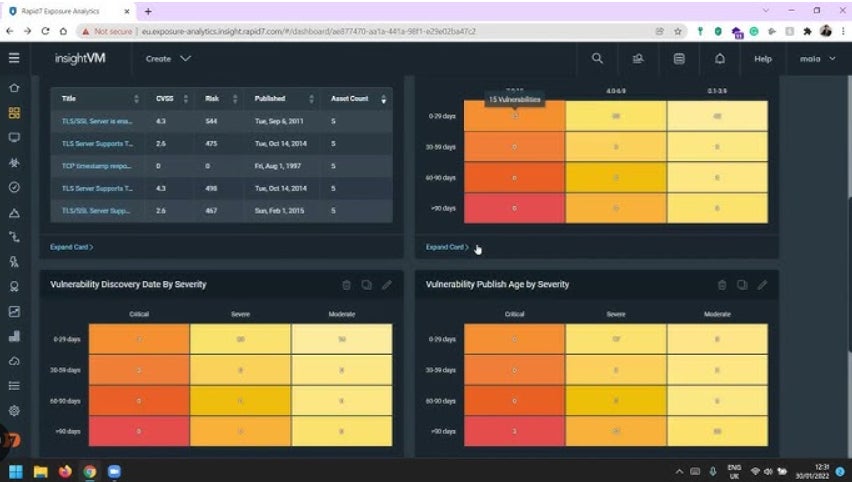
| Rapid7 | $6 per month per asset or $2 monthly per asset for a 500-asset license. | Available on cloud and on-premises | AI engine, XDR, exposure management, and attack surface management functionalities. | Yes | Yes |
| Ivanti | $4 per month per user. | Available on cloud or on-premises | Discovery tools, IT automation, real-time insights, endpoint management, network and endpoint security, supply chain, and service and asset management. | Yes | Yes |
| StorageGuard | $200 monthly for up to 50 systems. | Delivered through the cloud | None | Yes | Limited |
Tenable Vulnerability Management: Most comprehensive solution

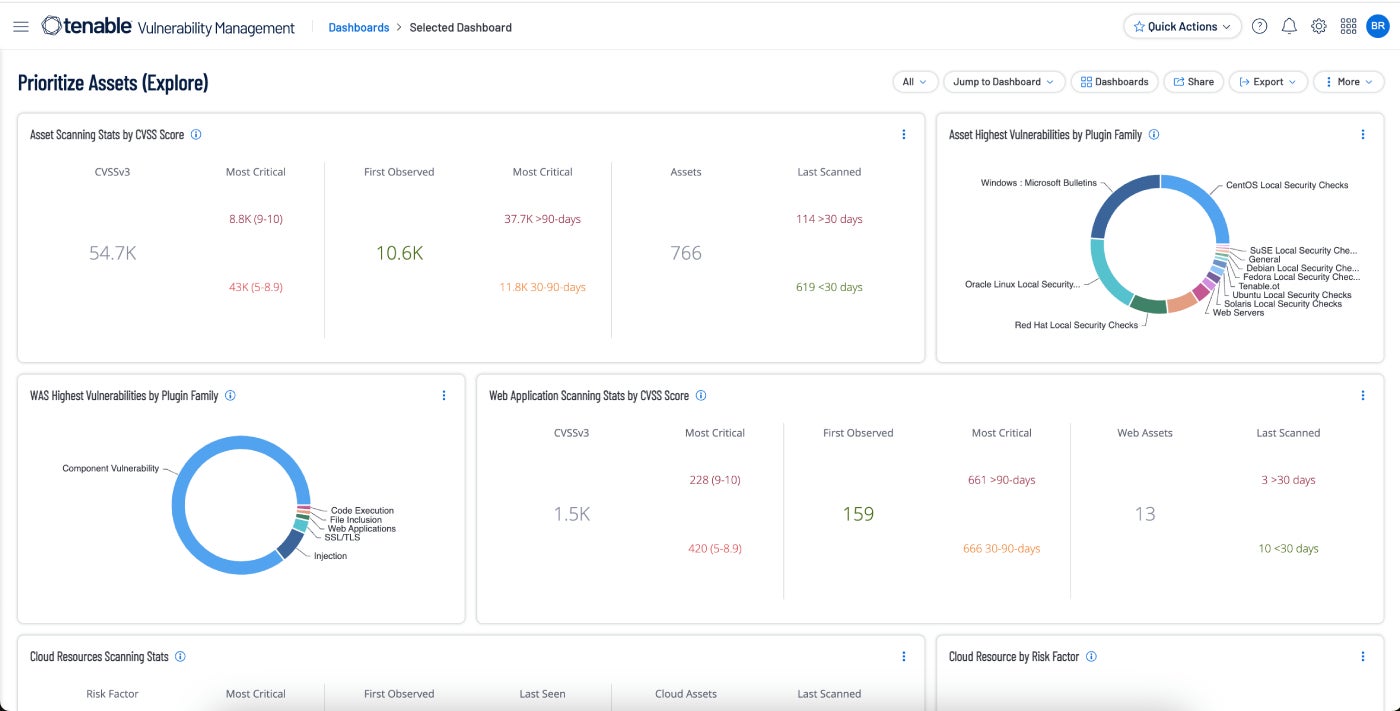
Tenable Vulnerability Management adopts a risk-focused methodology for managing vulnerabilities. It prioritizes network visibility to forecast potential attacks and responds swiftly to critical vulnerabilities. A free 60-day trial is offered.
SEE: Tips for Developing a Successful Cybersecurity Awareness Program (TechRepublic Premium)
Reasons for Choosing Tenable
My selection of Tenable as the top vulnerability management tool is backed by various factors. It leads the market segment of vulnerability management tools with a 25% market share. It encompasses numerous functionalities and fulfills nearly all requirements. The platform integrates seamlessly with diverse platforms and security tools, streamlining workflow automation and reducing the necessary resources for maintaining enterprise security.
Pricing Information
- The cost of Tenable is approximately $4,000 yearly for 100 assets.
Feature Highlights
- The Tenable Community is highly active, offering substantial support from users to address any issues.
- Active and passive scanning capabilities for on-premises systems, virtual servers, cloud instances, and mobile devices.
- Cloud Connectors provide continuous evaluation and visibility into public cloud platforms like Microsoft Azure, Google Cloud Platform, and Amazon Web Services.
- Built-in prioritization, threat intelligence, and real-time reporting empower users to comprehend risks and take proactive measures against potential attack vectors.
Advantages and disadvantages
| Benefits | Drawbacks |
|---|---|
| Fully linked to the wider Tenable One system. | Certain users indicate that support could be enhanced. |
| Continuous, always-active discovery and evaluation | Scanning in real-time and overall scanning speed could be enhanced. |
| Threat insight | Not the most affordable choice in the market. |
| Automated risk prioritization of vulnerabilities. | More suitable for skilled IT experts |
| Real-time display of danger levels, and monitoring of vulnerabilities, assets, and solutions. | |
| Vulnerability hazard ratings for recognizing risks. |
ESET Vulnerability and Patch Management: Optimal for SMEs
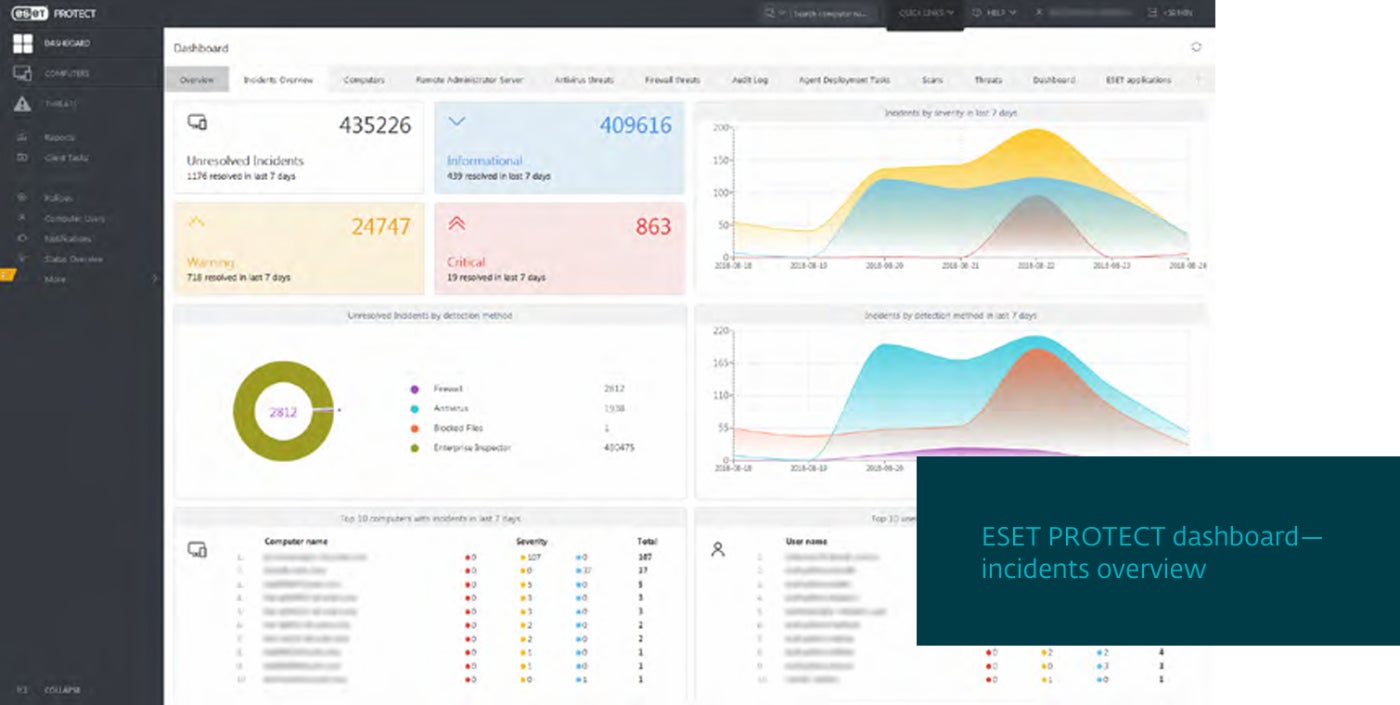
ESET Vulnerability and Patch Management can automatically analyze thousands of applications for tens of thousands of prevalent vulnerabilities and exposures. It can categorize and sift through vulnerabilities by exposure score and seriousness.
Reasons for Selecting ESET Vulnerability and Patch Management
I appreciated ESET for its simple installation and operation. This makes it appealing for SMEs and large companies with limited IT and cybersecurity resources.
Pricing
- $275 for five devices per year for the ESET Protect package containing ESET Vulnerability and Patch Management.
Characteristics
- Compatible with various editions of Windows, Linux, and macOS.
- Detects over 35,000 CVEs.
- Automatic assessments with adaptable schedule settings.
- Prioritizes and sorts vulnerabilities by exposure score and seriousness.
Pros and cons
| Advantages | Disadvantages |
|---|---|
| Simplifies patching by prioritizing critical assets and scheduling the rest for non-peak hours. | Automated discovery and repair features lack the comprehensiveness of certain other solutions. |
| Defenses against ransomware and zero-day risks. | More focused on small and medium-sized organizations rather than the corporate market. |
| Effortless to configure, utilize, and sustain. |
Syxsense Enterprise: Optimal for patch management

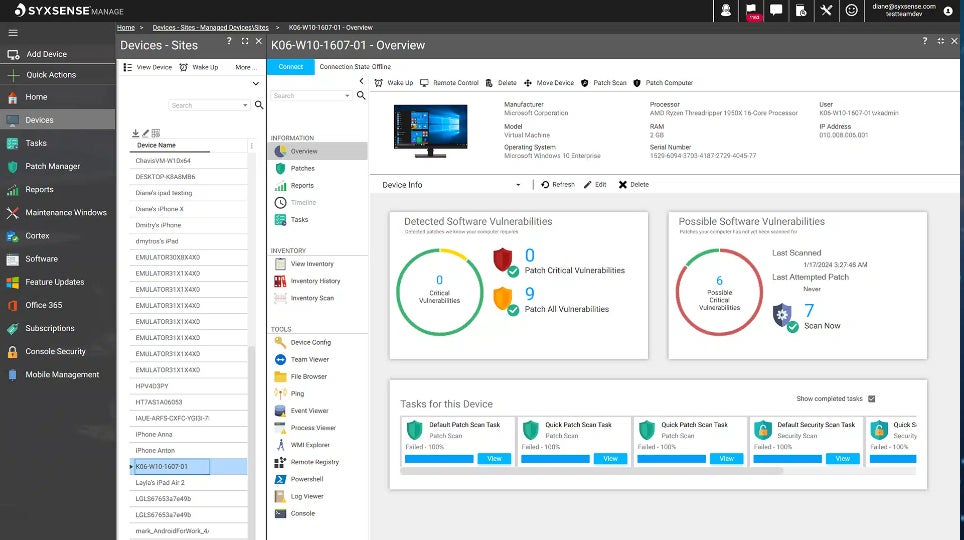
The suite of Syxsense Enterprise encompasses patch monitoring, vulnerability inspection, IT administration, and mobile device control within its security management infrastructure. Recently, it has introduced integrated rectification features as well as zero trust. Everything is now consolidated into a single dashboard through Syxsense Enterprise.
Reasons for Electing Syxsense
Originally focusing on patch supervision, Syxsense has extended into a robust vulnerability management package. Despite lacking elements like SIEM, threat intel, and antivirus, it concentrates on vulnerability and device control. For those with an existing security system seeking to enhance patch and vulnerability management, Syxsense proves to be a fitting selection.
Cost
- $9 per device monthly or $960 annually for 10 devices.
Highlights
- Automated detection and resolution workflows.
- Inclusive patch oversight covering patch succession, rollback, and application on any device including mobile gadgets.
- A Zero Trust Evaluation Engine creates a reliable security stance for devices.
Advantages and disadvantages
| Pros | Cons |
|---|---|
| Effective patch management features. | Syxsense has recently been acquired by Absolute Security, which might hinder the rapid innovation that propelled Syxsense to the forefront in patch and vulnerability management. |
| Focused on vulnerability management. | The suite lacks components such as antivirus, threat detection, and SIEM. |
| Separate editions for cloud and on-premise. |
CrowdStrike Exposure Management: Premier cybersecurity suite integrating vulnerability management

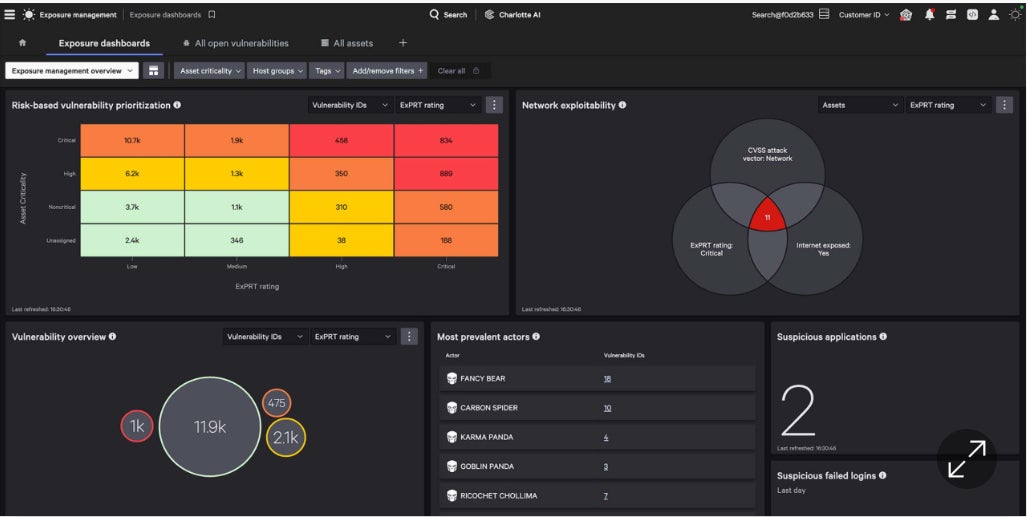
CrowdStrike Exposure Management sprouted from a prior product named Falcon Spotlight, which I was already acquainted with. I observed how it enhances Falcon Spotlight’s capabilities by adopting a more risk-focused approach alongside various AI functionalities.
Why CrowdStrike Exposure Management Stood Out
CrowdStrike Exposure Management proves itself as a solid product on its own. It constitutes a portion of a comprehensive suite offering an array of security functionalities. Most customers opt for the complete CrowdStrike platform rather than just the Exposure Management facet. Branded as the CrowdStrike Falcon Platform, it comprises EDR, antivirus, threat intelligence, exposure management, AI, threat hunting, cloud security, SIEM, data protection, automation, and more, all accessible via a single agent. Individuals seeking a vulnerability management tool and a new security suite find adopting the entire Falcon Platform as a wise decision.
Pricing
- Around $184 annually for the complete suite and about $40 yearly for the exposure management module.
Featured Aspects
- Automated evaluation for vulnerabilities, whether connected or disconnected from the network.
- Reduced response time with real-time visibility into vulnerabilities and threats.
- The capacity to prioritize and predict the vulnerabilities most likely to impact the organization.
- The company touts a single lightweight-agent structure.
Advantages and disadvantages
| Advantages | Disadvantages |
|---|---|
| Coordination of vulnerabilities and patch management. | Limited functionality regarding the detection of security application misconfigurations. |
| Seamless integration with the CrowdStrike Falcon suite. | More emphasis placed on the suite as a whole rather than on vulnerability control. |
| Artificial intelligence connects threat information with real-time vulnerability evaluation. | – |
| A unified agent for multiple components. | – |
Qualys VMDR: Ideal for cloud-centric businesses

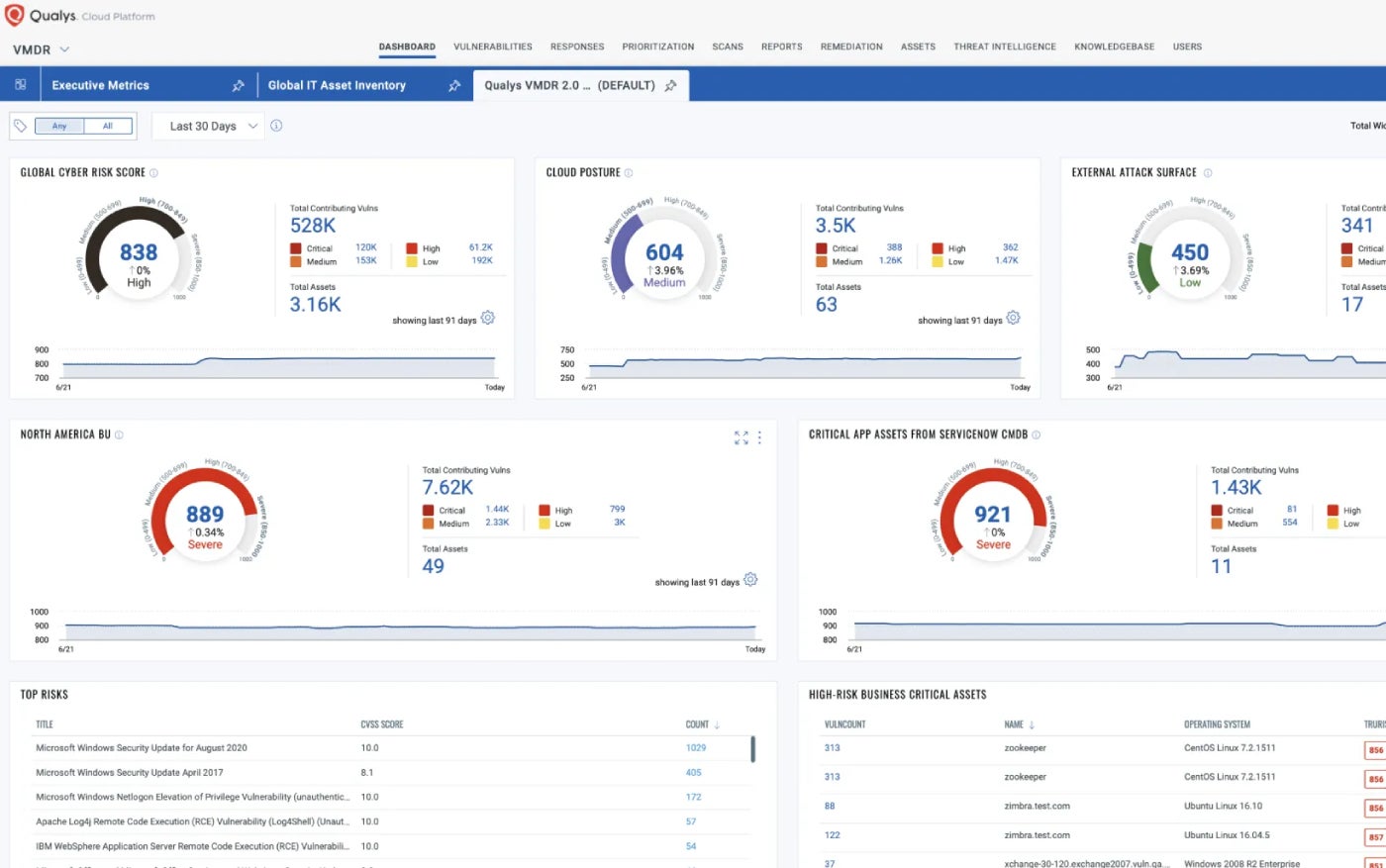
Qualys Vulnerability Management Detection and Response incorporates threat intelligence to prioritize and address critical threats promptly. Its automated scoring method called TruRisk adds significant value.
Why I selected Qualys VMDR
Qualys VMDR efficiently combines essential security functions like vulnerability evaluation, asset discovery, inventory control, and attack surface management. It is a key offering within an extensive cloud-based security portfolio, making it a solid choice for cloud-driven enterprises and large corporations.
Pricing
- The pricing structure of Qualys seemed intricate. It is determined by the count of cloud-based compute units such as virtual machines, serverless, and container images. Unit pricing varies based on module functionality, complexity, and overall value proposition. The enterprise version of the suite begins at approximately $500 per month and increases based on user volume. The vulnerability management module is accessible to small businesses starting at $250 per year, and to larger enterprises for $2000 annually.
Characteristics
- Primarily cloud-native, with an option for an on-premises private cloud appliance to cater to customers with strict data locality regulations.
- A cloud-centric offering geared towards small and medium-sized enterprises, providing VMDR along with endpoint detection and response, and patch management tools.
- Risk-focused and context-aware threat prioritization
- Seamless integration with patch management, inventory management, and IT service management.
- The Qualys Threat Research Unit actively identifies new threats by analyzing user data, numerous threat intelligence sources, external data, and the dark web.
Merits and demerits
| Merits | Demerits |
|---|---|
| Extensive array of vulnerability signature repositories. | Installation, learning curve, and usability might pose challenges for less experienced IT environments. |
| Timely detection of vulnerabilities like critical patches and misconfigurations. | Enhancing support for cloud and hypervisor technologies is needed. |
| Automated recognition of the most recent superseding patch forthe exposed asset and implements it. | |
| Qualys is among the dominant players in vulnerability oversight based on market presence. |
Characteristics
- Consistently evaluates and ranks critical weak points using a risk scale from 1 to 1000.
- Monitors conformity with policies and regulations, and contrasts with industry standards.
- Rapid7 Labs contributes to recognizing all outward-facing resources and signaling about weak points.
- Strong scanning uniformity and variety of gadgets.
Advantages and disadvantages
| Advantages | Disadvantages |
|---|---|
| Automated resolution. | Most suitable for well-informed security units. |
| Automatic penetration testing. | Can at times be intricate to configure. |
| One of the leading vulnerability oversight suppliers by market presence. | Certain users experience problems with integration and deployment. |
| Conducts vulnerability scans across cloud, physical, and virtual infrastructure and automatically gathers data from all endpoints. | Assistance responsiveness could be enhanced. |
| Security units can optimize resolution operations like patching vulnerabilities and containment. | |
| Integrates with a variety of third-party instruments including ticketing systems, patch management solutions, and SIEM. |
Ivanti VMaaS: Supreme as a service proposition
Ivanti possesses an extensive background as a prime vulnerability oversight supplier. It furnishes tools that can be deployed within the organization or as a service.
Reasons for opting Ivanti VMaaS
To me, Ivanti VMaaS stands out due to its integration of vulnerability oversight as-a-service with proficient security analysts, scanning tools, and procedures that aid enterprises in pinpointing weak points on the network and in applications. However, the business also presents top-notch cloud-based utilities such as Ivanti Neurons for risk-focused vulnerability oversight.
Costing
- $4 per month per user.
Characteristics
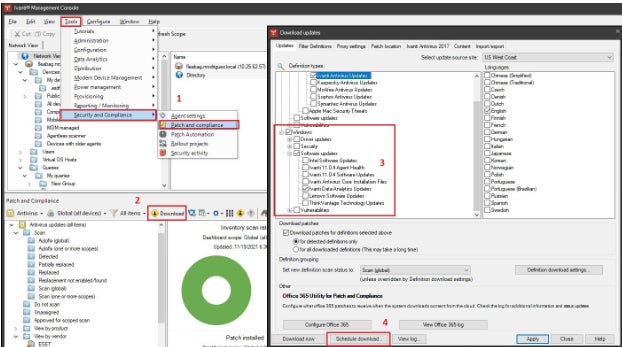
- Ivanti Neurons for RBVM, has the ability to receive data from numerous third-party scanners to assist in bridging gaps and hidden areas.
- It automatically scrutinizes data from vulnerability scanners and provides insights to IT and security teams.
- Examination findings are automatically connected and given context with threat information and analysis, and then prioritized.
- Detects code frailty and identifies coding mistakes.
Advantages and disadvantages
| Advantages | Disadvantages |
|---|---|
| This completely managed service releases staff for other assignments. | Certain users gripe about the lack of assistance. |
| Simple-to-follow resolution strategies. | The options for customization are restricted. |
| Risk scoring secures that resolution suggestions concentrate on moves that target the most severe risks. | Competing patch oversight products might be more exhaustive in detecting all endpoints functioning on the network. |
| Automatic workflows. |
StorageGuard: Ideal for storage and backup applications

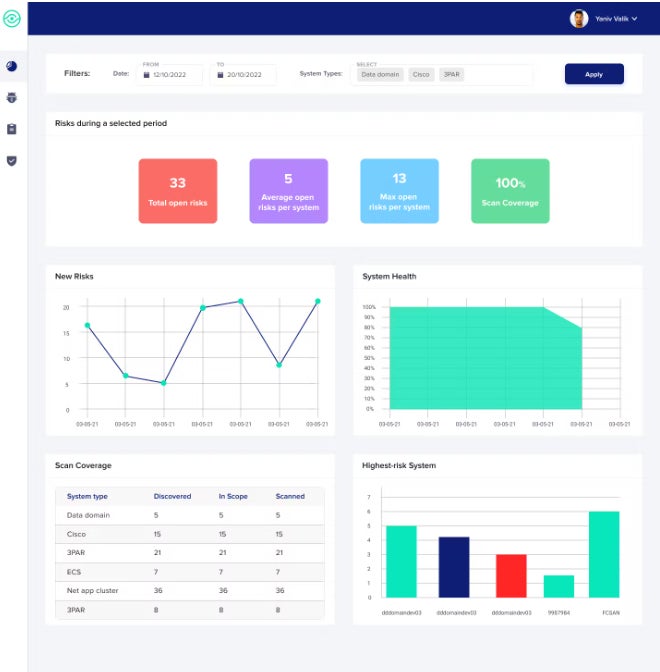
StorageGuard by Continuity Software scans, identifies, and rectifies security misconfigurations and vulnerabilities across numerous storage, backup, and data protection systems.
Why Opt for StorageGuard
While most tools discussed in this guide offer extensive coverage — either spanning the entire vulnerability management field or being part of large security suites that exceed vulnerability management, I have chosen StorageGuard for its unique approach. It singularly focuses on a specific aspect of this market: delivering a thorough solution to a significant gap often found in many vulnerability management products — storage and backup vulnerabilities and misconfigurations. StorageGuard effectively fills this void and is recommended to be used alongside some other tools mentioned here.
Price Point
- $200 per month for a maximum of 50 systems.
Attributes
- Directly targets the vulnerabilities and potential threats identified by NIST in Security Guidelines for Storage Infrastructure.
- Extensive coverage of storage and backup applications and systems from various providers such as Dell, NetApp, Hitachi Vantara, Pure, Rubrik, Commvault, Veritas, HPE, Brocade, Cisco, Veeam, Cohesity, IBM, Infinidat, VMware, AWS, and Azure.
- Capable of detecting deviations from a selected configuration baseline.
Advantages and disadvantages
| Pros | Cons |
|---|---|
| Identifies weaknesses in storage and backup applications that are often overlooked by other scanners. | Does not tackle conventional vulnerabilities in third-party applications and operating systems. |
| Users praise its user-friendly interface and thorough detection of backup and storage misconfigurations. | Primarily focuses on issue discovery rather than resolution. |
| Offers compliance validation against CIS Controls, NIST, ISO, PCI, NERC CIP, and more. |
Vulnerability management: Common inquires
What are vulnerability management tools?
Citing NIST, vulnerability management refers to a “capability that identifies vulnerabilities [common vulnerabilities and exposures] on devices that are likely to be used by attackers to compromise a device and utilize it as a platform from which to extend compromise to the network.”
In addition to addressing configuration or code issues that could be exploited by an attacker, the scope is often broadened to encompass patch management, MDM, IT asset management, and EDR. The vulnerability management function is commonly integrated into a comprehensive security suite.
How do vulnerability management tools operate?
Vulnerability management can be delineated into a series of steps, many of which are now automated:
- Conducting vulnerability scans.
- Generating reports on identified vulnerabilities and prioritizing them based on their potential business impact.
- Implementing remediation or suggesting remedial actions.
- Confirming remediations to ensure resolution of issues.
- Reporting on vulnerability status and their rectification within the enterprise.
How are vulnerability management tools deployed?
They are deployable as on-premises software, offered as SaaS, or as managed services.
What encompasses vulnerability management as a service?
Vulnerability management as a managed service is dispensed by a provider via the cloud instead of being downloaded and run as on-prem software. It consistently identifies, evaluates, reports, and governs vulnerabilities across cloud identities, workloads, platform configurations, and infrastructure.
What attributes should I seek in a top-tier vulnerability management tool?
Key functions are inherent in all leading vulnerability management platforms. These encompass:
- Uncovering all devices, applications, and systems and detecting possible vulnerabilities and misconfigurations that may be present anywhere within the network on any connected device.
- A vulnerability and threat database that is continuously updated.
- Integration with an array of platforms, security systems, vulnerability scanners, ticketing systems, and other security solutions.
- A method for risk assessment and prioritization.
- Automated remediation or guidance on remediation.
- Reporting tools that emphasize issues and compliance.
How can I select the optimal vulnerability management tool for my business?
Individuals seeking a vulnerability management tool should pose queries such as:
- On which platforms does the tool operate? Be mindful that some are specialized in Linux, some in Windows, while others cover multiple or all operating systems and platforms. Also consider the existing expertise of your staff. Avoid adding Linux tools if your personnel are proficient in Windows, and vice versa.
- Which endpoints are encompassed? Some primarily focus on servers, PCs, and laptops, whereas others extend to smartphones, IoT, wireless, and other devices.
- What aspects of the security landscape are you seeking to augment beyond vulnerability management? If undergoing a complete revamp of your security infrastructure, commence with the suite and then select one that integrates the necessary vulnerability management features. However, if you already possess a robust security framework, concentrate on vulnerability management tools that offer the required coverage.
- Scrutinize the specifics in contrasts and closely examine cost structures, potential additional fees, support expenses, etc.
- Avoid fixating on a single vendor for all security requirements. Vendor A may suffice for most of your security infrastructure, whereas Vendor B may excel in vulnerability management.
- What are the evaluations from analysts like Gartner regarding the various tools, their market reach, advantages, limitations, and future trajectory?
Irrespective of the tool selected from the aforementioned list, the benefits of vulnerability management swiftly manifest in terms of reduced breaches, enhanced data protection, early detection of attacks, and increased automation.
Methodology
The tools featured here were chosen based on analyst assessments, user feedback, and satisfaction, as well as reviews shared on TechRepublic and other Technology Advice portals. A diverse selection of comprehensive vulnerability management products, highly specialized tools, and those where vulnerability management is a component within a larger suite has been included.
About Author