Given the increasing complexity of cyberattacks in today’s world, standard antivirus solutions are insufficient in safeguarding the data of large corporations and businesses. Robust tools and technologies are now essential to ensure the safety and protection of critical company assets.
Thankfully, enterprise antivirus software, endpoint detection and response software, and extended detection and response tools are among the cutting-edge security solutions that are well-equipped to safeguard large enterprises.
In this post, we present the finest business antivirus solutions available for you and your organization.
Top business antivirus comparison
It is worth mentioning, this list comprises a blend of enterprise antivirus software as well as more advanced EDR and XDR solutions. Note that with enterprises, a conventional antivirus might not be adequate for comprehensive protection. Hence, I have included a range of security solutions to cater to various enterprise needs and demands.
| Initial cost | Availability of demo or trial | Key features | Operating system support | |
|---|---|---|---|---|
| SentinelOne Singularity | Contact sales for pricing | Ability to request a demo | Notable value and minimal impact on system resources | Windows, macOS, Linux, Windows XP, IoT, cloud workload protection |
| Microsoft Defender for Endpoint | $54.75 per user per month | Free trial offered | Possible bundling with Microsoft 365 applications and services | Windows, macOS, Linux, Android, iOS, and IoT devices |
| CrowdStrike Falcon | $184.99 per device annually | Free trial available | High threat identification and blocking capabilities | Windows, macOS, Linux, ChromeOS |
| ESET Protect | Contact sales for pricing | Free trial offered | Combination of home and business antivirus features | Windows, macOS, iOS, Android, Linux, Lotus Domino |
| Kaspersky | £14.99 yearly | Free trial available | 30-day trial period | Windows, macOS, Android, iOS |
| Bitdefender GravityZone | Contact sales for pricing | Free trial offered | User-friendly interface and flexible deployment | Windows (from Windows 7 onwards), Windows Server 2008 R2, macOS (starting from macOS Mojave and later), Linux |
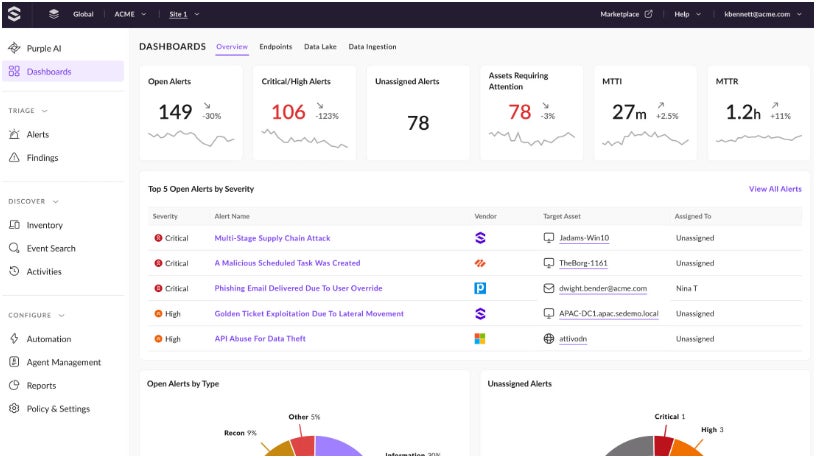
SentinelOne Singularity: Top Choice Overall

The best comprehensive enterprise antivirus and security solution I recommend is SentinelOne Singularity. It delivers an array of security products, encompassing cloud-native NGAV, EDR, and XDR tools designed to meet diverse security requirements.
SEE: How to Execute a Cybersecurity Risk Evaluation in 5 Steps (TechRepublic Premium)
What I especially like about it is its strong emphasis on providing a seamless experience without compromising on threat detection efficiency. Noteworthy is its recognition by Gartner as a Leader in the EPP sector in its Magic Quadrant for Endpoint Protection Platforms report dated December 2023.
In addition, I commend SentinelOne for offering a comprehensive enterprise package that includes EDR, XDR, advanced EPP, and expert onboarding and deployment services — a critical provision for businesses initiating their security infrastructure.
Reasons for Choosing SentinelOne Singularity
I have selected SentinelOne as the top choice for its robust threat detection, low system resource impact, and competitive pricing. For me, SentinelOne emerges as the optimum alternative following CrowdStrike Falcon, offering comparable performance at a more attractive price point.
I also believe it to be the logical selection for enterprises growing cautious of CrowdStrike after the global IT disruption in July 2024.
Pricing Details
For details on pricing of its Singularity Enterprise solution, SentinelOne recommends reaching out to its sales team. Here is a brief overview of other offerings with pricing for 5–100 workstations, respectively.
- Singularity Core Cloud-Native NGAV: $69.99 per endpoint; includes EPP, role-based access control, and multi-tenant management.
- Singularity Control: $79.99 per endpoint; allKey characteristics with advanced EPP and EDR.
- Unity Full: $159.99 per device; all Command features alongside 14-day data retention.
- Unity Business: $209.99 per device; all Full features together with 30-day data retention, XDR, managed threat tracking, and identity threat recognition and response.
- Unity Corporate: Call for pricing; all Business features combined with network and vulnerability control, educational services, and directed onboarding and installation.
Main points
- Swift reaction and device resolution.
- Automated replies and customizable routines.
- Identity-focused threat recognition.
Advantages and disadvantages
| Advantages | Disadvantages |
|---|---|
|
|
Top choice for Windows settings: Microsoft Defender for Endpoint
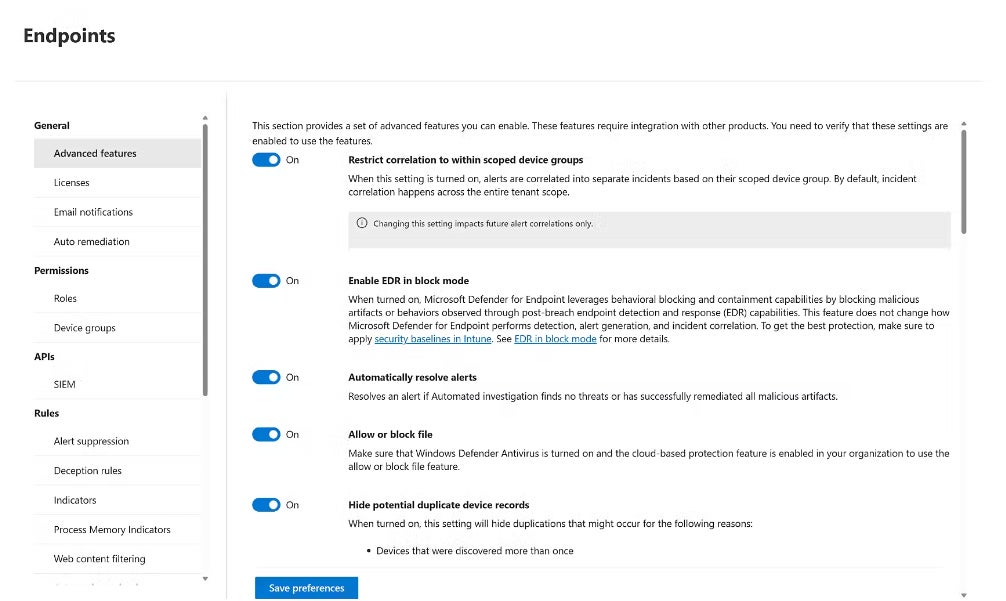
Microsoft Defender for Endpoint, also known as MDE, stands out in businesses predominantly utilizing Windows devices and Microsoft services. MDE employs AI-driven mechanisms to counteract ransomware, cyber threats, and other opponents. It presents a unified endpoint governing console for streamlined management of devices and a global threat awareness repository that monitors daily threats.
I appreciate its emphasis on granting adaptable enterprise controls to efficiently regulate access in complex organization frameworks. This plays a vital role in nurturing effective workflows within a company without compromising security.
Reasons for selecting Microsoft Defender for Endpoint
I decided on Microsoft Defender for Endpoint due to its seamless blend with Windows workstations and its inclusion in the value-enriched Microsoft 365 E5 enterprise package.
For enterprises deeply invested in the Microsoft or Windows environment, MDE is an obvious choice — especially considering its compatibility with other Microsoft products like Outlook, OneDrive, Power BI Pro, and more. This is complemented by top-notch threat detection capabilities and smooth integration with other Microsoft software.
Cost
Microsoft Defender for Endpoint is obtainable in two subscription tiers: MDE P1 and P2. P1 encompasses Microsoft’s state-of-the-art anti-malware and endpoint firewall tools. P2 includes all P1 features along with the core EDR security suite. For EDR users, opting for MDE P2 is advisable.
Both P1 and P2 can be acquired through one of the Microsoft 365 bundles, detailed below:
- Microsoft 365 E3: $33.75 per user, per month; involves MDE P1 anti-malware solution, along with 365 apps, Windows for Enterprise, and 1TB of cloud storage.
- Microsoft 365 E5: $54.75 per user, per month; comprises all Microsoft 365 E3 features in addition to MDE P2 EDR solution with advanced security and compliance features and Power BI business analytics.
Features
- International threat awareness.
- Automated deceptive tactics delay.
- Automatic intervention in cyber attacks.
Advantages and disadvantages
| Advantages | Drawbacks |
|---|---|
|
|
CrowdStrike Falcon Insight XDR: Optimal for high-level security

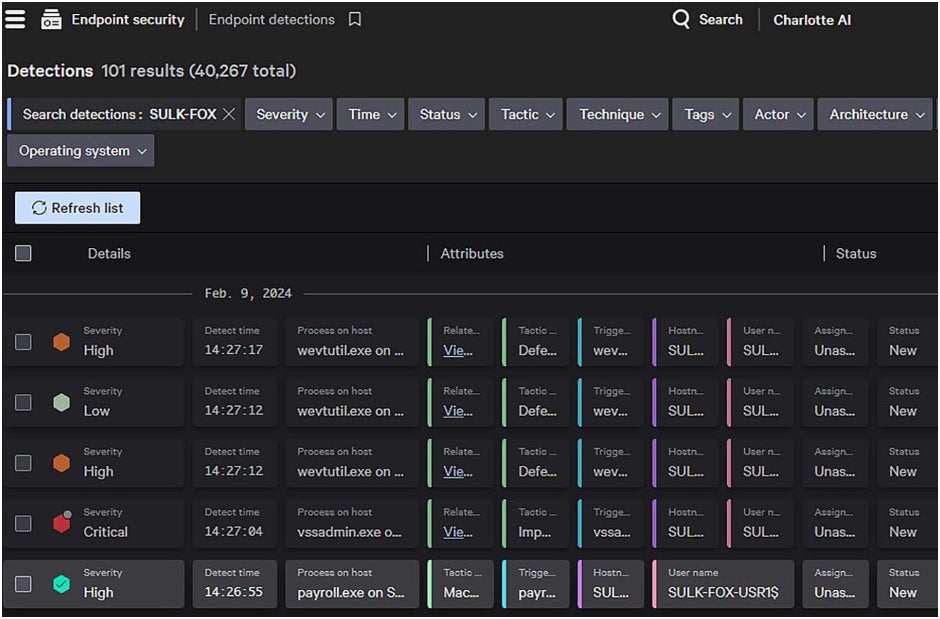
If security is your utmost concern, I suggest opting for CrowdStrike Falcon. CrowdStrike’s XDR is widely acknowledged as one of the top services in the EDR realm. It provides AI-driven threat identification, a nimble and user-friendly agent, and enterprise-level automation capabilities. In Forrester’s Endpoint Security report for Q4 2023, CrowdStrike was commended as a frontrunner in endpoint security, with its potent prevention mechanisms and minimal impact on endpoint performance highlighted.
Regrettably, CrowdStrike faced a major IT disruption recently, where an update for one of its services led to disturbances on over 8.5 million Windows machines globally.
Due to this incident, it is understandable why some companies might hesitate to select CrowdStrike, considering the scale of the disruption. To delve deeper, you can read the complete account of the CrowdStrike disruption here.
Reasons I opted for CrowdStrike Falcon
Despite the recent setback, I still believe CrowdStrike Falcon offers significant value with its top-tier threat identification and mitigation capabilities.
From my review of user feedback, CrowdStrike emerges as a consistent choice for many individuals seeking a reliable EDR solution. As per a cybersecurity enthusiast on Reddit, “CrowdStrike consistently excels in detection and prevention. Notably few false alarms, and easy to fine-tune.”
Naturally, it is reasonable to have reservations about choosing CrowdStrike following the outage, especially if your business was adversely impacted by the widespread disruptions. If you are uncertain about CrowdStrike and wish to explore other options, you can refer to our CrowdStrike alternatives article here.
Pricing Details
CrowdStrike offers three enterprise packages: Falcon Pro, Falcon Enterprise, and Falcon Elite. Among these, Falcon Enterprise and Elite encompass CrowdStrike’s EDR and XDR solutions. Below is a summary of the pricing structure for each package and the respective features they include:
- Falcon Pro: $99.99 per device annually; advanced antivirus, device management, integrated threat intelligence.
- Falcon Enterprise: $184.99 per device annually; incorporates all Falcon Pro features alongside EDR and threat detection.
- Falcon Elite: Reach out to sales for pricing; endpoint and identity protection, Falcon Insight XDR, threat detection.
Characteristics
- Risk assessment powered by AI for prioritizing threats.
- Falcon Fusion for streamlining security orchestration and response.
- Intelligence on 230+ threat actors.
Advantages and disadvantages
| Advantages | Disadvantages |
|---|---|
|
|
ESET: Ideal for home office and business antivirus needs
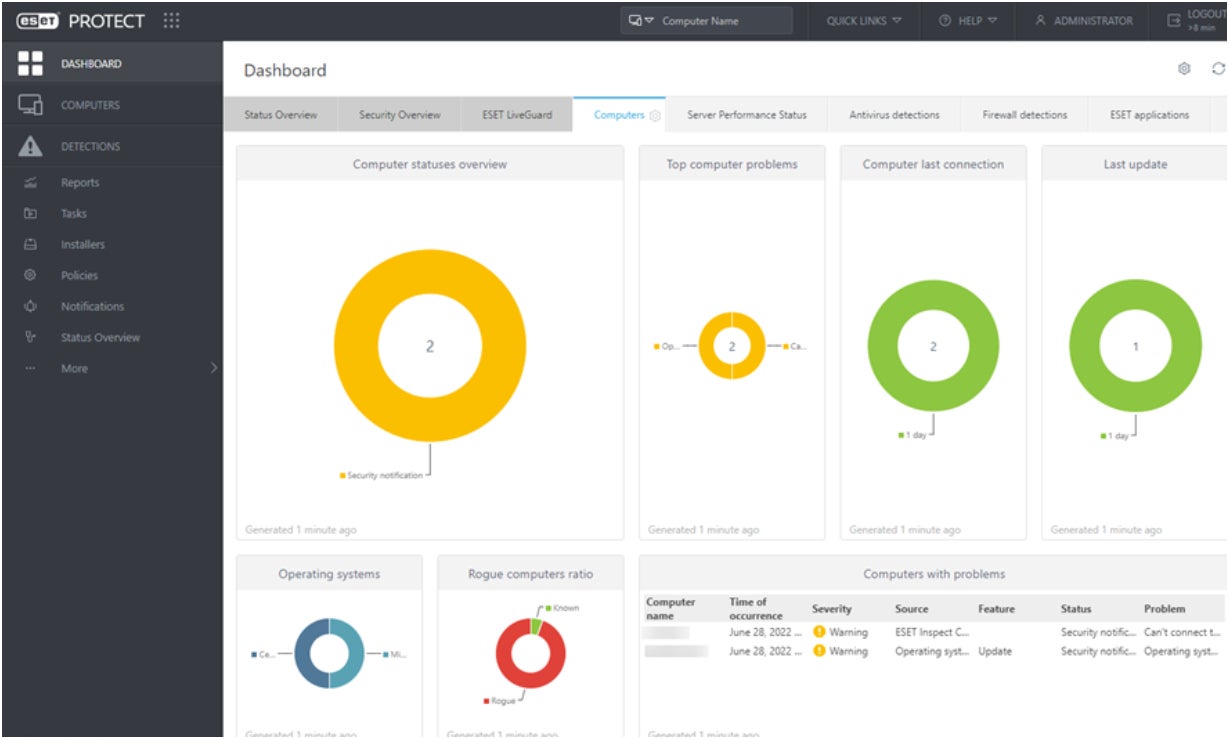
While enterprises typically refer to larger organizations, they can also encompass smaller businesses or any business in general. If you are in need of a home office or business antivirus solution, my recommendation is ESET. Their platform offers multi-layered anti-malware protection, server security, and anti-theft functionality.
According to AV-TEST’s June 2024 evaluation of ESET, its ESET PROTECT Advanced business antivirus successfully defended against all malware and web threats presented to it.
I particularly value its broad selection of antivirus and EDR products, catering to individual consumers, small and home offices, small-to-mid-sized businesses, and enterprises.
Reasons for selecting ESET
I opted for ESET due to its extensive range of antivirus products that can serve individual users, small offices, and even large enterprises. If you are a business owner seeking a single provider for both your home office and business needs, I believe ESET offers compelling value propositions for both.
Pricing Details
For users looking to protect both their business and personal devices, I recommend exploring ESET’s Small Business Security subscription. This plan is tailored for non-IT experts seeking a straightforward protection solution for 5–25 endpoints. Here is an overview of the Small Business Security pricing:
- Small Business Security 5 devices, 1 year: $179.99
- Small Business Security 10 devices, 1 year: $204.99
- Small Business Security 20 devices, 1 year: $410.00
Capabilities
- Protection against cyberattacks and for servers.
- Secure banking and browsing features.
- Built-in unlimited VPN service.
Advantages and disadvantages
| Advantages | Disadvantages |
|---|---|
|
|
Kaspersky: Ideal for users outside the United States

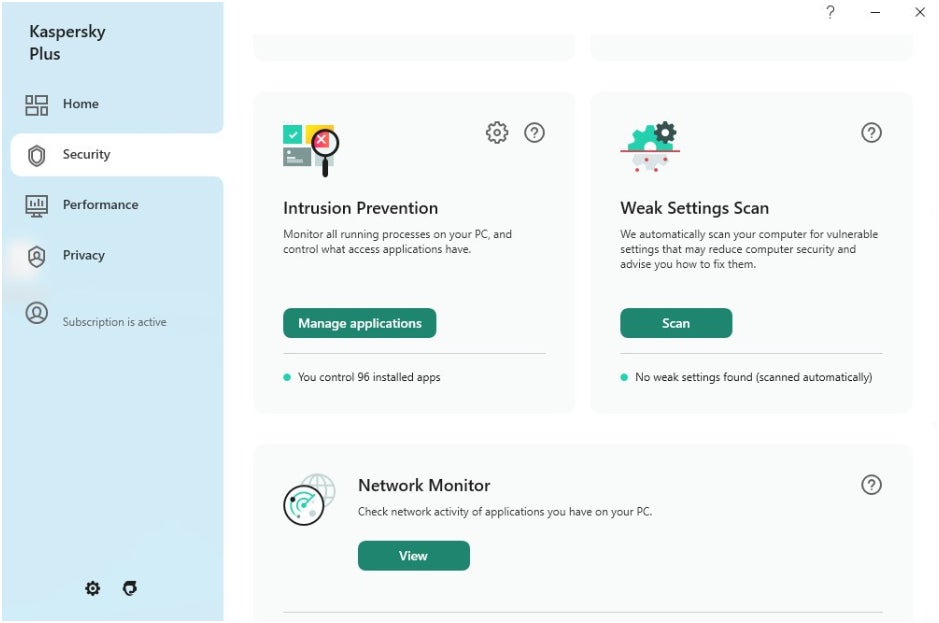
If you’re an international user seeking a top-notch antivirus, Kaspersky is definitely worth considering. As a household antivirus, Kaspersky excels in defending against new malware threats and web-based dangers. I personally find it to be a standout option as it offers a generous 30-day trial of its premium antivirus solution. This can particularly benefit small business or corporate owners who are looking to test out antivirus software without any obligations.
According to AV-TEST’s evaluation from May to June 2024 on Kaspersky Plus, the software successfully identified and blocked 100% of malware while consuming minimal system resources.
However, there’s a significant caveat — I can recommend Kaspersky only for international users and business proprietors due to its upcoming ban commencing on September 29, 2024. This restriction is a result of the U.S. Bureau of Industry and Security categorizing Kaspersky’s products as national security threats due to the organization’s Russian connections.
For more information, you can view the complete BIS statement on Kaspersky here.
Reasons behind selecting Kaspersky
I opted for Kaspersky due to its generous 30-day free trial of its residential antivirus solution and its cost-effective pricing plans overall. While not specifically geared towards enterprises, I believe Kaspersky’s residential antivirus is a good introduction for business owners looking to explore the benefits of such software for themselves and their businesses.
Unfortunately, the U.S. embargo on Kaspersky restricts this recommendation to our international audience. With this embargo, Kaspersky may not be a sustainable long-term choice, as other nations might take similar actions. Nevertheless, I still view Kaspersky as a valuable starting point for non-U.S. users contemplating an antivirus solution.
Price Points
Given that Kaspersky is discontinuing sales in the U.S., the prices mentioned below are based on Kaspersky’s official website in the United Kingdom.
- Kaspersky Standard 1 device: £14.99; includes real-time antivirus, two-way firewall, and online payment protection.
- Kaspersky Plus 1 device: £18.99; features all Standard components, along with a data leak checker and unlimited VPN.
- Kaspersky Premium 1 device: £19.99; incorporates all Plus attributes, identity protection, and expert virus check and removal.
Key Features
- Secure internet browsing capabilities.
- Advanced malware and ransomware defense.
- Bidirectional firewall.
Strengths and weaknesses
| Strengths | Weaknesses |
|---|---|
|
|
Bitdefender GravityZone: Ideal for beginner level endpoint defense
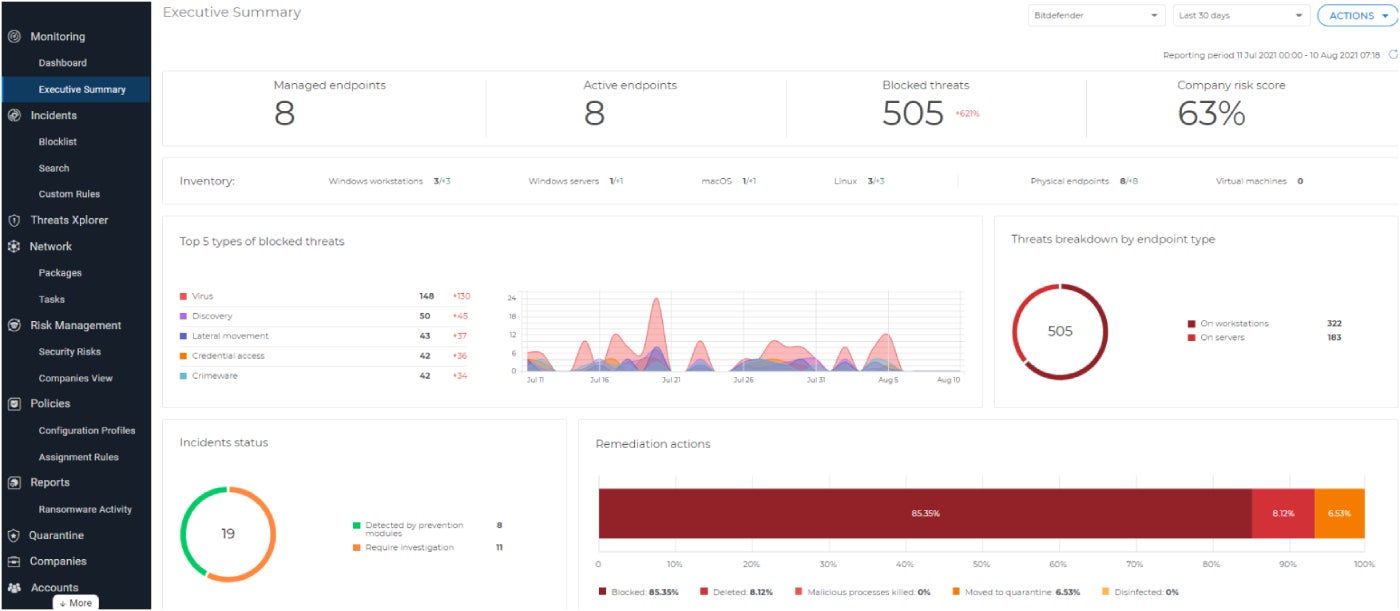
If you’re in need of fundamental endpoint protection, Bitdefender GravityZone is a prime choice. Featuring AI-powered security, Bitdefender’s GravityZone is tailored to swiftly detect abnormalities and block threats with minimal false alarms. It comes with automated patch management for quick vulnerability updates and cross-endpoint correlation that connects attacks across multiple endpoints.
In Gartner’s Magic Quadrant for EPP 2023 report, Bitdefender was commended for its user-friendliness and capability to be deployed in cloud or network-constrained settings. These qualities make it an ideal choice for enterprises considering an EDR solution as an enhanced security tool akin to “enterprise antivirus.”.
Rationale behind selecting Bitdefender GravityZone
I included Bitdefender GravityZone on this list for being a reliable option for enterprises looking to venture into the EDR realm. Additionally, Bitdefender’s broad OS support, spanning modern and legacy systems, positions it as a feasible choice for enterprises with aging hardware.
Pricing Details
With a focus on medium to large-scale enterprises, Bitdefender’s GravityZone offers a variety of plans tailored to cater to different business sizes.Companies, each necessitate potential clients to reach out to their sales staff for a quotation. Here is a summary of its four top-tier offerings and their respective attributes:
- GravityZone Business Security Premium: Reach out for pricing details; automated threat prevention, rectification, attack forensics, and cloud sandboxing.
- GravityZone Business Security Enterprise: Connect for pricing information; EDR with cross-endpoint correlation and integrated EPP capabilities.
- GravityZone XDR: Get in touch for pricing; XDR with organization-wide data correlation and easily understandable insights for security incidents.
- MDR PLUS: Inquire for pricing details; MDR plus dark web detection and response.
I admire the fact that the three GravityZone offerings mentioned above all offer convenient trial versions. In contrast, Bitdefender’s MDR PLUS provides an interactive demonstration on its official website.
Characteristics
- Automated cross-endpoint correlation.
- Defense against fileless attacks.
- Capabilities for Risk Management.
Advantages and disadvantages
| Advantages | Disadvantages |
|---|---|
|
|
How can one select the ideal enterprise antivirus for their company?
When deciding on the best enterprise antivirus, it is highly recommended to take into account these aspects:
Transition to EDR from enterprise antivirus solutions
Although typical antivirus software performs well at identifying known malicious software, they are ill-equipped to safeguard companies with many endpoints and devices. Conversely, EDR solutions are specifically designed for large enterprises and can analyze not just known malware but also zero-day threats via machine learning and behavioral analytics.
Thus, our aforementioned list suggests more EDR solutions over solely antivirus programs, as they are better suited to cater to the security demands of an enterprise setting.
Evaluate independent assessment outcomes
Thankfully, several independent assessment organizations focus on testing the efficacy and quality of antivirus software. When you have a particular AV software in mind, it is highly recommended to check whether this solution has recent evaluations from websites like AV-TEST or AV-Comparatives.
These AV testing firms offer impartial test results that encompass how efficiently an AV solution identifies and guards against malware, as well as the impact they have on a computer system’s resources.
Connect with providers and leverage trial versions
Lastly, most enterprise antivirus and EDR solutions provide complimentary product trials or a means to request one through their official site. It is highly recommended to maximize these free trials to gain insight into how an AV or EDR solution functions and if they can meet your enterprise’s requirements.
Approach
My compilation of the best enterprise antivirus solutions involved a detailed evaluation of each solution’s distinct security attributes, pricing, and overall worth.
Research for this piece was conducted through an exhaustive analysis of official product literature, independent test outcomes, and authentic user opinions.
Additionally, I contemplated which type of business or corporation would derive the most benefit from each solution enumerated above. The objective here is to assist enterprises in aligning with the enterprise antivirus and EDR provider that best fits their security prerequisites.
About Author