
Spotlight on Software: CrowdStrikeIntroducing CrowdStrike Falcon® Next-Generation SIEM, a cutting-edge cloud-native solution that integrates primary and third-party security and IT data, threat intelligence, AI, and automation. This platform aids organizations in swiftly detecting, investigating, and responding to threats with unparalleled speed and effectiveness.
Discover more about Falcon Next-Gen SIEM. |
SIEM plays a crucial role in analyzing device and environmental data to safeguard company assets, information, and staff. By offering in-depth security analysis and associated recommendations, SIEM tools aid in ensuring adherence to regulations and addressing potential or ongoing threats.
A recent study by the IMARC Group revealed that the global SIEM sector surpassed nearly $5.8 billion in 2023. The report anticipates the market to surge to roughly $14 billion, particularly as more enterprises allocate additional resources toward fortifying defenses and addressing vulnerabilities.
Considering this scenario, let’s delve into the premier SIEM tools and software solutions presently available.
Comparing Leading SIEM Software
Organizations contemplating SIEM adoption or upgrading from legacy systems to modern platforms should meticulously assess the available tools. Key considerations should include cloud and on-premises functionality, remediation capabilities, and supported platforms.
| Cloud-Based | On-Premises Hosting | Remediation Features | Supported Platforms | Pricing Model | |
|---|---|---|---|---|---|
| SolarWinds SEM | Yes | Yes | Incorporates automated remediation functionalities. | Windows, Linux, and Mac OS. | Starting at $2,992 |
| CrowdStrike Falcon LogScale | Yes | No | Comprehensive suite of remediation features. | Windows, Linux, Mac OS, and Chrome OS. | Contact provider for a custom quote |
| Splunk Enterprise Security | Yes | No | Includes some remediation capabilities. | Windows, Linux, and Mac OS. | Reported range: $173 per month up to $1,800 per GB |
| Datadog Security Monitoring | Yes | No | Limited remediation features. | Windows, Linux, and Mac OS. | Starting at $15 per host, per month |
| LogRhythm SIEM | Yes | Yes | Limited remediation features. | Windows, Linux, and Mac OS. | Contact provider for a personalized quote |
| RSA NetWitness SIEM | Yes | Yes | Limited remediation features. | Windows, Linux, and Mac OS. | Contact provider for a custom quote |
| ManageEngine Log360 | Yes | Yes | Limited remediation features. | Windows, Linux, and Mac OS. | Obtain a personalized quote via an online form |
| IBM Security QRadar SIEM | Yes | Yes | Complete suite of remediation features. | Windows, Linux, and Mac OS. | Request a personalized quote through the online pricing estimator |
| Trellix Enterprise Security Manager | Yes | Yes | Remediation features require additional purchase of Trellix modules. | Windows, Linux, and Mac OS. | Reach out to the provider for a detailed quote |
| AT&T USM Anywhere | Yes | No | Inclusive remediation capabilities. | Windows, Linux, and Mac OS. | Starting at $1,075 per month |
SolarWinds: Optimal Choice for Log Aggregation

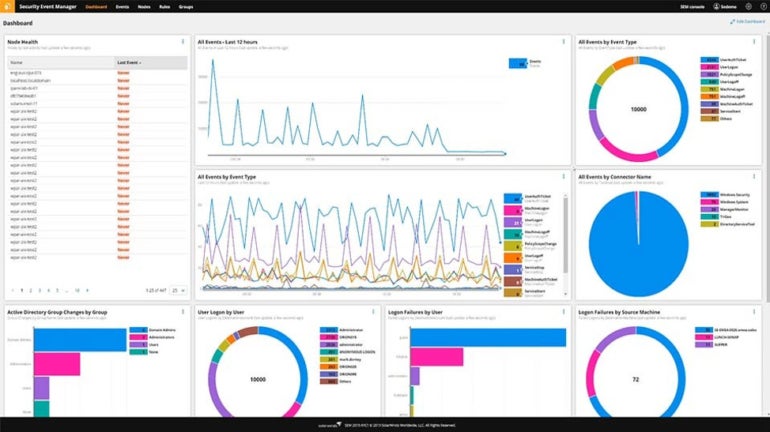
SolarWinds Security Event Manager (SEM) places special focus on log aggregation and threat detection. It can effortlessly handle and transmit raw event log data to external applications for further scrutiny using syslog protocols, distinguishing itself in this field.
Reasons Behind Opting for SolarWinds
I chose SolarWinds for its comprehensive log aggregation and analysis capabilities. This empowers businesses to have a clear understanding of their device statuses, identify the causes behind each log, and subsequently devise improvement strategies. Furthermore, SolarWinds’ capacity to share extensive log data with other applications is a significant advantage.
Pricing Structure
- Starting at $2,992, annual subscriptions for SolarWinds SEM are available.
- Around $6,168, perpetual licensing can be obtained.
Attributes
- Automation for resolving particular incidents.
- Exporting log data and exchanging it with other teams or vendors.
- Visual dashboards that display security status, as well as reports for addressing compliance demands.
- Pre-built connectors for pulling data from various sources.
- A file integrity checker to monitor access and alterations to files and directories, detecting unauthorized or malicious activities.
Connections
- Amazon Web Services.
- Microsoft Azure.
- Heroku.
- Apache Server.
- Oracle.
Advantages and Disadvantages of SolarWinds
| Advantages | Disadvantages |
|---|---|
| Ideal for network-related incidents and examining activities based on hosts, such as logins, privilege use, and changes in registry settings. | Dashboards may become cluttered and difficult to comprehend when handling extensive datasets. |
| Security features encompass data encryption, single sign-on functionality, and smart card authentication. | May face challenges with the intricacies of very large corporate environments. |
| Capable of limiting access from specific IPs, blocking applications, and prohibiting access to removable storage devices. | Automated processes lack a complete set of remediation capabilities. |
Attributes
- Scalable log collection up to petabyte levels.
- Instant access to live data with sub-second latency.
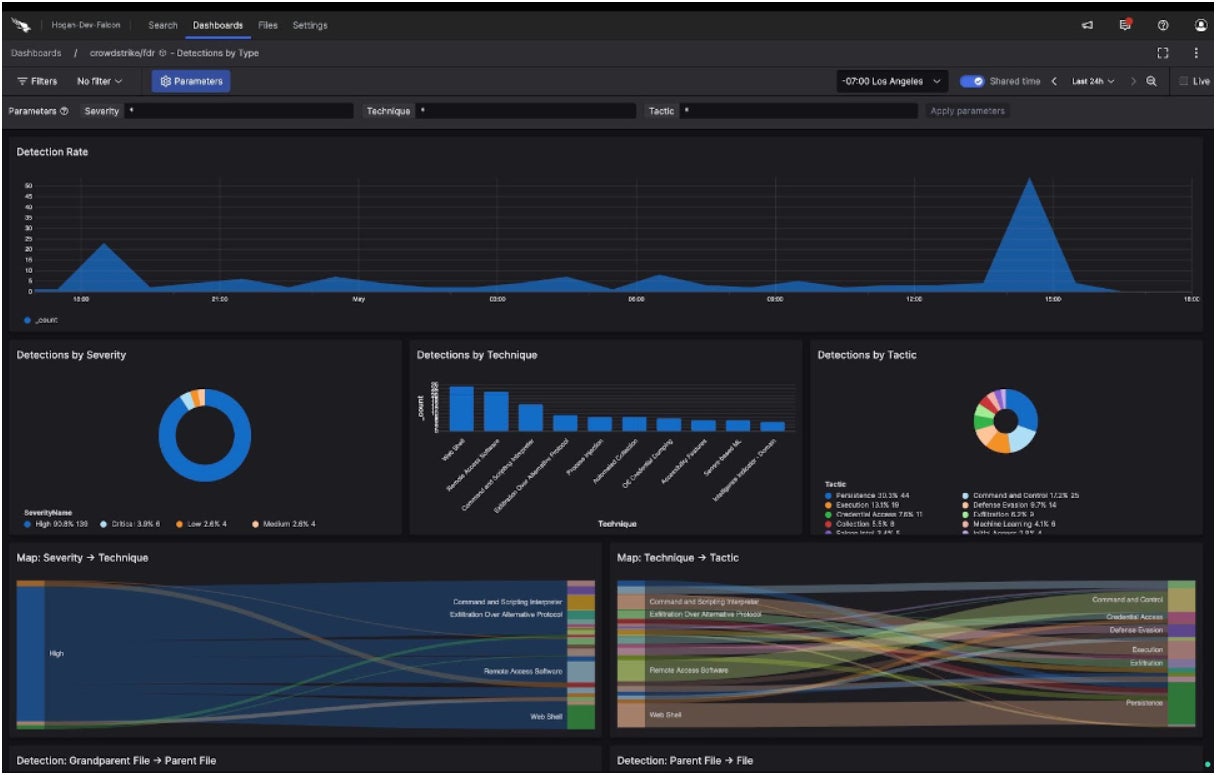
- Swift search capabilities, real-time alerts, and customizable dashboards.
- Data retention for as long as required for compliance, threat analysis, and historical inquiries.
Connections
- AWS (Amazon Web Services).
- Google Cloud Platform.
- Azure by Microsoft.
- Red Hat Services.
- Other products within the Crowdstrike ecosystem.
Advantages and Disadvantages of CrowdStrike
| Advantages | Drawbacks |
|---|---|
| Architecture without indexes and compression technology reduce the computing and storage resources needed for data ingestion and management. | Derived from the XDR aspect, it leans more towards being a log management tool with characteristics resembling those of a SIEM rather than a comprehensive SIEM suite. |
| Reported to reduce log management expenses by as much as 80% compared to other options. | |
| Effective remediation capabilities, thanks to integration with the CrowdStrike Falcon platform. |
Top Choice for Cloud-Native Environment: Splunk Enterprise Security
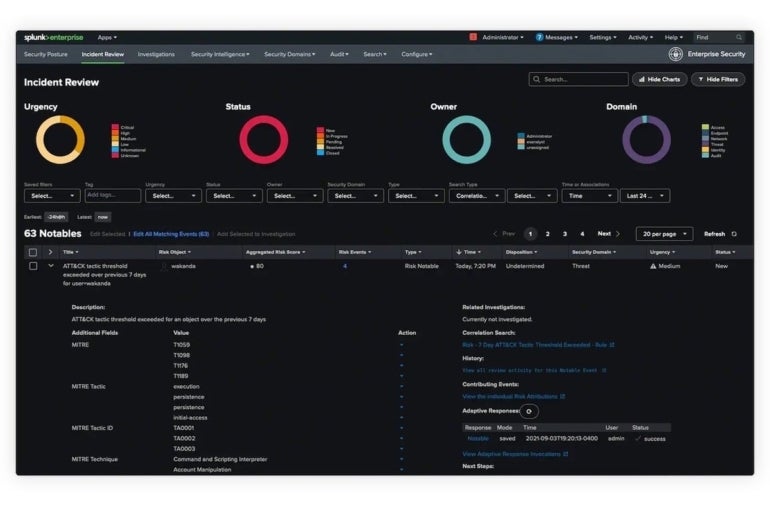
Splunk Enterprise Security provides cloud-based security event notifications and log monitoring. Its capabilities include identifying resource bottlenecks, failing hardware, capacity issues, and other potential concerns. Given its evolution during the cloud era, it is specifically tailored for cloud-native environments.
Reasons for Choosing Splunk Enterprise Security
Splunk Enterprise Security stands out for its specialized focus on safeguarding cloud environments. This tool empowers cloud-native enterprises to effortlessly establish security monitoring and unified visibility within the cloud. Its extensive visibility features are complemented by over 1,500 detections, numerous integrations, and risk-based alerting. For many cloud-native businesses, Splunk’s integrated threat detection, exploration, and response service is a crucial security resource.
Pricing Details
- Splunk has a pricing model divided into entity, activity, workload, and ingestion categories.
- Exact prices are not publicly disclosed, but user feedback suggests costs range from $173 per month to $1,800 per GB.
Functionality
- Detection of threats using machine learning, spanning 1,400 detections for frameworks like MITRE and others.
- Ingestion and monitoring of tens of terabytes of data daily from any structured or unstructured source.
- Assigning risk to users and systems, aligning alerts with cybersecurity frameworks, and triggering alerts when risks surpass predefined thresholds.
- Swift investigation of security incidents or suspicious activities.
Integration Details
- AWS.
- Azure.
- Google Cloud Platform.
- Kubernetes.
- OpenShift.
- Kafka.
Strengths and Weaknesses of Splunk
| Advantages | Drawbacks |
|---|---|
| Triggers that respond to logged incidents with custom response patterns. | Some users find Splunk expensive for monitoring extensive data volumes in large enterprise settings. |
| Built-in analytical capabilities capable of generating long-term graphs. | The recent acquisition of the company by Cisco might result in extended integration delays and hinder progress on its innovation roadmap. |
| Visualize diverse sets of logs and delve into specific timestamps or data sources. | |
| Ability to address challenges across multiple platforms. |
Optimal for Customization: Datadog Security Monitoring
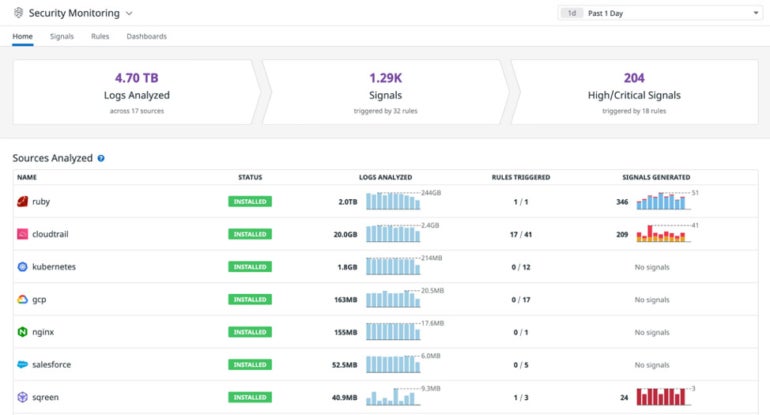
Datadog has crafted its platform to suit individual user requirements effectively. Datadog Security Monitoring simplifies the process of observing all the data sources under analysis at a quick glance. It provides security monitoring for fluid environments, tools for monitoring security in real-time, and functionality for identifying the root cause of issues. Moreover, there is a trial version that allows organizations to experiment with Datadog to check its compatibility with their needs.
Reasons for selecting Datadog Security Monitoring
My choice of Datadog Security Monitoring is based on its strong focus on user customization and adaptability. Organizations can make use of Datadog’s configurable rules to identify common attacker behaviors and tactics. Additionally, you have the freedom to choose which logs to index while continuously processing data. All this can be done on top of having a dashboard and a user interface that can be personalized.
Cost
- The professional version is priced at $15 per host per month, while the enterprise version costs $23 per host per month.
Characteristics
- More than 350 detection rules and over 500 integrations with log sources ensure comprehensive visibility into security operations.
- Capability to inspect any stack or application at any scale and from any location.
- Integrated services such as infrastructure monitoring, APM, log management, device monitoring, cloud workload monitoring, server monitoring, and database monitoring are all included.
- Integration of data from logs and other metrics to offer context and reduce incident response time.
Integration
- Slack.
- SSH.
- AWS.
- Google Cloud Platform.
- Oracle.
- IBM Cloud.
Advantages and disadvantages of Datadog
| Advantages | Disadvantages |
|---|---|
| Datadog adopts a monitoring strategy tailored for analytics, making it popular among DevOps and IT personnel for managing cloud and infrastructure performance. | Although Datadog focuses more on cloud monitoring and security, it falls short of branding itself as a complete SIEM platform. However, it has been expanding its cloud SIEM capabilities. |
| Datadog’s installation is simple due to agent deployment. | Datadog lacks some of the log monitoring features found in fully-featured SIEM platforms. |
| The customization of dashboards and interfaces is effortless. |
LogRhythm SIEM: Optimal for on-premises

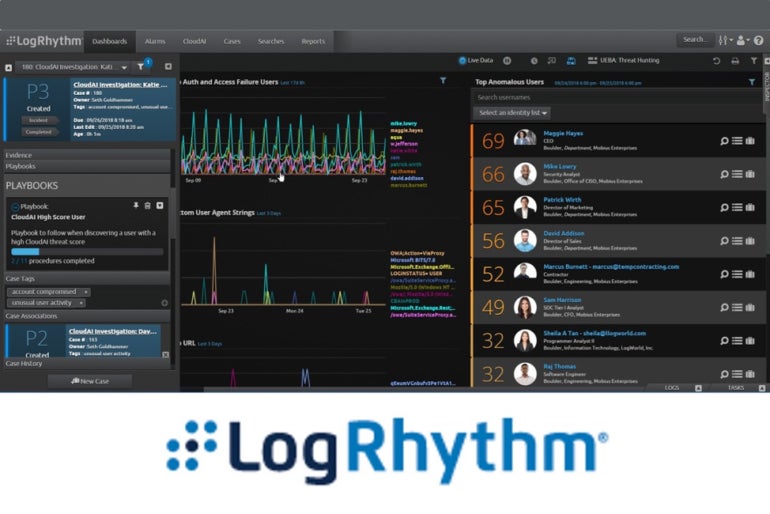
The SIEM software from LogRhythm is specifically designed for on-premises hosting. The platform incorporates AI and automation features, with easily configurable reporting based on queries. It has seamless integration with various security and technological solutions.
SEE: The SIEM Buyer’s Guide (TechRepublic)
Reasons for opting for LogRhythm SIEM
For organizations needing an on-premises solution, I endorse LogRhythm. It provides a comprehensive security approach, featuring embedded modules, threat monitoring, and automated detection and response. Additionally, it offers streamlined incident investigation and analysis capabilities for organizations seeking an overview of their IT infrastructure. For on-premises deployments, LogRhythm pays significant attention to providing compliant and regulatory content.
Pricing
- Contact for specialized pricing.
- Multiple pricing options are available, including perpetual or subscription software licenses, an unlimited data plan, and a high-performance plan.
Integrations
- Kibana.
- Trend Micro.
- Rapid7.
- Acronis.
- CimTrak.
- CloudSEK.
LogRythm pros and cons
| Pros | Cons |
|---|---|
| Established on a machine analytics/data lake technology foundation designed for easy scalability. | Significant upfront investment is often required for the on-premise version. |
| Flexible platform enabling integration with corporate security and IT infrastructure. | |
| Incorporated modules, dashboards, and rules providing threat monitoring, threat hunting, threat investigation, and incident response. | |
| Connectivity to multiple third-party platforms. | |
| Positive feedback on the speed and responsiveness of the support team from users. |
RSA NetWitness: Best for large enterprises

RSA, renowned for its multifactor soft and hard token authentication products, has a solid presence in the security community at large. Its NetWitness SIEM is tailored more towards sizeable enterprises, offering versions for both on-premises and cloud-based operations.
SEE: Top 8 Advanced Threat Protection Tools and Software Options for 2024 (TechRepublic)
Reasons for Choosing RSA NetWitness
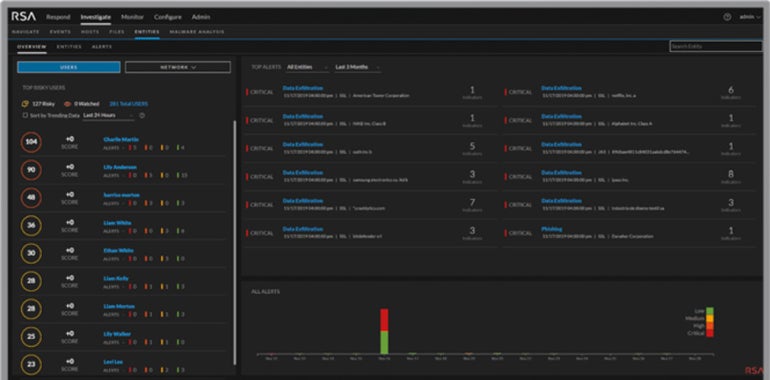
RSA NetWitness earns its spot on this list for being a comprehensive security solution crafted for larger organizations. It grants visibility across various capture points and possesses intelligent analytics and automation features to combat both known and unknown threats. I believe that large enterprises, in particular, will find NetWitness’s rapid threat detection beneficial in uncovering the complete attack landscape promptly.
Pricing
- Reach out for tailored pricing.
Features
- NetWitness monitors actionable events.
- Behavior analytics observe malicious activity and reconstruct full sessions to study the exact anatomy of an attack.
- Customizable intelligence feeds track and maintain essential operations.
- Visibility into log data scattered throughout the IT environment.
Associations
- Microsoft Azure.
- Amazon Web Services.
- Cisco Systems.
- Google’s Cloud Platform.
- Symantec Endpoint Protection.
- Kaspersky CyberTrace.
Merits and Demerits of RSA NetWitness
| Merits | Demerits |
|---|---|
| Simplifies identifying threats, shortens dwell time, and aids in meeting regulatory requirements. | Steep learning curve and substantial implementation efforts. |
| Centralized log management and monitoring for logs created by cloud services and SaaS apps. | Certain users need significant rack space. |
| Spotting suspicious activity that bypasses traditional security tools based on signatures. |
ManageEngine Log360: Optimal for small enterprises
ManageEngine Log360 is a SIEM solution suitable for businesses of all sizes, with a focus on small business deployments, thanks to its seamless integration with various security and monitoring products offered by the company.
Reasons for Choosing ManageEngine Log360
One of the reasons ManageEngine Log360 stands out is its tailored functionality for small enterprises. It includes essential SIEM features like event log analysis, cloud infrastructure monitoring, threat detection, and automated responses. Additionally, I appreciate how ManageEngine offers businesses easy access to Log360’s premium features through a generous 30-day trial period.
Pricing
- Submit ManageEngine’s online form for a personalized quotation.
Characteristics
- Detect internal threats, such as data leakage and compromised user accounts, by recognizing subtle shifts in user behavior.
- Pinpoint suspicious or blocked IPs, URLs, and domains infiltrating your network by correlating log data with reputable threat intelligence feeds.
- Automate responses to incidents using customizable workflows.
- Monitor active VPN connections and receive alerts for unusual VPN activities and malicious source access.

Associations
- Amazon Web Services.
- Microsoft Azure.
- Salesforce.com.
- Google Cloud.
- ESET Antivirus.
- Cisco Systems.
Merits and Demerits of ManageEngine Log360
| Merits | Demerits |
|---|---|
| Transfer SharePoint setups to Microsoft 365 by selecting necessary SharePoint site users, groups, and permission levels. | Users report inadequate support experiences. |
| Examine modifications in Active Directory infrastructure and Azure AD in real-time. | Difficulty scaling efficiently in large, intricate environments. |
| Uncover and categorize sensitive files, scrutinize file access and activity of users operating in Active Directory and Windows servers. |
experiences, and examine file access rights.
IBM Security QRadar SIEM: Top Pick for IBM-centric Enterprises

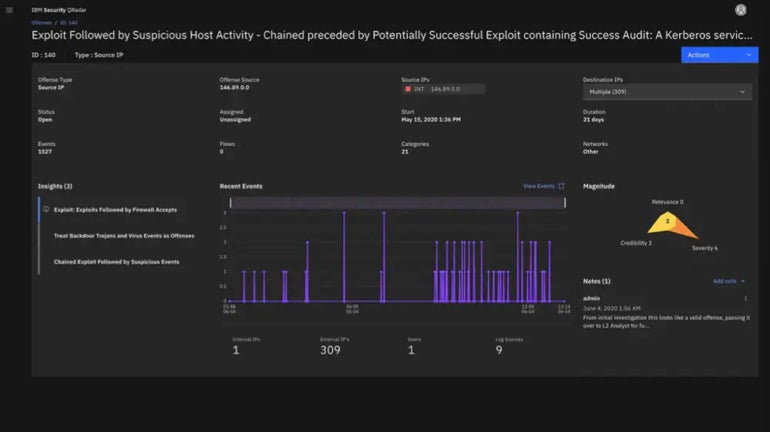
IBM QRadar serves as a solution for identifying threats and responding to them, incorporating a SIEM module. It is particularly well-suited for enterprises heavily reliant on IBM tools and systems, along with large-scale enterprise implementations.
Reasons for Choosing IBM Security QRadar SIEM
I have selected IBM’s QRadar SIEM as a savvy option for organizations deeply embedded in IBM product suites and utilities. Fortunately, Security QRadar also boasts a substantial range of integrations with various third-party services, making it a feasible SIEM solution even for firms without an IBM infrastructure.
Pricing Details
- Visit IBM’s official online price estimator for a customized quote.
Capabilities
- Enhanced response to threats through dashboards highlighting critical alerts.
- Utilizes nearly real-time analytics to intelligently explore and prioritize high-impact alerts based on risk severity.
- Detects internal threats and risky user actions.
- Part of IBM Cloud Pak for Security, leveraging AI for risk appraisals and analytics.
Link-ups
- Amazon Web Services.
- Check Point.
- Google Cloud.
- Palo Alto Networks.
- Trend Micro.
- Carbon Black (VMware).
IBM Security QRadar advantages and disadvantages
| Advantages | Drawbacks |
|---|---|
| Anomaly identification through machine learning-based analytics for potential threat discovery. | Limited compatibility with other SIEM tools. |
| QRadar SIEM supplements conventional log data by overseeing crucial network flow details. | Non-IBM platform users may encounter challenges in deployment. |
Trellix Security Operations and Analytics: Ideal Choice for Windows Environments
Trellix Security Operations (SecOps) and Analytics was built on the foundations of the former McAfee Enterprise Security Manager SIEM platform and now forms part of Trellix as Trellix Enterprise Security Manager. Originally aligned with Active Directory, making it a good fit for Windows environments, Trellix has expanded its capabilities to provide robust cloud support.
Reasons for Selecting Trellix Security Operations and Analytics
I have included Trellix Security Operations and Analytics in this list due to its excellent compatibility with Windows systems, which makes it an excellent option for businesses primarily reliant on Windows machines.
execute a Windows-focused ecosystem. Apart from this, it delivers robust automation capabilities for swift identification and resolution. Ideally, this should result in reduced risk exposure and quicker response times when handling security threats.
Cost
- Reach out to Trellix for customized pricing.
Characteristics
- The Trellix Helix SecOps platform is a component of a suite that incorporates SIEM to empower IT in managing incidents, detections, and responses.
- Trellix Insights offers predictive threat intelligence to prioritize threats and recommend countermeasures.
- The Trellix ePO security management platform facilitates central control and administration of all endpoints from a unified console.
Linkages
- Trellix Endpoint Detection and Response.
- Trelix Helix.
- Trelix Insights.
- Cisco.
Strengths and weaknesses of Trellix Security Operations and Analytics
| Advantages | Disadvantages |
|---|---|
| Streamlined overview of potential threats with integrated workflows simplifies processes. | Complete remediation capabilities require the entire Trellix suite. |
| Enhanced transparency in monitoring users, applications, networks, and devices. | Some users report delays in responsiveness. |
| Instantaneous threat identification and response minimize the time to shield against threats. | |
| Capable of integrating products from over 650 third-party vendors. |
AT&T USM Anywhere: Ideal for asset detection

Formerly AlienVault Unified Security Management platform, now known as AT&T USM Anywhere, specializes in asset discovery and data collection on active services, users, operating systems, and hardware details. Its focus on assets enables it to identify any devices within the safeguarded environment.
Reasons for Choosing AT&T USM Anywhere
USM Anywhere earned its spot on this list as an effective tool for businesses prioritizing threat detection and asset discovery above all. It can identify vulnerabilities and threats across various IT infrastructures, whether on the cloud, network, or on-premises — making it a versatile detection solution.
Pricing
- Essentials – $1,075 per month; designed for small IT teams as a security and compliance tool.
- Standard – $1,695 per month; aimed at IT security teams needing automation and in-depth security analysis.
- Premium – $2,595 per month; tailored for IT security teams targeting PCI DSS audit compliance.
- Alternatively, complete USM Anywhere’s online form for a personalized quote.
Characteristics
- Automatically gathers and assesses data across the attack surface.
- Threat intelligence sourced from AT&T Alien Labs.
- Supports a range of AlienApps for orchestrating and automating actions with other security tools and incident response.

Linkages
- AWS.
- Azure.
- Cisco.
- GCP.
Trellix Security Operations and Analytics pros and cons
| Advantages | Disadvantages |
|---|---|
| Ideal for users seeking managed cybersecurity and SIEM services. | Unsuitable for organizations requiring strict control over their assets for privacy or compliance considerations. |
Essential features of SIEM software
All SIEM software solutions manage log monitoring and administration. Other crucial aspects include the tool’s cloud-based nature, its on-prem capacity, inclusion of remedial features, and compatible platforms.
Cloud-based
Today, the majority of SIEM software operates in the cloud. Cloud-centric tools offer easier deployment, management, and operation. Given the prevalence of enterprises in various clouds, cloud-based SIEM solutions are indispensable. Some vendors provide SIEM via Software-as-a-Service (SaaS), while others deliver it as a fully managed service.
Deployed On-premises
Certain entities prefer on-premises operations due to privacy, security, or compliance concerns, necessitating the installation of SIEM on internal servers. While some vendors offer this option, others do not.
Remedial Measures
Initially designed to act as a means of detecting and responding to threats, SIEM has evolved to offer more advanced capabilities.In order to streamline the compilation and examination of security logs, a solution was introduced to enterprises. This system allowed for the assessment of large quantities of log records and notifications to identify possible problems or unauthorized access attempts. Recently, however, SIEM platforms have started integrating remediation capabilities. Certain tools now offer automated remediation actions, while others grant access to a broad array of security remedies either through the SIEM platform itself or through associated tools from the same provider.
VIEW: Comprehensive Guide on the Malvertising Cybersecurity Threat (TechRepublic Premium)
Frameworks
The competition within the SIEM market is intense. Most suppliers aim to deliver utilities that function across all major operating systems and cloud platforms. However, there may be some gaps. For instance, users heavily reliant on Google Chrome may face limited SIEM alternatives. Thus, it’s imperative to confirm that your chosen vendor is fully equipped to deploy their systems within your operational environment.
How can I opt for the most suitable SIEM software for my enterprise?
Each of the described products provides solid security safeguards and can be beneficial to any company — since every organization requires some degree of real-time security log analysis to prevent and identify threats.
When deciding on the appropriate SIEM software, factors such as company priorities, needs, financial resources, IT proficiency level, and availability to manage and address threats will play a crucial role. A managed SIEM like USM Anywhere might be the preferred choice in scenarios where budget is not a constraint and technical staff lacks the capacity or willingness to address security risks hands-on. Conversely, if financial constraints are in place, and in-house expertise and resources are plentiful, options like SolarWinds SEM, Datadog, or AlienVault would be recommended. Otherwise, solutions such as LogRhythm, CrowdSrike, Splunk, RSA, IBM QRadar, and ManageEngine are worthy contenders to be considered.
Approach
The SIEM tools discussed earlier were chosen after a thorough evaluation of official security characteristics, recognition in analysis reports, and feedback from real users. Each SIEM platform was assessed based on its advantages and disadvantages, security features, and pricing structure.
Furthermore, significant consideration was given to understanding how each SIEM tool could cater to specific use cases and businesses. This evaluation factored in the unique strengths of each product and identified the organizations that could best leverage their feature set.
Lastly, the breadth and diversity of integrations with third-party security services were also taken into account to compile this shortlist. This was done to ensure a smooth integration of the SIEM solution into a company’s existing infrastructure and seamless monitoring of data points across the IT framework of the business for the SIEM itself.
About Author