
With hybrid and remote work setups becoming more prevalent in organizations, the proliferation of digital accounts supporting work processes has resulted in a significant challenge of handling multiple login credentials. This not only increases the intricacy of password management but also raises concerns about potential security breaches.
A lone instance of compromise in a single account can jeopardize the entire organization — and even its associated partners. To streamline the password management process and address password-related security incidents, companies rely on corporate password management tools.
Corporate password management solutions provide a robust, effective, and centralized platform for generating, storing, and handling passwords, thereby reducing the risk of unauthorized access and promoting compliance with regulations.
This piece will delve into the foremost corporate password management tools, analyzing their principal characteristics, pricing, advantages, and disadvantages.
Comparison table of Leading Corporate Password Management Solutions
The following table compares the primary features present in each high-quality corporate password management tool.
| Web extension | Encryption method | Password sharing capability | Biometric entry | Free version availability | Pricing details | |
|---|---|---|---|---|---|---|
| Keeper | Brave, Chrome, Firefox, Opera, Edge and Safari. | AES 256-bit, Elliptic-Curve cryptography (EC) | Yes | Yes, on macOS. | Yes | Commences at $2/user per month. |
| Dashlane | Chrome, Firefox, Opera, Brave, Edge and Safari. | Argon2 | Yes | Yes | Yes | Begins at $8/seat per month. |
| 1Password | Chrome, Brave, Firefox, Edge and Safari. | 256-bit AES | Yes | Yes | No | Commences at $7.99/user per month. |
| Bitwarden | Chrome, Firefox, Opera, Edge and Safari. | AES-CBC 256-bit, PBKDF2 SHA-256 or Argon2. | Yes | Yes | Yes | Commences at $6/user per month. |
| Enpass | Opera, Vivaldi, Brave, Chrome, Firefox, Edge, Safari and Tor. | 256-bit AES 256-bit, PBKDF2-HMAC-SHA512 on SQLCipher engine. | Yes | Yes | Yes | Commences at $9.99/user per month for corporate users. |
| ManageEngine Password Manager Pro | Chrome, Edge, Firefox, Opera, Brave and Safari. | AES-256 encryption | Yes | Yes | No | Corporate pricing begins at $3,995 for 10 administrators. |
| Zoho Vault | Ulaa, Chrome, Firefox, Safari, Edge, Vivaldi, Brave, Opera. | AES-256 bit | Yes | Limited | Yes | Commences at $7.20/user per month for corporate users. |
| NordPass | Opera, Vivaldi, Brave, Chrome, Firefox, Edge, Safari. | XChaCha20 | Yes | Yes | Yes | Commences at $1.79/user per month. |
Leading Corporate Password Management Tools for 2024
Presented here are our selections for the top eight corporate password management tools in the year 2024.
Keeper: Superior enterprise password manager

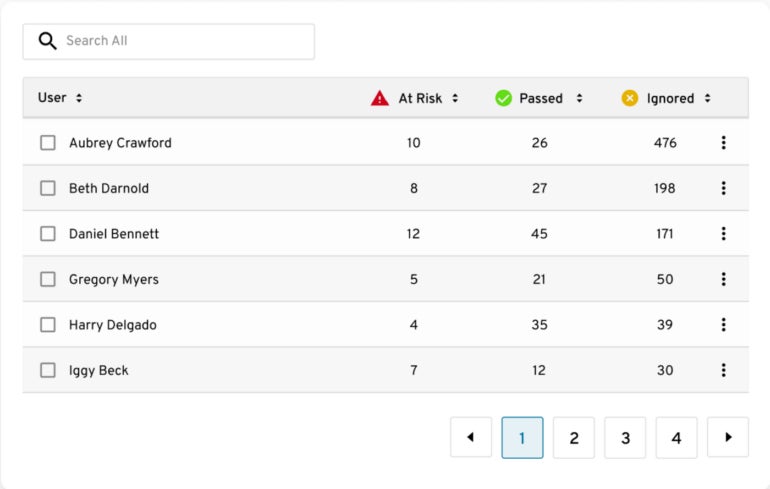
Keeper stands out as a solution for password management with its encrypted vaults allocated to each user. It delivers an efficient organizational framework through folders and subfolders, complemented by shared team folders. Users can conveniently access their encrypted vaults across an array of devices. Furthermore, Keeper offers a policy engine and enforcement functionality to ensure adherence to security protocols. Its Security Audit and Activity Reporting functionalities provide valuable insights into password usage and user behaviors.
One striking feature of Keeper is its BreachWatch tool, which continually monitors employees’ password vaults on the dark web for exposed passwords, triggering immediate alerts for security teams to swiftly respond. This feature is particularly crucial for organizations with a substantial workforce to maintain the security of internal credentials.
Why the Choice is Keeper
The seamless integration of usability and robust security measures, such as secure file storage, secrets manager, and role-based access controls tailored for large organizations, impressed me about Keeper. The balance between user-friendliness and management-oriented features makes it my leading recommendation for enterprises seeking a password management solution.
Notable Characteristics
- Provisioning through Command Line.
- Multi-step authentication.
- Event log and notifications.
- Routine security audits.
- Integration with Active Directory and LDAP.
- Authentication through Single Sign-On (SAML 2.0).
Advantages and Disadvantages of Keeper
| Advantages | Disadvantages |
|---|---|
|
|
Pricing Information
Keeper offers three pricing options tailored for businesses and enterprise users.
- Business Starter: Commences at $2 per user per month, for a minimum of 5 users and a maximum of 10 users (annual billing).
- Business: Starting at $3.75 per user per month (annual billing).
- Enterprise: Reach out to Keeper for a personalized quote and availability.
Should you desire more information, kindly refer to our comprehensive Keeper review here.
Dashlane: Optimal for multi-platform compatibility

Dashlane serves as a password management solution facilitating password access and administration across various devices and operating systems. It features an unrestricted secure password-sharing functionality that allows crucial password sharing while retaining complete control. This grants the capability to revoke access to shared passwords at any given time. For heightened security, the tool offers dark web monitoring and automated alerts in cases of data breaches. Moreover, Dashlane enables users to generate robust passwords with a single click and auto-fill them whenever necessary, streamlining the login process.
Personally, I appreciate the integration of Dashlane with popular identity management platforms like Okta, Duo, and OneLogin. This integration equips organizations with a comprehensive and multi-tiered security stance to fortify against threats and vulnerabilities.
Rationale Behind Opting for Dashlane
Dashlane made it to our list due to its additional features such as VPN functionality for Wi-Fi protection and limitless secure password-sharing capability.
Highlighted Features
- Limitless secure password sharing.
- Compatibility across multiple platforms.
- Instant password and form generation.
- Dark web monitoring and alerts.
- Password generation function.
Advantages and Disadvantages of Dashlane
| Advantages | Disadvantages |
|---|---|
|
|
Pricing
For enterprises, there’s the choice between the Dashlane business plan or the enterprise plan.
- Business: Commences at $8 per seat per month (annual billing).
- Enterprise: Get in touch with the vendor for a quote.
If you’d like to find out more, check out our complete Dashlane review here.
1Password: Optimal for User-Friendliness
1Password is a password management tool that provides various security, administrative and compliance functionalities. Among its security features is multi-factor authentication that supports various methods such as TOTP, U2F, and WebAuthn to enhance employee login security.
Regarding its corporate capabilities, the security monitoring feature is notable as it simplifies monitoring employee password activities for any suspicious behavior like failed logins or unusual password changes.
By using the centralized Admins dashboard, password administrators can exercise complete control over employees’ platform usage, including setting password regulations, managing user groups, and auditing activity.
Some of the password management features include clipboard management to automatically clear passwords from clipboards, auto-lock during inactivity, and anti-phishing measures to guard against fraudulent emails and websites. 1Password also sends vulnerability alerts to highlight possible security risks, empowering users to take necessary steps.
Organizations can create a shared vault on 1Password for team access, facilitating password sharing among team members when required. Moreover, users can forward security events from 1Password to their chosen security information and event management tool for enhanced visualization and analysis.
Reasons for Choosing 1Password
I opted for 1Password due to its protective features, such as end-to-end encryption, customizable team roles, and seamless integrations, catering to secure and user-friendly password management for enterprises. The intuitive interface of 1Password is also a commendable feature, aiding less tech-savvy individuals in securing their logins and passwords.
Features
- Centralized password storage and sharing.
- Delivers vulnerability alerts.
- Phishing protection.
- Shared vaults.
- Customizable access policies
1Password Pros and Cons
| Advantages | Disadvantages |
|---|---|
|
|
Pricing
1Password provides the following plans for businesses and enterprises:
- Teams Starter Pack: $19.95 per month for up to 10 users.
- Business: Starting at $7.99 per user per month.
- Enterprise: Get a quote by contacting the vendor.
If you’re interested in learning more, read our complete 1Password review here.
Bitwarden: Top Free Password Manager
If you require a cost-free password handler, I suggest Bitwarden. This tool provides a variety of distinct characteristics that render it a comprehensive solution for password management in large-scale businesses. Administrators possess advanced capabilities such as user management, enabling them to easily incorporate, delete, or alter employee access to login credentials. Furthermore, the software supports password sharing, empowering teams to collaborate and share login information securely. In addition, Bitwarden seamlessly integrates with identity providers like Okta and Azure Active Directory, simplifying the login experience for employees operating within various business applications.
An aspect worth highlighting about Bitwarden is its transparent nature due to being open source. As a result, there’s an enhanced level of transparency as Bitwarden’s source code is accessible for public review. Diligent IT administrators will value the ability to personally inspect the code for potential vulnerabilities or weaknesses.
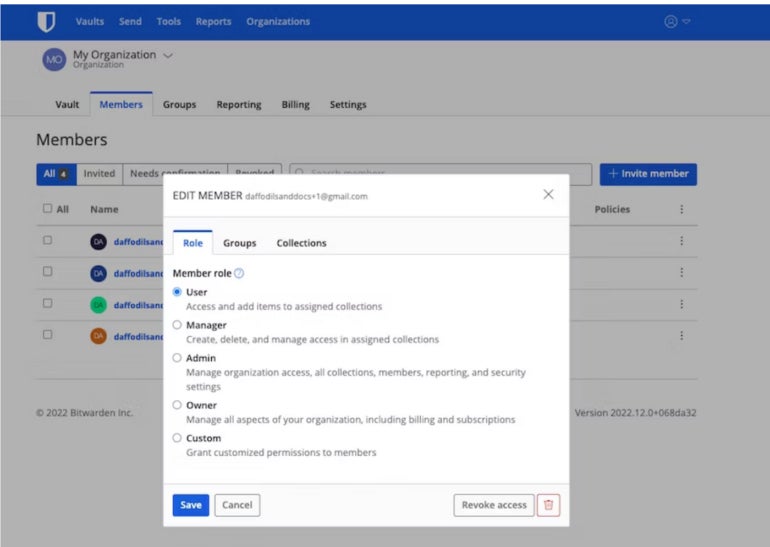
Through Bitwarden’s advanced security attributes, such as two-factor authentication and the ability to enforce policies like robust master passwords, member roles, and permissions, organizations can bolster their overall security stance. Furthermore, Bitwarden provides comprehensive audit logs and reports, facilitating easy monitoring of user activities and compliance adherence.
Reasons for selecting Bitwarden
Apart from being an open-source password manager, Bitwarden secures its spot by delivering robust security measures at a reasonable cost for enterprise users. Additionally, it supports crucial functions such as secure sharing, self-hosting options, and extensive customization capabilities, making it an excellent choice for budget-conscious enterprise users focused on security.
In addition to this, it offers what I believe is one of the finest free password management solutions for individual users and small enterprises.
Noteworthy Aspects
- Data encryption from end to end.
- Open-source structure.
- Accessible across multiple platforms.
- Regular health status reports for your vaults.
- Comprehensive security audit and regulatory compliance adherence.
- Efficient directory synchronization.
- Secure password sharing capabilities.
Advantages and Disadvantages of Bitwarden
| Advantages | Disadvantages |
|---|---|
|
|
Pricing
For enterprise users, Bitwarden’s pricing falls under the Business scheme.
- Teams Starter: Commences at $20 per month for 10 users.
- Enterprise: Initiates at $6 per user per month.
Additionally, a no-cost option is available for individual users or consumers. For further insights, refer to our comprehensive review of Bitwarden here.
Enpass: Ideal for adaptability and tailorization
If you’re in search of a versatile password manager, my recommendation is Enpass. It caters a unique password management approach for enterprises by enabling password vaults to be stored either locally or on a cloud storage service preferred by the user. This grants businesses the independence to choose their storage method, catering to their specific security requirements. However, this adaptability necessitates users to separately install browser extensions, which has been deemed somewhat inconvenient by certain users.
An additional feature that would capture the interest of businesses is the Admin Console, which is optimal for managing extensive workforces. Through the admin console, organizations can monitor password health and configure security protocols on a unified dashboard.
The password generator, while allowing for the creation of intricate passwords, offers customization flexibility. Users can specify the desired password length, character types within the password string, or opt for a pronounceable password. Moreover, the generator can formulate passwords that comply with a site’s requirements and constraints automatically.
While Enpass offers a no-cost version for desktop users, the mobile version restricts the storage capacity to 25 passwords only, which may pose a limitation for enterprises with employees utilizing mobile devices.
Reasons for Preference towards Enpass
My preference for Enpass stems from its potent yet adaptable password generator functions, permitting users to personalize their passwords according to their preferences. I also admire how Enpass grants businesses the flexibility to store their passwords either locally or through their chosen cloud storage provider. This enables businesses to tailor-fit their password management solution to conform with their existing tech landscape.
pile, notably if they already have a product they are heavily committed to.
Characteristics
- System administrator console.
- Security evaluations.
- Breach supervision.
- Encrypted password distribution.
- Deployment without servers.
- Infinite password storage and retrieval.
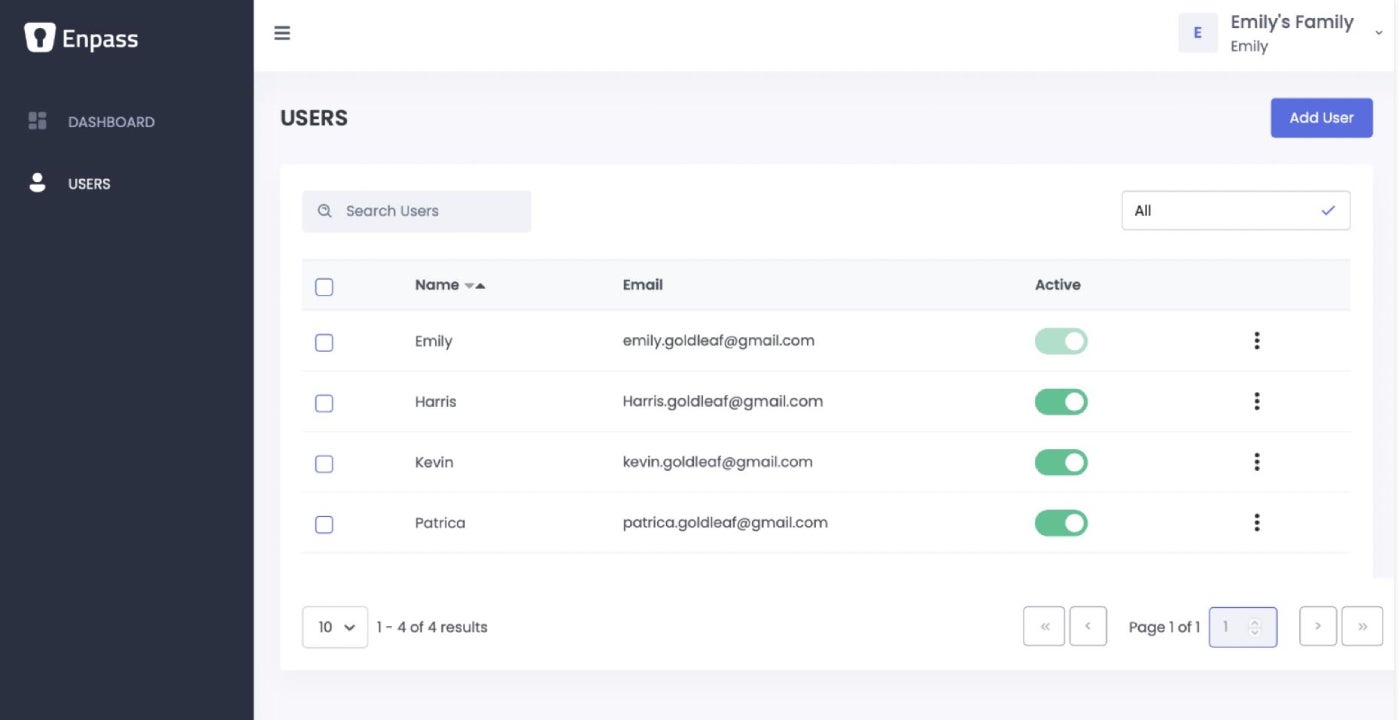
Advantages and disadvantages of Enpass
| Advantages | Disadvantages |
|---|---|
|
|
Pricing
This solution proposes two payment options: Individual/Family and Corporate scheme.
Individual/Family
- Single plan: $1.99 per month, invoiced $23.99 annually.
- Family plan: $2.99 per month, invoiced $35.99 for the initial 12 months then $47.99 annually.
- One-time scheme: $99.99 for an immovable acquisition.
Corporate
- Commencement scheme: $9.99 per month for up to 10 users (billed yearly).
- Ordinary scheme: $2.99/user per month (billed yearly).
- Corporate scheme: $3.99/user per month (billed yearly).
If you wish to gain further insight, review our complete Enpass critique here.
ManageEngine Password Manager Pro: Optimal for passcode distribution and cooperation

ManageEngine Password Manager Pro empowers corporations to securely preserve and regulate communal confidential data, including passcodes, records and digital identities, in a unified vault. An “automated reset” characteristic enables users to regenerate the passcodes of servers, databases, network devices, and other properties with ease.
Through this utility, users can access systems, websites, and applications from the PMP web interface without the necessity to manually duplicate and paste passcodes. I appreciate particularly how ManageEngine facilitates both preventive and investigative security mechanisms by utilizing approval courses and real-time alerts for passcode access. This simplifies the process of distributing passcodes across a corporation while still preserving a strong degree of security. ManageEngine PMP also empowers users to transfer user groups from Windows Active Directory or LDAP and leverage its authentication structure.
Reasons I opted for ManageEngine Password Manager
I selected ManageEngine Password Manager Pro for its unified passkey vault, which not only empowers organizations to stock their elevated trust passcodes in a singular site but also provides passcode management adaptability traits such as passcode rotation, passcode expiration, and passcode complexity enforcement for firm passcode security.
I also believe ManageEngine is a solid choice for administrators particularly in quest of a resolution that concentrates on collaboration, secure passcode distribution, and user-friendly access controls.
Characteristics
- Distant passcode synchronization.
- Privileged account discovery.
- Unified passcode vault.
- Automated passcode reset.
- Entry and undertaking statement.
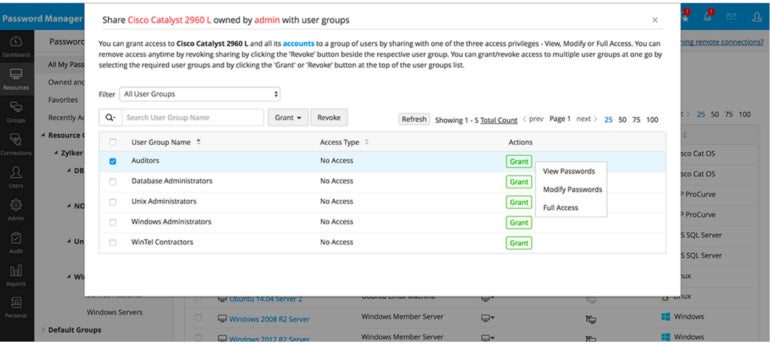
ManageEngine pros and cons
| Advantages | Disadvantages |
|---|---|
|
|
Pricing
Businesses using ManageEngine Password Manager can opt for a subscription plan, perpetual plan, or request a quote.
The enterprise pricing commences at $3,995 for 10 administrators. To obtain a personalized price for your organization, I recommend reaching out to them directly or visiting their official website.
Zoho Vault: Optimal for access management

Zoho Vault employs AES 256 encryption for all user passwords, allowing the storage of an infinite number of personal and enterprise passwords in a unified vault. It automatically signs users into saved websites and autofills credentials with a single click.
One notable feature of Zoho is the ability it provides to define user roles and administer access privileges as required. This attribute is vital for an enterprise-grade password manager, especially for companies with intricate organizational frameworks or hierarchies. It promotes team collaboration through its secure password-sharing tool, enabling users to share credentials within groups. In our evaluation, we observed that Zoho Vault allowed us to enforce a password policy and configure custom alerts.
Reasons for selecting Zoho Vault
I opted for Zoho Vault due to its capacity not only to secure passwords in a vault but also store other confidential business files such as admin keys, licenses, and credentials within the vault.
Particularly noteworthy was Zoho Vault’s access control functionality, which excels in managing access to numerous credentials within expansive organizational setups and various internal departments.
Characteristics
- Password repository.
- Integration with single sign-on.
- Feature for secure password sharing.
- Real-time auditing capabilities.
- Data backup provision.
- Access roles allocation.
- Support for multi-factor authentication.
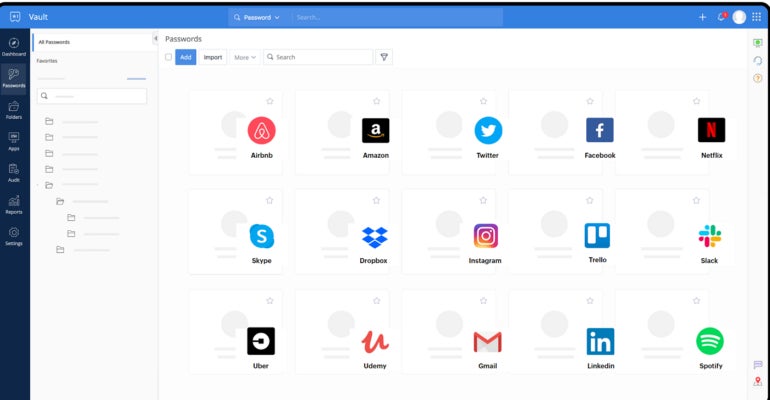
Advantages and disadvantages of using Zoho Vault
| Positives | Negatives |
|---|---|
|
|
Pricing
Zoho Vault offers two enterprise pricing packages.
- Professional: Starting at $4.50 per user monthly (annual billing).
- Enterprise: Beginning at $7.20 per user monthly (annual billing).
If you wish to discover more, explore our comprehensive Zoho Vault review here.
NordPass: Ideal for cross-browser support
NordPass’s password management tool aids in checking for exposed data, identifying weak passwords, recommending stronger alternatives, sharing passwords and keys within teams, and providing the option for safeguarding accounts with biometric security. Through the shared folders feature, team members can securely exchange company details and sensitive information stored in their vaults, facilitating seamless collaboration across teams.
SEE: How to Begin a Career in Cybersecurity (TechRepublic Premium)
Personally, I appreciate NordPass’ compatibility across devices and browsers. This enables businesses to effortlessly synchronize their passwords across various computers, tablets, or phones, as well as all popular browsers. Such functionality is valuable for companies utilizing multiple devices universally, accommodating diverse employee browser preferences.
In addition, the solution assists users in automatically identifying and swiftly importing passwords stored in their browsers into the system.
Reasons for Opting for NordPass
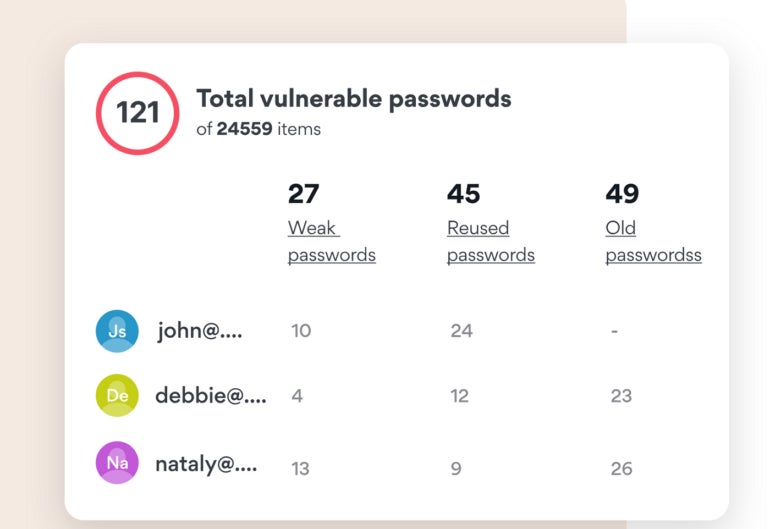
NordPass secured a spot on my list due to its intuitive security dashboard, providing business proprietors and password administrators with insights into weak, reused, and outdated passwords. Furthermore, the inclusion of a data breach scanner on the dashboard simplifies password breach evaluations. As mentioned, I find NordPass’ seamless compatibility across devices and browsers highly beneficial, facilitating easy password access for users regardless of their device or browser choice.
Characteristics
- Data breach scanner.
- Support for passkeys.
- Password health assessment.
- Encrypted vault.
- Accessibility across devices and browsers.
Strong and weak points of NordPass
| Strong points | Weak points |
|---|---|
|
|
Cost
NordPass provides three pricing options for corporate users.
- Teams: Maximum of 10 users starting at $1.79 per user/month for a two-year subscription, and $1.99 per user/month for a one-year plan.
- Business: Starting from $3.59 per user/month for a two-year plan, and $3.99 per user/month for a one-year subscription, with a cap of 250 users.
- Enterprise: Starting from $5.39 per user/month for a two-year plan, and $5.99 per user/month for an annual subscription.
To delve deeper, read our comprehensive examination of NordPass.
Here are the critical features to consider when selecting corporate password managers:
Access management
Administrators can define precise access control settings in the password manager, decide who can access specific passwords and sensitive data. This ensures only authorized personnel can reach vital accounts and information, decreasing unauthorized access risks and potential security breaches.
Monitoring and reporting
Thorough monitoring and reporting track password-related actions, giving administrators insight into password usage, alterations, and other significant activities. These records promote accountability, aid in compliance auditing, and help pinpoint suspicious behaviors.
Integration with single sign-on
By utilizing single sign-on (SSO), employees can log in to multiple services and applications with a single set of credentials, enhancing convenience and user satisfaction while upholding security measures.
Password sharing feature
In corporate settings, teams often need to share account passwords for collaborative endeavors. This function permits authorized individuals to securely share passwords amongst peers or teams.
Two-factor authentication
Two-factor authentication (2FA) enhances security by requesting additional verification, such as a biometric scan, hardware token, or one-time password, alongside the regular password. Incorporating 2FA strengthens the authentication process’s security, making it arduous for unauthorized persons to access information, even if passwords are compromised.
Guidelines to select the preeminent corporate password manager for your venture
When selecting a corporate password manager for your enterprise, contemplate the subsequent factors:
Scrutinize security components and encryption standards
Look for a password manager that implements robust encryption and adheres to industry-standard data protection practices. Consider features like end-to-end encryption, robust encryption algorithms, and secure password-sharing mechanisms.
Appraise compatibility and amalgamation
Ensure the password management solution smoothly integrates with your existing systems and applications. Look for compatibility across diverse operating systems, browsers, and devices. Verify if it supports integration with your enterprise’s SSO or identity management platforms.
Evaluate scalability and user governance
Evaluate the password manager’s scalability to ensure it can cater to your organization’s user count. Check for user governance tools such as roles and permissions to enhance administrative efficiency and access control.
Review user experience and availability
Opt for a user-friendly password manager to ensure swift adoption by your employees. Assess features like browser extensions, mobile applications, and offline access to improve accessibility and utility.
Check for auditing and compliance capabilities
For enterprises in regulated sectors, confirm that the password manager offers audit logs, reporting functionalities, and compliance with pertinent security standards. These features are vital for demonstrating compliance during audits and upholding regulatory obligations.
Methodology
To compile this list of the top corporate password managers, I focused on fundamental features essential for enterprise-grade password managers. I prioritized solutions offering features like SSO, password sharing, 2FA, centralized password management, and multi-platform compatibility. Information was gathered from each vendor’s website, combined with first-hand experiences from me and my team, along with video demonstrations and user feedback from reputable third-party review platforms to provide a comprehensive recommendation for this list.
About Author




