Strategies for Streamlining the Most Challenging Aspects of Staff Departure
If we look at the latest analysis on staff offboarding, 70% of IT specialists have encountered the adverse consequences of unfinished IT offboarding, whether it’s due to a security breach linked to an account that wasn’t disabled, unexpected costs for unused resources, or a crucial resource or account not being properly handed over. Despite the average time spent per departing staff member on tasks such as locating and disabling SaaS accounts being five hours, the expanding SaaS presence in most companies has made it increasingly challenging (and time-intensive) to ensure all access is either revoked or transferred when an employee exits the organization.
How Nudge Security Can be Beneficial
Nudge Security functions as a platform for SaaS management focused on contemporary IT governance and security. It identifies every cloud and SaaS account ever established by any individual in your company, including AI applications, offering you a single point of reference for outgoing users’ accounts and OAuth permissions that must be disabled, rescinded, or reassigned.
Moreover, an integrated playbook leads you through an exhaustive checklist for IT offboarding aligned with best practices from Google and Microsoft. This playbook can help you reduce up to 90% of the time and effort involved in SaaS offboarding by automating time-consuming, easily overlooked tasks such as revoking OAuth permissions and resetting passwords for non-single sign-on (SSO) accounts.
Let’s explore how Nudge Security facilitates each stage so that you can guarantee comprehensive offboarding of SaaS accounts.
1. Withdraw Permissions from Google Workspace or Microsoft 365
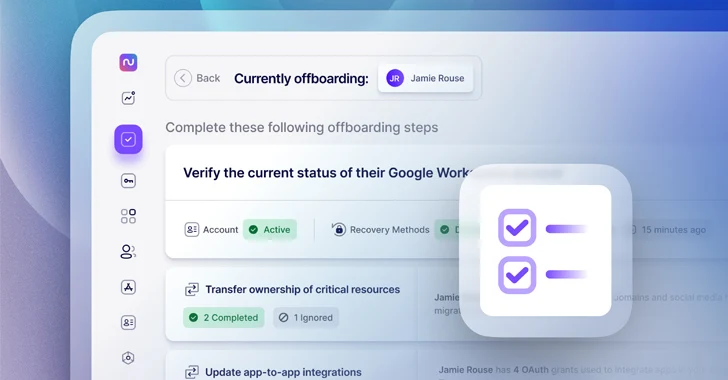
Upon selecting the staff member you need to offboard, the primary step involves validating the status of their Google or Microsoft account.
Initially, you’ll want to keep the staff member’s Google or Microsoft account active while you finalize other offboarding duties. However, you’ll need to ensure that the user can no longer access the account by resetting their password and deactivating any recovery methods they may have configured. Nudge Security aids in verifying the status of each of these procedures to confirm that access has been withdrawn.

2. Hand Over Ownership of Vital Resources
Prior to commencing the deprovisioning of accounts for your departing staff, it’s crucial to pinpoint and shift ownership of essential assets like AWS root user accounts, corporate domains, social media accounts, and others.
Nudge Security identifies crucial resources owned by the exiting staff member automatically and guides you through the process of transferring ownership to other team members. For each asset, Nudge Security offers detailed instructions with useful references and a summary of alternative app users who could assume responsibility for each asset. As you progress through the list, you can validate the completion of ownership transfer or note your choice to overlook a particular resource that doesn’t necessitate transfer.

3. Audit and Update App-to-App Collaborations
OAuth permissions are often utilized to enable app-to-app integrations and automation, so revoking a departing employee’s OAuth permissions without evaluation could disrupt daily operations.
Nudge Security displays all app-to-app OAuth permissions and scopes for the departing staff member, allowing you to assess the potential operational impacts of each integration and decide whether it should be reestablished with another account. You’ll also be able to identify other users of that application to engage them as necessary. This phase of the offboarding process will help ensure that automated business functions continue to function seamlessly after the staff member departs from the company.

4. Revoke Single Sign-On Managed Accounts
This step is uncomplicated. By clicking a button (without leaving the Nudge Security dashboard), you can disable access to all accounts managed by yourA solitary sign-on (SSO) service provider, such as Azure AD or Okta. The playbook will guide you in tidying up the contents of those accounts later.

5. Revoke access to applications authenticated via OAuth.
OAuth permissions simplify the process for employees to establish new accounts by opting to authenticate through Google Workspace or Microsoft 365. Nudge Security streamlines the capability for security and IT teams to pinpoint and withdraw departing users’ OAuth permissions directly within Nudge Security. After reviewing and recreating any relevant scopes for app integrations, proceed to revoke the remaining app authorizations gained via OAuth.

6. Revoke access to unmonitored accounts.
OAuth permissions and SSO-managed accounts offer only a partial view of the departing employee’s access. Lingering SaaS sprawl can create vulnerabilities for unauthorized access to sensitive resources and data post-employee departure. Thankfully, Nudge Security also logs unmonitored accounts potentially created by the employee using their work email outside standard IT or procurement protocols.
Nudge Security unveils the list of unmonitored apps and facilitates automated password resets from the platform to deter further access by the departing employee. Manual intervention for this task could be time-consuming if these accounts went unnoticed initially.

7. Clear revoked accounts.
After revoking a user’s access, it is crucial to tidy up their accounts to prevent orphaned corporate data or unnecessary license payments.
Nudge Security enables you to trigger an automated “nudge” to the technical or business owner of each SaaS application with guidance to delete or transfer sensitive data, reassign licenses, and redirect ownership of resources to another user.

8. Record offboarding actions with an inbuilt report.
Nudge Security logs all offboarding procedures undertaken, allowing you to revisit completed tasks for each employee. Once finalizing the offboarding of a departing employee’s SaaS and cloud accounts, generate a .pdf report containing the activities executed and share it with internal users or auditors.

Smoothly transition employees with Nudge Security
Nudge Security simplifies the offboarding process for departing users, safeguarding corporate resources and averting business interruptions without expending time unnecessarily on mundane tasks.
Initiate your complimentary 14-day trial now.
About Author