McAfee Labs has uncovered a widespread malware campaign hiding inside fake downloads for things like game mods, AI tools, drivers, and trading utilities.
In January 2026, researchers observed 443 malicious ZIP files impersonating software people might actively search for online. Across those files, McAfee identified 48 malicious WinUpdateHelper.dll variants used to infect devices. The campaign was spread through a mix of file-hosting and content delivery services, including Discord, SourceForge, FOSSHub, and mydofiles[.]com.
What makes this campaign especially notable is that some parts of it appear to have been built with help from large language models (LLMs). McAfee researchers found signs that certain scripts likely used AI-generated code, which may have helped the attackers create and scale the campaign faster.
That does not mean AI created the whole operation on its own. But it does suggest AI may be helping cybercriminals lower the effort needed to build malware and launch attacks.
Want the full research? Dive in here.
We break down the top takeaways below.
What McAfee Found
| Finding | What it means |
| 443 malicious ZIP files | Attackers created many different fake downloads to reach more victims |
| 48 malicious DLL variants | The campaign used multiple versions of the malware, not just one file |
| 1,700+ file names observed | The same threat was repackaged under many different names to look convincing |
| 17 distinct kill chains | Researchers found multiple attack flows, but they followed a similar overall pattern |
| Hosted on familiar platforms | The malware was distributed through services users may recognize, including Discord and SourceForge |
| AI-assisted code suspected | Some scripts contained explanatory comments and patterns that strongly suggest LLM assistance |
| Cryptomining and additional malware observed | Infected devices could be used to mine cryptocurrency or receive more malicious payloads |
What Is “AI-Written Malware”?
In this case, “AI-written malware” does not mean an AI system independently invented and launched the attack.
Instead, McAfee Labs found evidence that the attackers very likely used AI tools to help generate some of the code used in the campaign, especially in certain PowerShell scripts.
Put simply:
| Term | Plain-English meaning |
| Large language model (LLM) | An AI system that can generate text and code based on prompts |
| AI-assisted malware | Malware where attackers appear to have used AI tools to help write or structure parts of the code |
| Vibe coding | A style of coding where someone describes what they want and an AI does much of the writing |
This matters because it can make malware development faster, easier, and more scalable for attackers.
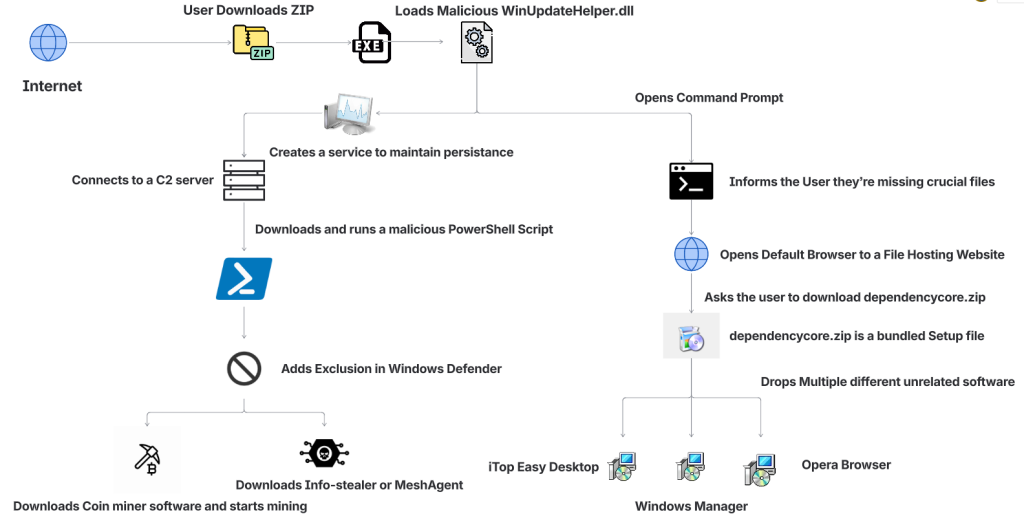
How The Fake Download Attack Works
The attack begins when someone searches for software online and downloads what looks like the tool they wanted.
That tool might appear to be a game mod, AI voice changer, emulator, trading utility, VPN, or driver. But behind the scenes, the ZIP archive includes malicious components that start the infection.
| Step | What happens |
| 1. A user downloads a fake file | The ZIP archive is disguised as something useful or desirable, such as a mod menu, AI tool, or driver |
| 2. The file appears normal at first | In some cases, the package includes a legitimate executable so it feels more convincing |
| 3. A malicious DLL is loaded | A hidden malicious file, often WinUpdateHelper.dll, starts the real attack |
| 4. The user is distracted | The malware may display a fake “missing dependency” message and redirect the user to install unrelated software |
| 5. A PowerShell script is pulled from a remote server | While the user is distracted, the malware contacts a command-and-control server and runs additional code |
| 6. More malware is installed | Depending on the sample, the device may receive coin miners, infostealers, or remote access tools |
| 7. The infected device is abused for profit | In many cases, attackers use the victim’s system resources to mine cryptocurrency in the background |
What Kinds of Files Were Used as Bait
McAfee found that the attackers cast a very wide net. The malicious ZIP files impersonated many types of software, including:
| Bait category | Examples |
| Gaming tools | game mods, cheats, executors, Roblox-related tools |
| AI-themed tools | AI image generators, AI voice changers, AI-branded downloads |
| System utilities | graphics drivers, USB drivers, emulators, VPNs |
| Trading or finance tools | stock-market utilities and related downloads |
| Fake security or malware tools | fake stealers, decryptors, and other risky-looking utilities |
That broad range is part of what made the campaign effective. It was designed to catch people already looking for shortcuts, unofficial tools, or hard-to-find software.
Why McAfee Researchers Believe AI Was Used
One of the strongest clues came from the comments inside some of the attack scripts.
McAfee researchers found explanatory comments that looked more like AI-generated instructions than the kind of shorthand attackers usually leave for themselves. In one example, a comment referred to downloading a file from “your GitHub URL,” which suggests the code may have come from a generated template and was not fully cleaned up before use.
These details do not prove every part of the campaign was AI-made. But they do support McAfee’s assessment that certain components were likely generated with help from large language models.
What Happens on an Infected Device
In many cases, the malware was used to turn victims’ computers into quiet crypto-mining machines.
McAfee observed mining activity involving several cryptocurrencies, including:
- Ravencoin
- Zephyr
- Monero
- Bitcoin Gold
- Ergo
- Clore
Some samples also downloaded additional payloads such as SalatStealer or Mesh Agent.
For victims, that can mean:
| Possible effect | What it may look like |
| Slower performance | apps lag, games stutter, system feels unusually sluggish |
| High CPU or GPU usage | fans run constantly, laptop gets hot, battery drains faster |
| Background malware activity | unknown processes, suspicious downloads, unexpected behavior |
| Potential data theft | if an infostealer or remote access tool is installed |
McAfee was also able to trace several Bitcoin wallets tied to the campaign. At the time of the report, those wallets held about $4,536 in Bitcoin, while total funds received were approximately $11,497.70. Researchers note the real total could be higher because some of the currencies involved are harder to trace.
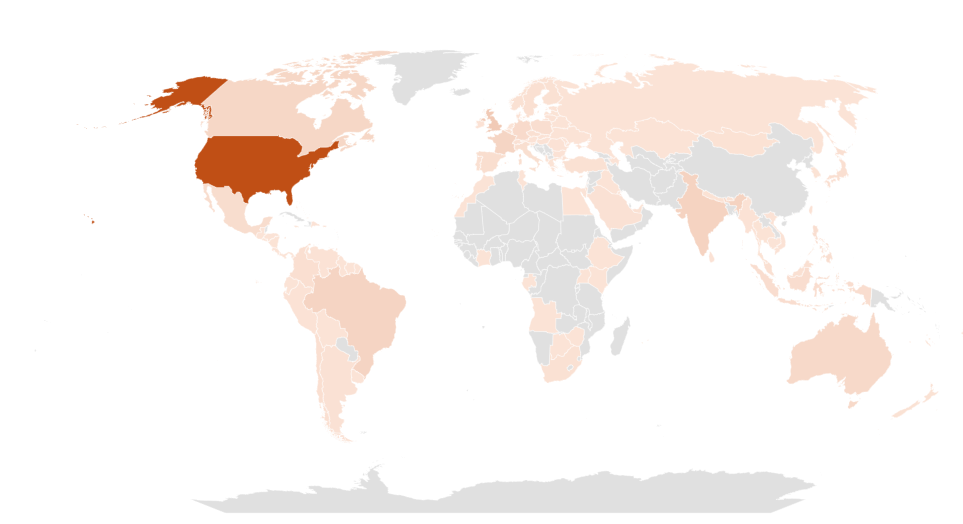
Who Was Targeted Most
This campaign was observed most heavily in:
- United States
- United Kingdom
- India
- Brazil
- France
- Canada
- Australia
That does not mean users elsewhere were unaffected. These were simply the countries where researchers saw the highest prevalence.
Red Flags To Watch For
Even though the campaign used advanced techniques, the warning signs for users were often familiar.
| Red flag | Why it matters |
| You found the file through a random link | Unofficial forums, Discord links, and file-hosting pages are common malware delivery paths |
| The download is a ZIP for something sketchy or unofficial | Cheats, cracks, mod tools, and unofficial utilities carry higher risk |
| You get a “missing dependency” message | Attackers may use this to push a second download while the real infection happens in the background |
| The file name looks right, but the source feels wrong | Familiar names can be faked easily |
| Your PC suddenly slows down or overheats | Hidden cryptominers often abuse system resources |
| You notice new, unrelated software installed | The campaign sometimes used unwanted software installs as a distraction |
How To Stay Safe From Malware Hidden in Fake Downloads
This campaign is a reminder that not every convincing file is a safe one. A few habits can reduce your risk significantly.
| Safety step | Why it helps |
| Download software only from official sources | This lowers the chance of accidentally installing a trojanized file |
| Avoid cheats, cracks, and unofficial mods | These categories are common bait for malware campaigns |
| Be skeptical of dependency prompts | Unexpected requests to install helper files or missing components can be part of the attack |
| Keep your security software updated | Current protection can help detect known threats and suspicious behavior |
| Pay attention to system performance | A suddenly hot, loud, or slow PC may be a sign something is running in the background |
| Review what you download before opening it | Even a familiar file name does not guarantee a file is legitimate |
McAfee helps protect against malware threats like these with multiple layers of security, including malware detection and safer browsing protections designed to help stop risky downloads before they can do damage.
What To Do If You Think You Opened One of These Files
If you think you downloaded and ran a suspicious file like one described in this campaign:
| Action | Why it matters |
| Disconnect from the internet | This can help interrupt communication with attacker-controlled servers |
| Run a full security scan | A trusted scan can help identify malicious files and behavior |
| Delete suspicious downloads | Remove the file and avoid reopening it |
| Check for unfamiliar software or startup items | The infection may have installed additional components |
| Change important passwords from a clean device | This is especially important if data-stealing malware may have been involved |
| Monitor accounts for unusual activity | Keep an eye on email, banking, and other sensitive accounts |
If your computer continues acting strangely after a scan, it may be worth getting professional help.
What This Means for the Future of Malware
This campaign highlights how cybercrime is evolving.
The core risk is not just fake downloads. It is the fact that attackers are using AI tools to help generate code, create variations, and speed up parts of the malware development process.
That can make campaigns like this easier to scale and harder to ignore.
For everyday users, the takeaway is simple: if a file seems unofficial, rushed, or too good to be true, pause before opening it. A fake download may look like a shortcut, but it can quietly turn your device into a target.
Frequently Asked Questions
| FAQs |
| Q: What is AI-written malware?
A: AI-written malware generally refers to malicious code, or parts of a malware campaign, that appear to have been created with help from AI coding tools or large language models. |
| Q: Did AI create this entire malware campaign?
A: McAfee Labs did not say that. The research suggests that certain components, especially some scripts, were likely generated with help from large language models. |
| Q: What was this malware disguised as?
A: The malicious files impersonated game mods, AI tools, drivers, trading utilities, VPNs, emulators, and other software downloads. |
| Q: What can happen if you open one of these fake files?
A: Depending on the sample, the malware may install coin miners, steal data, establish persistence, or download additional malicious tools. |
| Q: Can malware really use my computer to mine cryptocurrency?
A: Yes. McAfee observed samples in this campaign that used victims’ CPU and GPU resources to mine cryptocurrency in the background. |
| Q: What is the safest way to avoid this kind of malware?
A: Download software only from official or trusted sources, avoid unofficial tools and cheats, be cautious of fake dependency prompts, and keep your security protection up to date. |
Want to learn more? Dive into the full research here.
The post New Research: Hackers Are Using AI-Written Code to Spread Malware appeared first on McAfee Blog.
About Author