The tool for building forms and quizzes is a widely used platform for social manipulation and malicious software. Here are some tips to ensure your safety.

23 Apr 2025
•
,
5 min. read

When Google steps into a specific industry, it usually spells trouble for the existing players. This was the case with Google Forms, the form and quiz-building tool from the tech giant that was introduced in 2008. According to an estimation, it currently holds a market share of close to 50%.
Nevertheless, with a significant market share, there also comes a heightened scrutiny from malicious individuals. Malicious actors are adept at exploiting popular technologies for their own gain. They are now misusing Google Forms to gather sensitive data from their targets and even deceive them into installing malware.
What Makes Google Forms a Target?
Criminal elements are perpetually searching for ways to legitimize scams and bypass email security protocols. Google Forms provides an excellent opportunity to achieve both objectives. It is favored by cybercriminals because:
- It is free, allowing threat actors to conduct widespread campaigns with potentially high returns on their investment
- It is trusted by users, increasing the likelihood of victims assuming that the Google Form they receive or are directed to is legitimate
- It is a legitimate service, meaning that malicious Google Forms and links to malicious forms often get past traditional email security tools without detection
- It is user-friendly, benefiting legitimate users but also convenient for cybercriminals – enabling them to execute convincing phishing attacks with minimal effort or prior expertise with the tool
- Cybercriminals also exploit the fact that Google Forms communications are encrypted with TLS, complicating the ability of security tools to inspect for any malicious activity. Moreover, the solution frequently uses dynamic URLs, making it challenging for some email security filters to identify malicious forms.
What are the Common Types of Google Forms Attacks?
Most threats using Google Forms aim to deceive users into divulging their personal and financial details, although there are variations in how threat actors achieve this. Below are some key tactics to watch out for:
Forms related to Phishing
Threat actors create Google Forms that mimic authentic brands, such as login pages for social media platforms, banks, universities, or payment gateways. The advantage for the perpetrators is that creating these forms is quicker, easier, and cheaper than setting up a dedicated phishing website, and less likely to be blocked by security filters.
Typically, a link to these malicious Google Forms is received via a phishing email, which might be disguised to appear as if sent from a credible brand or sender. The email may even originate from a legitimate account that has been compromised. The ultimate goal is usually to:
- Collect your log-in credentials to hijack accounts and commit identity theft
- Acquire your card details or banking/cryptocurrency information to gain control over these accounts and conduct fraudulent transactions
- Convince you to click on a link in the malicious Google Form that redirects to a site where malware is surreptitiously installed on your device
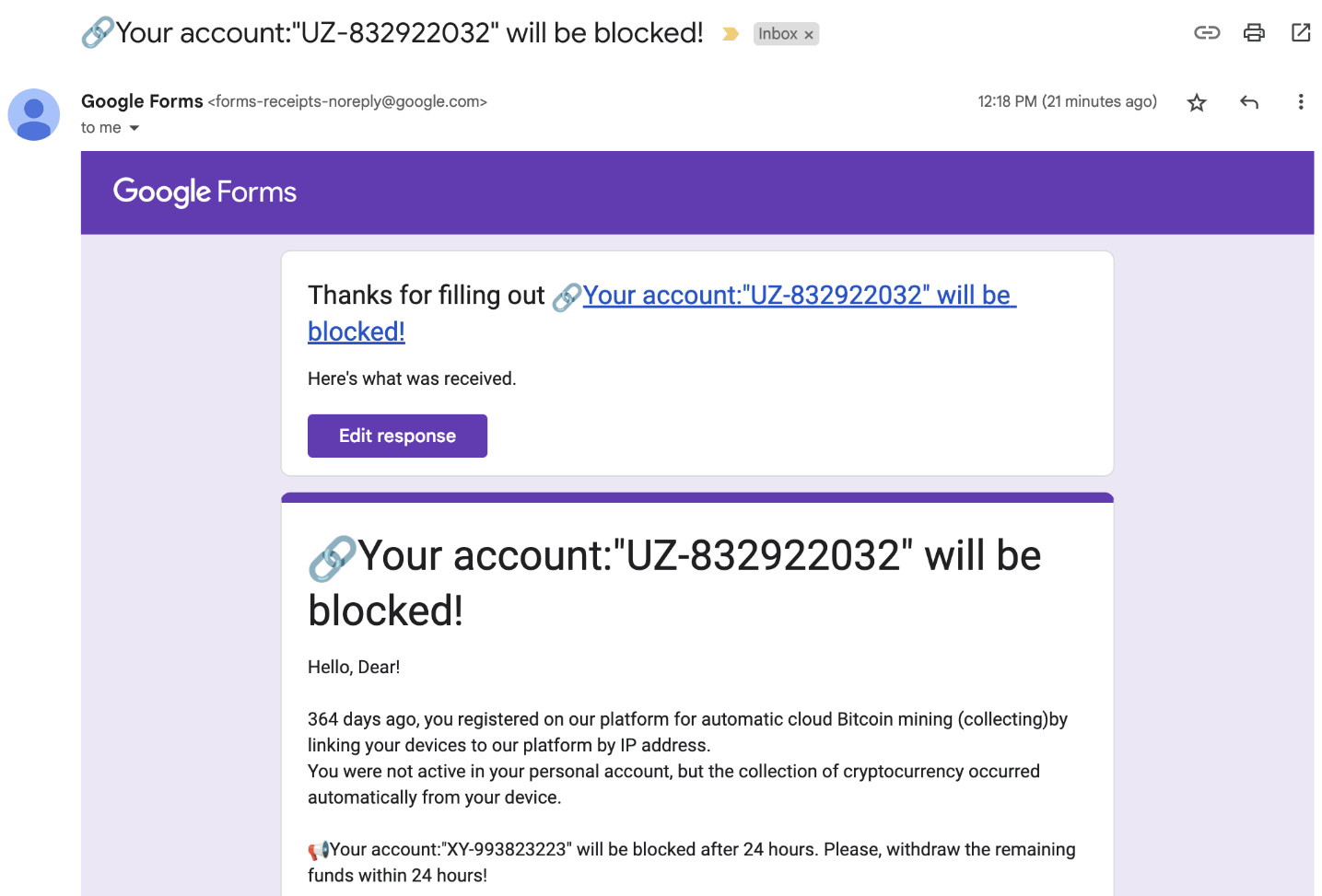
Call-back Phishing
Attackers send you a deceptive Google Form designed to coax you into calling a phone number provided. The form may be altered to seem as if originating from a bank or another trusted service. An urgency is created to pressure you into making a spontaneous decision – calling the number without a second thought. Often, the form will mention that your account is at risk of being blocked or that funds have been taken (or will be taken from your account) unless immediate action is taken.
Upon calling, you will be in contact with a member of a voice phishing (vishing) group who will employ charm to persuade you into revealing personal and financial data. They might also recommend downloading remote access tools to your computer, granting them full control over your device.
Quiz Spam
Cybercriminals may misuse the quiz feature in Google Forms by creating a quiz and inputting your email address. Clicking on “release scores” will trigger a message that the threat actor can customize – potentially adding links to phishing, malware, or fraudulent websites.
Real-world Attacks
Some of the actual campaigns observed by security experts in recent times include:
BazarCall
A vishing-style attack known as BazarCall, where victims received an email containing a malicious Google Form impersonating popular brands like PayPal, Netflix, or several other prominent names. The form contained details of a fake charge that was supposedly imminent, unless the recipient dialed the provided phone number.
Phishing targeting US universities
Google detected a surge in attacks on the US higher education sector recently. Victims received phishing emails with a link to a fake Google Form. Both the initial email and the form were manipulated to mimic messages from the universities, incorporating logos, mascots, and references to the institution’s name. The objective was to gather logins and/or financial information.
Securing Your Defenses
Being aware is crucial in mitigating the impact of social engineering threats like these. Now that you understand the tactics employed by malicious actors, it should be more challenging for them to manipulate you into making poor choices online. To guard against Google Form threats, consider the following measures:
- Utilize multi-layered security solutions from a reputable provider on all your computers and mobile devices. This will help thwart any attempted malware downloads even if you inadvertently click on a malicious link. Effective software will detect suspicious patterns, even if the Google Form appears legitimate, scan your devices routinely, and shield you from any malicious content.
- Remain vigilant against potential phishing schemes. Exercise caution with any unsolicited communications that prompt you to click on a link or make an urgent call. Instead, take a moment to relax, contact the sender through alternative means, and avoid engaging with the provided link or number hastily. It is advisable to hover over links to verify the actual destination. Ensure that your email security solution is
- Strengthen login security by employing robust, unique passwords for each account, managed through a password manager for easy retrieval. Activate multi-factor authentication (MFA) for every online account you use. This way, even if hackers obtain your password, they will be unable to access your accounts. Opt for a hardware-based security key or an authenticator application for better security.
- Pay attention: Google consistently issues a warning on Google Forms, cautioning recipients to “Never submit passwords through Google Forms”. Heed this advice.
In case you fall prey to a Google Forms attack, promptly change your passwords, perform a malware scan, coordinate with your bank to freeze any affected cards (if card details were submitted), activate MFA for all accounts if not already done, and monitor your accounts for any suspicious activity.
By familiarizing yourself with the information in this article, you will be better equipped to defend against the threat posed by malicious Google Forms. Maintain a skeptical approach towards any unsolicited emails you receive – irrespective of the sender’s reputation.
About Author