Emulating the Concealed Sinobi Ransomware
Sinobi is a financially motivated ransomware group that emerged in late June 2025, operating a closed, hybrid Ransomware-as-a-Service (RaaS) model in which a core team manages the malware, infrastructure, and payment/negotiation systems while a smal
Emulating the Concealed Sinobi Ransomware
Sinobi is a financially motivated ransomware group that emerged in late June 2025, operating a closed, hybrid Ransomware-as-a-Service (RaaS) model in which a core team manages the malware, infrastructure, and payment/negotiation systems while a small number of trusted affiliates carry out intrusions. The name “Sinobi,” derived from “shinobi” (Japanese for ninja), reflects the group’s focus on stealth and controlled execution. Both technical and infrastructural overlaps strongly suggest that Sinobi is a rebrand or direct successor of the Lynx ransomware group, which itself inherited code from the earlier INC ransomware family.
Sinobi conducts system and network discovery to identify local and remote targets prior to encryption, and implements a hybrid cryptographic scheme combining Curve25519 Donna for key protection with AES-128 in CTR mode for fast, scalable file encryption, enabling efficient impact across networked environments while preventing recovery without attacker-controlled private keys.
AttackIQ has released a new attack graph that emulates the Tactics, Techniques, and Procedures (TTPs) associated with the deployment of Sinobi ransomware to help customers validate their security controls and their ability to defend against this threat.
Validating your security program performance against these behaviors is vital in reducing risk. By using this new emulation in the AttackIQ Adversarial Exposure Validation (AEV) Platform, security teams will be able to:
Evaluate security control performance against baseline behaviors associated with the Sinobi ransomware.
Assess their security posture against an opportunistic adversary, which does not discriminate when it comes to selecting its targets.
Continuously validate detection and prevention pipelines against a playbook similar to those of many of the groups currently focused on ransomware activities.
Sinobi Ransomware – 2025-08 – Associated Tactics, Techniques and Procedures (TTPs)
This emulation replicates the sequence of behaviors associated with the deployment of Sinobi ransomware on a compromised system with the intent of providing customers with the opportunity to detect and/or prevent a compromise in progress.
The emulation is based on the behaviors reported by ESentire on August 27, 2025, and internal analysis.
Discovery & Privilege Escalation – Sinobi Ransomware Deployment
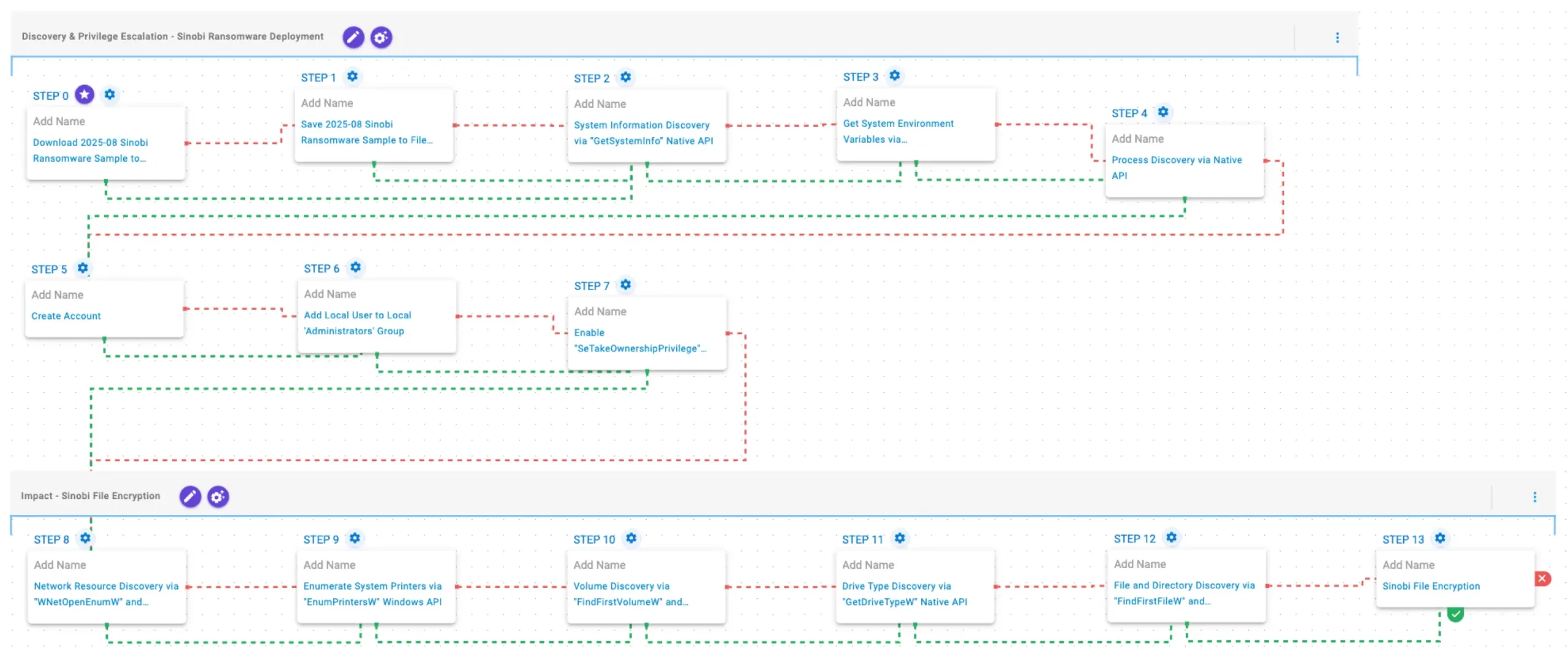
This stage begins with the deployment of Sinobi ransomware. It gathers system and environment information using GetSystemInfo and GetEnvironmentStrings, followed by process discovery via CreateToolhelp32Snapshot, Process32FirstW, and Process32NextW. It then establishes elevated access by creating a local account (Assistance), adding it to the Administrators group using net localgroup, and enabling the SeTakeOwnershipPrivilege privilege to facilitate further actions.
Download and Save Scenarios (T1105): The Sinobi Ransomware Sample (SHA256: 1b2a1e41a7f65b8d9008aa631f113cef36577e912c13f223ba8834bbefa4bd14) is first downloaded and then saved to disk in two separate scenarios to test network and endpoint controls and their ability to prevent the delivery of known malicious samples.
Enable “SeTakeOwnershipPrivilege” Privilege via Native API (T1134): This scenario enables the SeTakeOwnershipPrivilege privilege for the current process using the AdjustTokenPrivilege Windows API.
System Information Discovery via “GetSystemInfo” Native API (T1082): This scenario executes the GetSystemInfo Windows native API call to retrieve system information. This can be used to detect sandboxes, create unique identifiers, and adjust execution behaviors.
Process Discovery via Native API (T1057): This scenario executes the CreateToolhelp32SnapshotWindows native API call to receive a list of running processes and iterates through each process object with Process32FirstW and Process32NextW.
Get System Environment Variables via “GetEnvironmentStrings” Native API (T1082): This scenario executes the GetEnvironmentStrings Windows native API call to discover environmental variables, usually used to fingerprint the system or search for stored passwords and secrets.
Create Account (T1136.001): This scenario attempts to create a new user into the system with the net user Windows command.
Add Local User to Local ‘Administrators’ Group (T1098): This scenario adds a local user to the local Administrators group using the net localgroup command.
Impact – Sinobi File Encryption
In this stage, Sinobi discovers network resources via WNetOpenEnumW and WNetEnumResourceW, and identifies available printers using EnumPrintersW. It then enumerates volumes with FindFirstVolumeW and FindNextVolumeW, and determines drive types via GetDriveTypeW to prioritize targets. Finally, it traverses the file system using FindFirstFileW and FindNextFileW, and encrypts files using AES-128 in CTR mode, with Curve25519 used for key exchange and protection.
Network Resource Discovery via “WNetOpenEnumW” and “WNetEnumResourceW” Native API (T1049): This scenario performs network resource discovery by calling the WNetOpenEnumW and WNetEnumResourceW Windows native API calls to enumerate network resources from the local computer.
Enumerate System Printers via “EnumPrintersW” Windows API (T1120): This scenario executes the EnumPrintersW Windows API to enumerate available printers, print servers, domains, or print providers.
Volume Discovery via “FindFirstVolumeW” and “FindNextVolumeW” Native API (T1082): This scenario executes the FindFirstVolumeW and FindNextVolumeW Windows API calls to iterate through the available volumes of the system.
Drive Type Discovery via “GetDriveTypeW” Native API (T1120): This scenario retrieves information about the system’s physical disks using the GetDriveTypeW Windows API call.
File and Directory Discovery via “FindFirstFileW” and “FindNextFileW” Native API (T1083): This scenario executes the FindFirstFileW and FindNextFileW Windows native API calls to enumerate the file system.
Sinobi File Encryption for Windows (T1486): This scenario performs the file encryption routines used by common ransomware families. Files matching an extension list are identified and encrypted in place using similar encryption algorithms as used by Sinobi ransomware.
Wrap-up
In summary, this emulation will evaluate security and incident response processes and support the improvement of your security control posture against the behaviors exhibited by Sinobi ransomware. With data generated from continuous testing and use of this assessment template, you can focus your teams on achieving key security outcomes, adjust your security controls, and work to elevate your total security program effectiveness against a known and dangerous threat.
AttackIQ is the industry’s leading Continuous Threat Exposure Management (CTEM) platform, enabling organizations to measure true exposure, prioritize risk, and disrupt real-world attack paths. By moving beyond static vulnerability data, AttackIQ operationalizes CTEM by continuously validating exposures against real adversary behavior and defensive controls. The platform connects vulnerabilities, configurations, identities, and detections into adversary-validated attack paths—quantifying the likelihood of attacker movement and impact. This evidence-based approach empowers security leaders to focus on what matters most, optimize defensive investments, and strengthen resilience through threat-informed, AI-driven security operations.
The company is committed to supporting its MSSP partners with a Flexible Preactive Partner Program that provides turn-key solutions, empowering them to elevate client security. AttackIQ is passionate about giving back to the cybersecurity community through its free, award-winning AttackIQ Academy and founding research partnership with MITRE Center for Threat-Informed Defense.
*** This is a Security Bloggers Network syndicated blog from AttackIQ authored by Ayelen Torello. Read the original post at: https://www.attackiq.com/2026/04/02/sinobi-ransomware/
About Author