Since the beginning of 2024, the Sophos X-Ops Managed Detection and Response (MDR) group has intervened in numerous occurrences where the primary entry point was recognized as an unsecured Microsoft Remote Desktop Web Access portal lacking multi-factor authentication (MFA) defenses. This piece will present an outline of the observations made when this portal is exploited, offer insights into our investigative approach, and propose recommendations and strategies to aid those encountering (or preparing for) a similar scenario.
Definition of the RD Web Access Portal
The architecture of Microsoft Remote Desktop Services comprises several distinct roles as indicated in Figure 1.

Figure 1: Illustration of the roles set up on an exposed Remote Desktop Services (RDS) host
- The Remote Desktop Connection Broker (RD Connection Broker) role manages incoming remote desktop connections to RD Session Host server farms and directs connections to a suitable host.
- The Remote Desktop Gateway (RD Gateway) role is in charge of providing users on public networks access to Windows desktops and applications hosted within the RDS cluster. This role is commonly installed on the same server as the RD Web Access role, elaborated below.
- The Remote Desktop Licensing (RD Licensing) role oversees user licenses and facilitates user connections to the RD Session Host servers hosting the virtual desktops or applications.
- Lastly, the Remote Desktop Web Access (RD Web Access) login portal acts as the entry point for users, and in these investigations malevolent entities, to authenticate and eventually reach the Remote Desktop Session Host (RD Session Host) – the primary target at this stage. Once inside the RD Session host, various activities can be initiated, given that the attacker has attained access within your network. (In MITRE ATT&CK, this corresponds to T1133, Initial Access and External Remote Services.)
This piece focuses on the RD Gateway, RD Web Access, and RD Session Host roles. For a broader assessment of how Remote Desktop Protocol (RDP) can be misused and the techniques employed by attackers, kindly refer to the RDP series we released earlier this year.
Consequences of RD Web Access Abuse
When an RD Web Access host is exposed to the internet, it enables users to log in with their domain credentials to access an RD Session Host or a virtualized application, permitting them to work remotely and access crucial business assets. If these servers are inadequately secured while being publicly accessible, they may be exploited by malicious actors to gain a foothold in a system. The login portals are frequently subjected to brute force attacks to acquire legitimate user credentials, which are then utilized to log in, create persistence, and endeavor to raise privileges or even navigate sideways within the system.
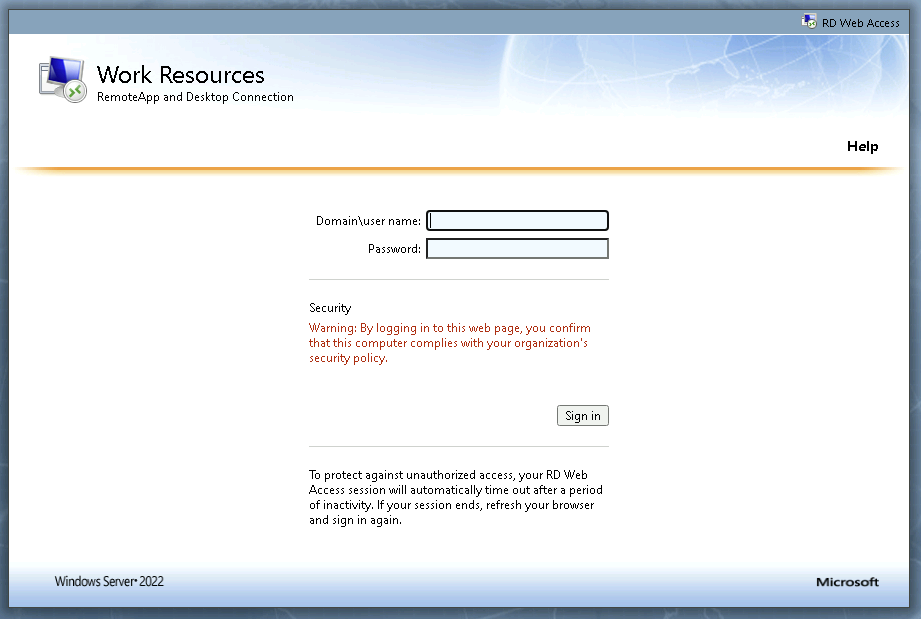 Figure 2: Default login page for an RD Web Access portal
Following successful authentication, the user will be given options to link to a published RD Session Host or a virtual application. In instances where only virtual applications are available, a malicious actor would need to find a way to bypass the contained application to execute code on the underlying host.
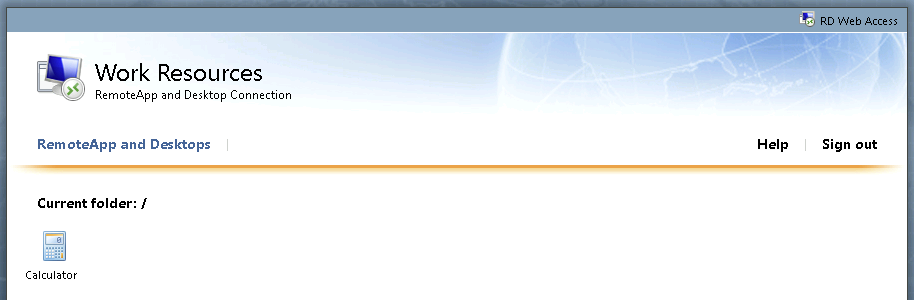
Figure 3: An RD Web portal presenting only a single published virtual application
As depicted in Figure 3, an RD Web portal showcasing a single application, the Windows calculator, is offered. Upon selecting the application, an .RDP file will be downloaded, pre-configured to launch the Calculator application. In this circumstance where there is no option to connect to a published RD Session Host, the aim for malicious actors is to find a method to execute code on the remote server hosting the calculator application.
An approach noticed by MDR involves utilizing the native Windows Accessibility feature to access a command prompt. With the Calculator application window in focus, the actor can press the shift key on their keyboard five times to bring up the Sticky Keys prompt. This prompt will be fetched from the remote RD Session host. Within the Sticky Keys prompt, there is an option to launch the accessibility options Control Panel item. This action triggers the Windows Control Panel, leading to the classic Control Panel loading in a Windows Explorer window in most cases. Via the Windows Explorer search bar, the actor can simply type ‘cmd.exe’ and hit enter to open an interactive command prompt on the RD Session host, advancing their objectives.
If given the choice to link to an RD Session Host, the actor will be directly logged into an interactive Remote Desktop Session with a graphical interface, enabling them to further pursue their objectives. Once a direct connection is established from the RD Web Access host to any of the session hosts, the authentication records will display an interactive RDP logon from the RD Web Access host, acting as a conduit for the connection from the actor’s device to the RD Session host.
In four out of the five RD Web Access incidents examined by MDR for this piece, the MDR team reacted to alerts triggered during the identification phase of the assault, when the threat actor(s) executed the ‘nltest / domain_trusts’ command to enumerate any Active Directory trusts on the targets. (The fifth scenario we evaluated alsoset off by this conduct, but starting with another happening, distinct to that instance.) Performers will frequently carry out exploration directives to enhance their comprehension of the setting and fundamental Active Directory domain framework to which they’ve gained entry successfully.

Figure 4: Instances of exploration directives after a triumphant connection
While scrutinizing these occurrences, the MDR crew noticed continuous forceful efforts aimed at the IIS operation that facilitates the RD Web Access portal, ultimately leading to the unauthorized individual obtaining entry.
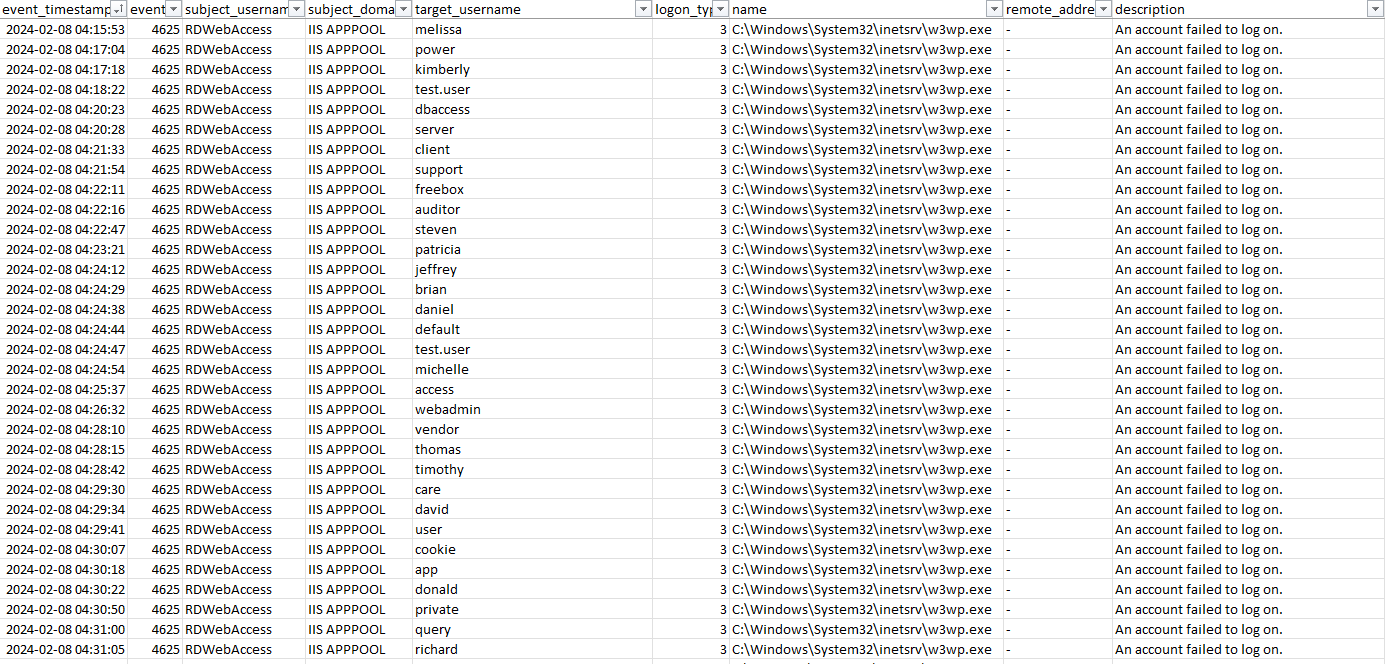
Figure 5: Instances of forceful activity against the RDWebAccess IIS operation
Throughout the initial phase of an incident response, the MDR crew implements suitable measures to incapacitate any impacted users and terminate any ongoing sessions to restrict the menace as rapidly as achievable. Should multiple accounts exhibit hints of compromise, MDR will also segregate the RD Web Access host to ultimately cease any further entry to the estate through that initial entry point. The MDR crew employs various searches to aid in the investigative process and have integrated many of them in the subsequent Investigative Guide segment.
Investigative Guide
In this section, we furnish a variety of searches that investigators can utilize in scenarios where RD Web Access misuse is suspected. The searches in this section have been formulated by the Sophos MDR crew and can be executed within the Sophos Central portal by navigating to Threat Analysis Center -> Live Discover. For readers not currently utilizing Sophos Central, the general recommendations remain applicable, but the procedures should be executed according to the technology you are using.
Detecting exposed RD Web Access portals via OSINT
Oftentimes, an inspection of the external assault surfaces unveils numerous services that are accessible on the internet. The subsequent Shodan search can recognize exposed RDWeb servers.
hostname:<insert company domain name here> path=/RDWeb/
Detecting RD Gateway servers using Live Query
RD Gateway servers can be recognized by the presence of the Remote Desktop Gateway service titled ‘TSGateway.’ This is a terminal query, so you must choose all online servers within Sophos Central Live Discover to identify which hosts have the RD Gateway role installed.
SELECT
   name,
   display_name,
   start_type,
   path,
   status
FROM services
WHERE name = 'TSGateway'
Examining RD Gateway records
After establishing that a governed host is operating the RD Gateway role, you can leverage the subsequent query via Sophos Central Live Discover to capture the most recent connection occurrences from the RD Gateway Windows Event Logs. These records will present the connection and disconnection occurrences for the impacted user and will reveal the remote source IP address responsible for connecting to the session. Once the source IP address is identified, it is strongly advised to block it at your network perimeter. This is a terminal query, so you must select only the hosts that were indicated in the previous query (Detecting RD Gateway servers using Live Query) to be running the RD Gateway role.
SELECT
strftime('%Y-%m-%d %H:%M:%S',swe.datetime) AS Datetime,
swe.time,
swe.eventid AS EventID,
CASE
WHEN eventid = 200 THEN 'Client Connected'
WHEN eventid = 303 THEN 'Client Disconnected'
END AS Description,
JSON_EXTRACT(swe.data, '$.UserData.Username') AS Username,
JSON_EXTRACT(swe.data, '$.UserData.AuthType') AS AuthType,
JSON_EXTRACT(swe.data, '$.UserData.IpAddress') AS IpAddress,
JSON_EXTRACT(swe.data, '$.UserData.Resource') AS Resource,
JSON_EXTRACT(swe.data, '$.UserData.BytesReceived') AS BytesReceived,
JSON_EXTRACT(swe.data, '$.UserData.BytesTransfered') AS BytesTransfered,
JSON_EXTRACT(swe.data, '$.UserData.SessionDuration') AS SessionDuration,
JSON_EXTRACT(swe.data, '$.UserData.ConnectionProtocol') AS ConnectionProtocol
FROM sophos_windows_events as swe
WHERE source = 'Microsoft-Windows-TerminalServices-Gateway/Operational'
AND eventid IN (200,303)
AND swe.time > $$starttime$$
--AND swe.time > )$$starttime$$ AND swe.time < $$endtime$$
ORDER BY swe.time
Take note of the date/time-range data at the conclusion of the query. This should be adjusted to fit the timeframe of the investigation. In the Sophos Central GUI, this can be chosen using the date variable type; click on the calendar to select the commencement and conclusion times.
Inspecting IIS records
By default, IIS records its logs in UTC and adopts the format ‘YYYY-MM-DD hh:mm:ss.’ Minutes and seconds have been intentionally omitted from the below grep pattern, so we capture a complete hour of logs surrounding the login occurrences. You will also need to modify the ‘file.path’ value to match the date of the IIS log you wish to review. The format for this is merely YYMMDD (for instance, 240223 for February 23, 2024).
Subsequent to executing the preceding query and knowing the timestamp for the successful logins from the RD Gateway event logs, you can adapt the subsequent query to acquire the neighboring IIS logs. This will provide you with data on the IIS login time and the likely actions the actor took while connected to the web portal. Since the source IP address is known from the outcomes of the prior query, that info can also be utilized as a ‘grep.pattern’ filter to display all IIS logs encompassing that address. This is a terminal query, so you must select the specific host within Sophos Central Live Discover.
SELECT grep.*
FROM file
CROSS JOIN grep ON (grep.path = file.path)
WHERE
file.path LIKE 'C:inetpubLogsLogFilesW3SVC%u_exYYMMDD.log'
AND grep.pattern = 'YYYY-MM-DD hh: '
Examining for indications of forceful activity
Forceful attempts towards an RD Web portal can be detected by filtering login occurrences to the Windows IIS operation, w3wp.exe, as depicted in Figure 5 (above, previous segment). This is a Sophos Central data lake query; as with the query forUpon a thorough examination of the RD Gateway logs displayed above, options for narrowing the time-range query can be configured through the central user interface.
SELECT
meta_hostname, date_format(from_unixtime(CAST(event_timestamps AS bigint)), '%Y-%m-%d %H:%i:%S') AS event_timestamp, eventid, subject_username, subject_domain, target_username, target_domain, target_logon_id, subject_logon_id, logon_type, logon_process, authentication_package, transmitted_services, key_length, name, remote_address, remote_port, description, provider_name, source
FROM
xdr_data
WHERE
event_timestamps NOT LIKE '%,%'
AND
query_name IN ('windows_event_successful_logon','windows_event_invalid_logon')
AND name LIKE '%w3wp.exe%'
AND meta_hostname = '$$hostname$$'
Enumerate RD Web-deployed applications via the Windows Registry
Scrutinize the Windows Registry for a catalog of deployed applications or session hosts, inclusive of any access restrictions applicable to the listed items. This query is aimed at an endpoint investigation, necessitating the selection of the specific host within Sophos Central Live Discover.
SELECT path, data, type, strftime('%Y-%m-%d %H:%M:%S',datetime(mtime,'unixepoch')) AS modified_time
FROM registry
WHERE path LIKE 'HKEY_LOCAL_MACHINESOFTWAREMicrosoftWindows NTCurrentVersionTerminal Server%%'
Analysis of compromised account history across the estate
Subsequent to identifying a compromised account accessing through the RD Web interface, the following query can be employed to probe the user activity. This aids in uncovering whether the threat actor has transitioned to other hosts within the network based on the retrieved data. This is a query within the Sophos Central data lake. Bear in mind, the full username must be specified on the second-to-last line of the query.
SELECT
 meta_hostname,
 date_format(from_unixtime(time), '%Y-%m-%d %H:%i:%s') as date_time,
 username, cmdline, name, path, sophos_pid, parent_name,parent_cmdline,parent_path, parent_sophos_pid, uid, gid,file_size, sha1, sha256
 FROM
 xdr_ext_data
 WHERE
 query_name = 'running_processes_windows_sophos'
 AND username = '$$username$$'
 ORDER BY date_time DESC
Data collection on the compromised account
The ensuing Sophos Central data lake query furnishes additional insights regarding the compromised account.
SELECT
meta_hostname,uid, gid, username, description, directory, shell, type, uuid
FROM
xdr_data
WHERE
query_name = 'user_accounts'
AND username = ‘$$username$$’
Alongside the above query, running these PowerShell commands enables the examination of a domain or local user to retrieve additional user account attributes like last password change and account status. Similar to the former query, ensure the complete username is input on the second-to-last line of the query.
MDR Response Measures
Instances involving compromised RD Web Access hosts warrant immediate action to thwart the threat before any lateral movements occur. Hence, our MDR team commonly executes the ensuing response measures to expediently transition tampered systems into a contained state.
- Quarantine affected hosts, encompassing the RD Gateway, to halt further illicit authentication attempts against the exposed login interface
- Identify and obstruct the source IP address utilized for unauthorized access to the interface
- Deactivate affected domain users
- Block malevolent executable hashes in Sophos Central
- Enforce Application Control policies in Sophos Central to restrict the execution of frequently exploited tools
- Submit suspicious and unidentified files to SophosLabs for classification and the creation of new detections
Recommendations and Risk Mitigation Approaches
Despite the utility of RD Web Access in facilitating remote connections to business resources, crucial recommendations should be implemented to mitigate the risk of system exposure to attacks. The following three measures, if executed preemptively, may reduce the effectiveness of potential attacks:
- Enforce multi-factor authentication for all domain users
- Audit the configurations of published applications and RD Session hosts to ensure only authorized items have been published, limiting access to intended users. Contemplate implementing a group policy object to restrict cmd.exe and PowerShell access for irrelevant users.
- If feasible, confine online access to the login interface to approved source IP addresses exclusively
If the aforementioned recommendations and mitigations are unfeasible and continued use of an RDS cluster is imperative, consider shielding the RD Web Access portal behind a VPN, with enforced multi-factor authentication. This arrangement prevents direct exposure of the portal to the internet, thereby diminishing the surface area vulnerable to attacks.
Conclusion
An in-depth exploration into the burgeoning prevalence of abuses within RD Web Access, or the specific threat actor(s) favoring this method, falls beyond the scope of this discourse. It is worth noting, however, that leaving internet-accessible Remote Desktop configurations unprotected is a risky decision, particularly in the absence of multi-factor authentication on the observed systems. Articles like this aim not to cast blame on attack victims but rather strive to impart insights into investigating such breaches, urging adherence to best security practices to potentially avert such scenarios.
About Author