
Almost every online platform necessitates users to register, leading to an overwhelming number of passwords that are difficult to remember. Employing password managers is crucial as they aid in creating and storing unique and complex passwords for each account, thereby augmenting security.
Among the prominent password management tools available, NordPass and Bitwarden stand out. While NordPass is recognized for its robust encryption and VPN integration, Bitwarden offers open-source functionality and the option for self-hosting, making it a compelling alternative. But how do you go about selecting the most suitable one? Let’s delve into it.
- NordPass: Recognized for its user-friendly interface and comprehensive security solutions through the Nord Security software suite.
- Bitwarden: Noted for its open-source password management platform and a generous free version.
Detailed Comparison of NordPass and Bitwarden
Refer to the summary table below to gauge how these two password managers fare against each other.
| NordPass | Bitwarden | |
|---|---|---|
| Rating | 4.6 out of 5 stars | 4.6 out of 5 stars |
| Native authenticator app | Yes | Yes |
| Open source | No | Yes |
| Encryption | Utilizes XChaCha20 encryption | Employs 256-bit AES encryption |
| Password autofill | Yes | Yes |
| Command Line Interface | No | Yes |
| Free plan availability | Yes, (for one device) | Yes (usable across multiple devices) |
| Integrated VPN | Yes | No |
| Initial pricing | Starting at $1.69 per month for one year | Commencing at $0.83 per month; annual billing of $10 |
| Free trial | Affirms availability of 30-day NordPass Premium trial and 14-day NordPass Business trial | Confirms provision of a 7-day free trial for most plans |
| Explore NordPass | Check Out Bitwarden |
Pricing Comparison of NordPass and Bitwarden
NordPass Pricing
NordPass provides two subscription options: Personal and Business. All premium plans by NordPass come with a 30-day refund policy, and the Free plan offers a 30-day Premium trial as well. Additionally, NordPass extends a 14-day free trial for its Business package.
Personal:
| Free plan | Premium plan | Family plan | |
|---|---|---|---|
| Annual plan | Free | $1.69 per month | $3.69 per month |
| Biennial plan | Free | $1.29 per month | $2.79 per month |
| Key features | Automatic saving and filling of passwords; secure storage; one-user session | Includes all Free features plus device accessibility, password health information, breach scanning, and file attachments | Encompasses the entirety of Premium features for six user accounts |
Business:
| Teams plan | Business plan | Enterprise plan | |
|---|---|---|---|
| Annual plan | $1.99 per user, monthly | $3.99 per user, monthly | $5.99 per user, monthly |
| Biennial plan | $1.79 per user, monthly | $3.59 per user, monthly | $5.39 per user, monthly |
| Citizens | Limited to a maximum of 10 users | From 5 up to 250 individuals | Infinite users |
| Variances in Features | Organization-wide configurations and Google Workspace Single Sign-On | All Crew attributes plus Security Dashboard, Collaborative Directories | All Commercial attributes plus Single Sign-On with Entra ID / MS ADFS / Okta, Provisioning for Users and Groups, Centralized Sharing |
Pricing of Bitwarden
Bitwarden also provides various plans under their Personal and Business sections. Bitwarden includes a seven-day no-cost trial period for its Families scheme and a seven-day evaluation for its Teams package on the corporate side.
Here is a summary of the pricing and disparities in features for both.
Personal Edition:
| Free offering | Premium tier | Families plan |
|---|---|---|
| Complimentary | $0.83 / $10 payable annually | $3.33 per month |
| Device limit, passphrase management, boundless password storage | Inclusive of all Free attributes, integrated authentication, emergency access, security summaries, and document attachments | Accommodates up to 6 individuals; Incorporates all Premium characteristics, infinite sharing and collections, structured storage |
Corporate:
| Team version | Enterprise package | Bespoke plan |
|---|---|---|
| $4 monthly per user | $6 monthly per user | Get in touch with the Sales team for a custom quotation |
| Protected information exchange, activity logs monitoring, SCIM assistance, Integration with Directories | Encompasses all Team elements, along with Unique Roles, Passwordless Single Sign-On, Free Families Plan for all users, Self-hosting alternative, Enterprise protocols | Dependent on your tailored prerequisites |
NordPass against Bitwarden: Detailed Feature Evaluation
Regarding attributes, both NordPass and Bitwarden offer answers for safeguarding, distributing passwords, encryption, and more. The exceptional features provided by each are included below:
Verification
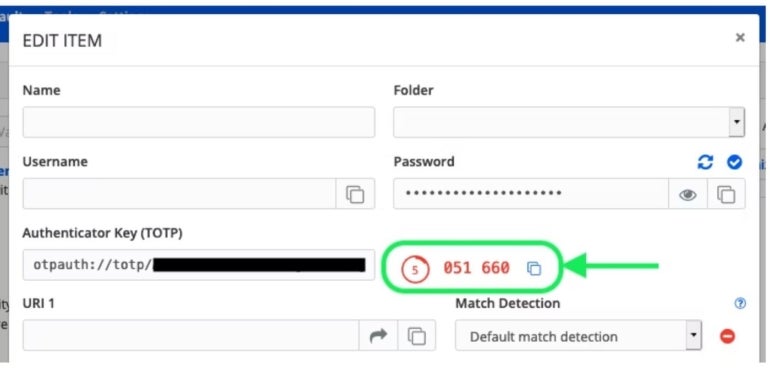
Both NordPass and Bitwarden present two-step verification (2SV) solutions to supplement an added shield to your accounts. NordPass Validator utilizes biometric, possession, and knowledge-based authentication methods. The time-limited one-time codes (TLCs) from NordPass expire every 30 seconds and act as the second login step you input beside your password. The Validator also includes QR code scanning and manual key admittance choices for an effortless setup.
Bitwarden’s Validator similarly takes advantage of TLCs for secure logins and features choices for QR code configuration and manual key input. Everyone can stock validator keys in Bitwarden, but generating the codes demands a premium account or membership in a paid subscription like a Families, Teams, or Enterprise plan..
Password Transfer and Export
You can bring in your saved passcodes from alternative key managers like 1Password and LastPass using NordPass on desktop apparatus or import codes from browsers via the Android tool. Reminder: To transfer data into NordPass, you must arrange the CSV file accordingly.
Import and export data is also supported by Bitwarden through its Password Safe in CSV format. Data can be transferred to Bitwarden from the web vault or via the Command Line Interface (CLI). In my trials, I observed that the import process does not check for duplicates in the Bitwarden vault, so extra caution is advised.
Sharing Passwords
Secure password sharing is a feature offered by NordPass across most of its subscription plans. Passwords can be securely shared through the NordPass app or by using NordPass Sharer, which allows secure sharing of passwords or other critical information via a secure link. This link is one-time use and stays valid for 24 hours or until opened.
Bitwarden provides two ways to share passwords: Bitwarden Organizations for sharing highly sensitive data like business accounts, where collections can be created and shared with organization users to manage access levels; and Bitwarden Send for less sensitive data like sharing a streaming service account, where usernames, passwords, and notes are shared. This method enables control over access duration and the number of times the shared item can be accessed.
Security Measures
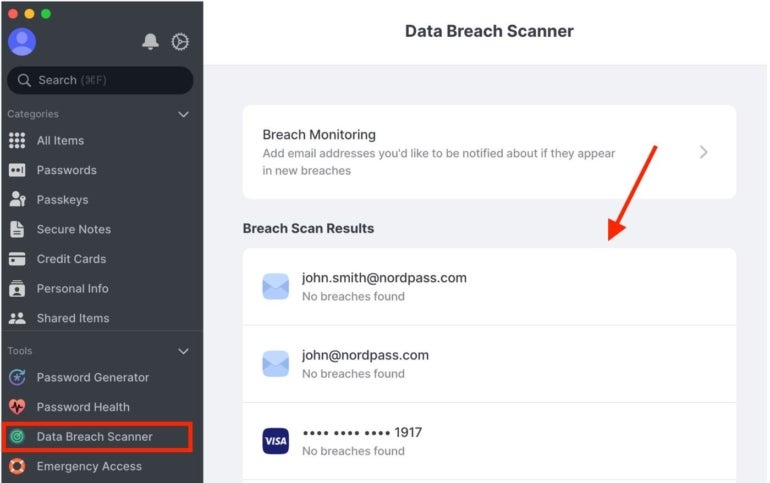
Multi-factor authentication is offered by NordPass as an extra security layer to prevent unauthorized access to accounts. It utilizes advanced encryption algorithms such as XChaCha20 to guarantee the security of your vault. Moreover, NordPass Enterprise provides access to additional security features like Single Sign-On (SSO), Data Breach Scanner, Password Health, and Secure Item Sharing.
Bitwarden provides open-source protection and employs the subsequent crucial safety measures to safeguard user information: 256-bit encryption utilizing AES-CBC, PBKDF2 SHA-256, and salted hashing. Bitwarden handles all cryptographic keys’ generation and management on your devices, with all encoding occurring locally. It also includes vault health assessments, single sign-on for business users, and a two-step login utilizing YubiKey OTP, Duo, FIDO2 WebAuthn, Email, and the Authentication app.
Automated device synchronization
NordPass can automatically synchronize and backup your credentials and files, allowing you to retrieve your vault data from any location, whether through the application on your mobile device or a browser extension.
Regarding Bitwarden, items owned by you in the online vault will consistently remain synchronized. Items owned by an entity will synchronize across users and client applications every half an hour. Other Bitwarden applications, like browser extensions, mobile apps, desktop apps, and CLI, will synchronize automatically upon login and routinely upon unlocking.
NordPass advantages and disadvantages
Benefits
- Availability of Data Breach Scanner.
- Feasible encryption alternative.
- Presents a free plan.
- Free trials for most packages.
- Secure password exchange.
- Immediate chat assistance.
Disadvantages
- Only allows one device on the unpaid version.
- The complimentary tier has extremely restricted characteristics.
Bitwarden advantages and disadvantages
Benefits
- Characterized by openness.
- Supports both visual and command-line interfaces.
- A single unpaid account can run on multiple devices, albeit with restricted features.
- Advanced two-step authentication.
- Capable of being self-hosted or cloud-supported.
Disadvantages
- SSO integration and administrative password reset are absent in certain plans.
- The desktop UI demands enhancement.
- Only provides a seven-day unpaid trial.
Should your establishment employ NordPass or Bitwarden?
The decision between NordPass and Bitwarden hinges on your priorities. NordPass provides seamless merging with other Nord products like NordVPN and NordLocker, guaranteeing a unified security ecosystem for a business environment. The layout is intuitive and straightforward, integrating well with numerous prominent apps and browser extensions. NordPass’ communal folders enable users to securely share data and confidential information stored in their vaults, facilitating team collaboration. Additionally, it features an embedded data breach scanner on the dashboard for effortless password breach scans.
Bitwarden, an open-source security password manager, prioritizes transparency, robust security, and customization for budget-conscious individuals or businesses. It permits advanced users to self-host and integrates seamlessly with SSO providers like Azure Active Directory and Okta, streamlining the login process for diverse team members within a company.
The pricing structures of both NordPass and Bitwarden are quite similar, yet Bitwarden offers more adaptability. Its free iteration encompasses more features and supports limitless device connections, unlike NordPass, where the free version supports only one device.
SEE: Penetration Testing and Scanning Policy (TechRepublic Premium)
Methodology
I scrutinized NordPass and Bitwarden by evaluating their user interfaces, security functionalities, and user-friendliness. To gain practical experience, I installed the complimentary versions of each application on my Android and Windows devices, as well as the Chrome browser. This method allowed me to test features such as password generation, autofill capabilities, password lengths, and cross-platform operability. Both applications performed well in these evaluations; however, NordPass exhibited faster prompts, although I found Bitwarden more user-friendly on Chrome. Furthermore, during my evaluation, I noted that users can generate random character strings containing digits, letters, and symbols up to 128 characters in Bitwarden, exceeding NordPass’ 60-character limit.
The websites of the products were also considered to offer an extensive pricing overview.
Go through our complete analyses of NordPass and Bitwarden.
This article was initially published in December 2023. It has been revised by Luis Millares in February 2025.
About Author




